> ## Documentation Index
> Fetch the complete documentation index at: https://docs.abbyy.com/llms.txt
> Use this file to discover all available pages before exploring further.
# Parse Fields tool
> Parse Fields converts a JSON result file from the Get Result tool into an Alteryx data table of extracted field names and values.
The **Parse Fields** tool creates an Alteryx data table from a JSON file containing extracted data received in the results of processing a transaction (for example, `Invoice US.json`).
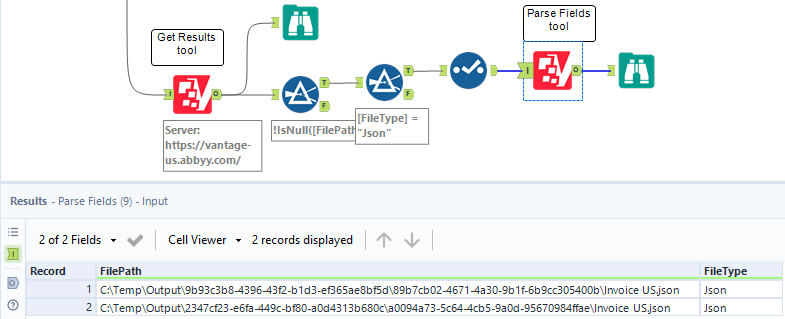
Pass the path to a `FileType = Json` result file in the **FilePath** input column. You can filter the output of the **Get Result** tool by `FileType = Json` to get the correct file paths.
For more information about JSON output file types and which skill types generate them, see [JSON output](/vantage/developer/output/json/json-output).
## Input anchor
| Column | Type | Description |
| -------- | ---------- | ------------------------------------------------------------------------------------------------------------------------------------------------------------------------------------------------------------------------- |
| FilePath | V\_WString | The path to the JSON file containing the extracted data (values, metadata, and field structure for each document). Pass the path to a file with `FileType = Json`. If a file is not in JSON format, an error is returned. |
Input example, showing the **Parse Fields** tool receiving filtered output from **Get Result**:
 ## Output anchor
| Column | Type | Description |
| ------------- | ---------- | ----------------------------------------------------------------------------------------------------------- |
| TransactionId | V\_WString | The identifier of the transaction. |
| DocumentId | V\_WString | The identifier of the document. |
| Name | V\_WString | The field name from the Document skill applied to the document. |
| Value | V\_WString | The field value from the Document skill applied to the document. |
| IsSuccess | Bool | Indicates whether parsing was successful for the specific input file. |
| Error | V\_WString | Specifies the error message if parsing was not successful (for example, an invalid JSON file in the input). |
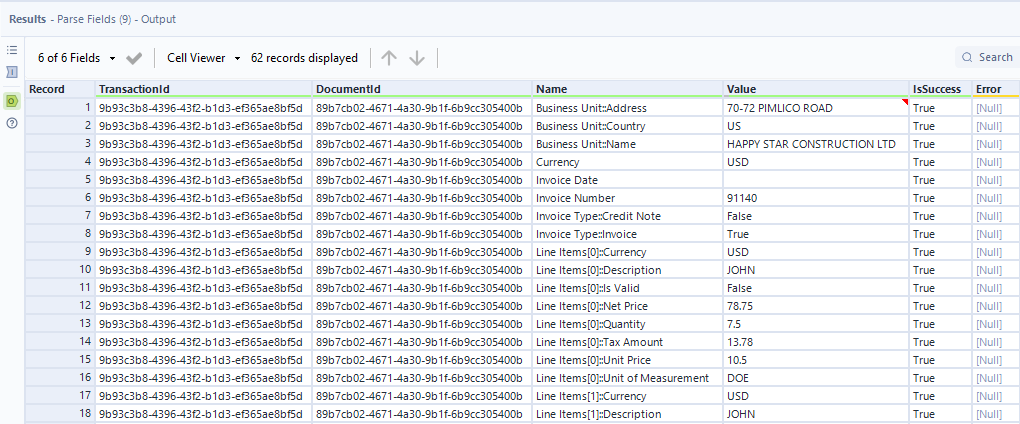
Output example:
## Output anchor
| Column | Type | Description |
| ------------- | ---------- | ----------------------------------------------------------------------------------------------------------- |
| TransactionId | V\_WString | The identifier of the transaction. |
| DocumentId | V\_WString | The identifier of the document. |
| Name | V\_WString | The field name from the Document skill applied to the document. |
| Value | V\_WString | The field value from the Document skill applied to the document. |
| IsSuccess | Bool | Indicates whether parsing was successful for the specific input file. |
| Error | V\_WString | Specifies the error message if parsing was not successful (for example, an invalid JSON file in the input). |
Output example:
 ## Limitations
* **Parse Fields** will not return any fields if **Values only** JSON is enabled in the Process Skill output settings. Use only the full JSON file as input.
* **Parse Fields** will not return field values if the input JSON is from a Classification Skill. As a workaround, use the embedded Alteryx **Parse JSON** tool to extract classification data from the result JSON.
## Related topics
* [Get Result tool](/vantage/connectors/alteryx/tools/get-result)
* [Use Skill tool](/vantage/connectors/alteryx/tools/use-skill)
* [Sample process](/vantage/connectors/alteryx/sample-process)
## Limitations
* **Parse Fields** will not return any fields if **Values only** JSON is enabled in the Process Skill output settings. Use only the full JSON file as input.
* **Parse Fields** will not return field values if the input JSON is from a Classification Skill. As a workaround, use the embedded Alteryx **Parse JSON** tool to extract classification data from the result JSON.
## Related topics
* [Get Result tool](/vantage/connectors/alteryx/tools/get-result)
* [Use Skill tool](/vantage/connectors/alteryx/tools/use-skill)
* [Sample process](/vantage/connectors/alteryx/sample-process)