> ## Documentation Index
> Fetch the complete documentation index at: https://docs.abbyy.com/llms.txt
> Use this file to discover all available pages before exploring further.
# Troubleshooting
> Enable logging for the ABBYY Vantage Connector for Alteryx to collect log files for technical support.
If you encounter problems while using the ABBYY Vantage Connector for Alteryx, collect the relevant log files and send them to [ABBYY technical support](https://support.abbyy.com/).
To collect log files, you must first enable logging by setting an environment variable.
Only users with administrator privileges can create the logging environment variable.
## Enable logging
On your machine, open **Control Panel** > **System** > **Advanced System Settings** > **Environment Variables**.
In the **User variables** section, click **New**.
Set the **VANTAGE\_CONNECTOR\_LOG\_FILEPATH** key. The value of this key is the absolute path to the file where logs will be stored. This file must be located in the Alteryx installation folder.
For example: `C:\Program Files\Alteryx\bin\debug.txt`
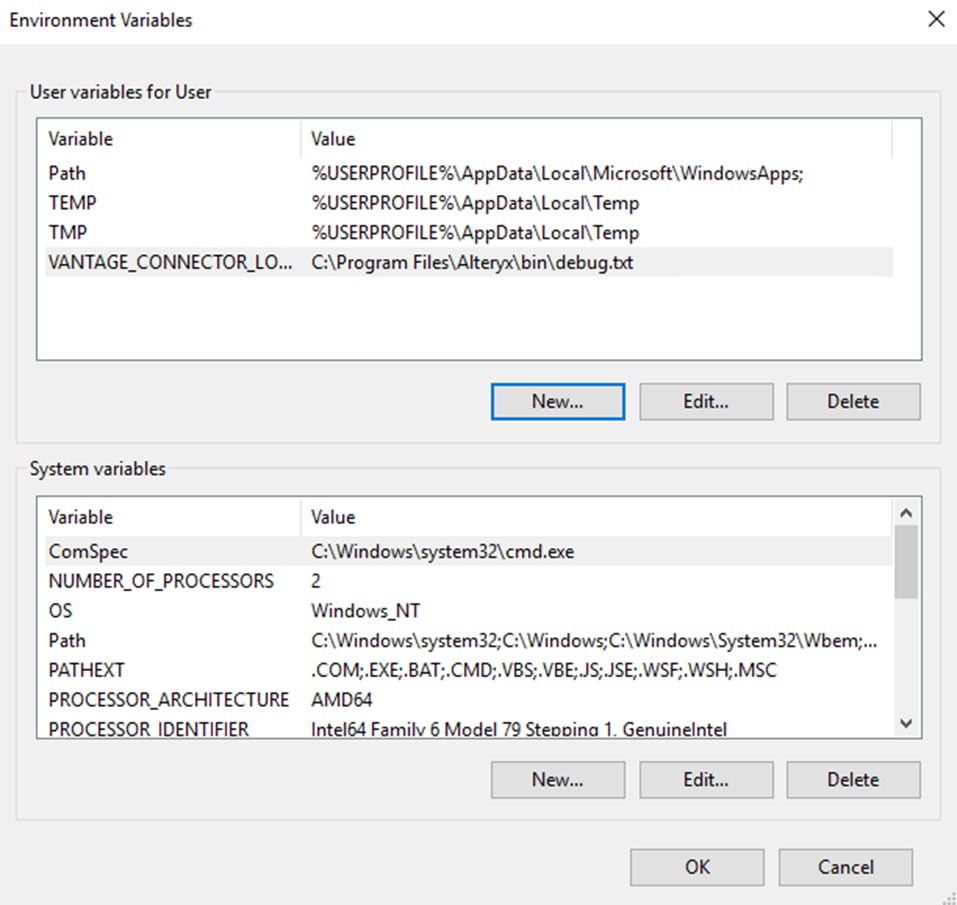 After the key is created, click **Apply** and then click **OK**.
Restart Alteryx Designer.
Reproduce the issue and collect the log file at the path you specified.
After collecting the log file, disable logging by deleting the **VANTAGE\_CONNECTOR\_LOG\_FILEPATH** environment variable.
After the key is created, click **Apply** and then click **OK**.
Restart Alteryx Designer.
Reproduce the issue and collect the log file at the path you specified.
After collecting the log file, disable logging by deleting the **VANTAGE\_CONNECTOR\_LOG\_FILEPATH** environment variable.