> ## Documentation Index
> Fetch the complete documentation index at: https://docs.abbyy.com/llms.txt
> Use this file to discover all available pages before exploring further.
# SaveTransactionResult action
> The SaveTransactionResult action monitors a transaction, returns the ABBYY Vantage processing results, and saves them to disk. Recommended for Blue Prism 7.2.
The **SaveTransactionResult** action monitors the status of a transaction, gets the processing results from ABBYY Vantage, and saves those results to disk.
Use the **SaveTransactionResult** action with Blue Prism version 7.2. When you upgrade to Blue Prism 7.2, update the connector to the latest version and replace the **GetTransactionResult** action with **SaveTransactionResult**. For more information, see [Replace the GetTransactionResult action with SaveTransactionResult](/vantage/connectors/blue-prism/install#replace-the-gettransactionresult-action-with-savetransactionresult).
## Action parameters
| Parameter | Direction | Data type | Description |
| ----------------------------- | --------- | ------------ | ---------------------------------------------------------------------------------- |
| **transactionId** | In | `Text` | Transaction identifier. |
| **maxMonitoringTimeout** | In | `TimeSpan` | Optional. The maximum time to monitor the transaction status. Default: 10 minutes. |
| **delay** | In | `TimeSpan` | Optional. The interval between transaction status checks. Default: 1 second. |
| **outputDirectoryPath** | In | `Text` | The path to the folder where the transaction export files are stored. |
| **manualReviewLink** | Out | `Text` | Link to review the processing results in the ABBYY Vantage Manual Review Client. |
| **documentProcessingResults** | Out | `Collection` | Collection of document processing results. |
The **documentProcessingResults** collection contains the following fields:
| Field | Data type | Description |
| ----------------------------- | ------------ | ------------------------------------------------------------------------------------------------------------------------------------------------------------------------- |
| **Id** | `Text` | Document ID. |
| **ClassName** | `Text` | The document class from the classification results. Populated only when the skill includes a classification step. |
| **IsClassificationConfident** | `Flag` | `TRUE` if the resulting class was determined with confidence. Populated only when the skill includes a classification step. |
| **ClassificationResults** | `Collection` | All classes in the applied Classification Skill with their confidence values. Empty if no Classification Skill was applied. |
| **ExtractedData** | `Text` | Extracted data as JSON, if available. Populated only when the skill exports **Values, metadata, and field structure** JSON in the **Output** activity. |
| **DocumentFullText** | `Text` | Full-text layer of the document captured by ABBYY Vantage. Populated only with an OCR skill, or a process skill with an OCR step and OCR text export configured. |
| **Fields** | `Collection` | Fields collection, if available. Populated only for document skills, or process skills whose **Extract** activity exports **Values, metadata, and field structure** JSON. |
| **ResultFiles** | `Collection` | Collection of exported files. |
The **ClassificationResults** collection contains the following fields:
| Field | Data type | Description |
| -------------- | --------- | ---------------------------------------------------------------------- |
| **ClassName** | `Text` | The name of the class. |
| **Confidence** | `Number` | The confidence that the document belongs to this class, from 0 to 100. |
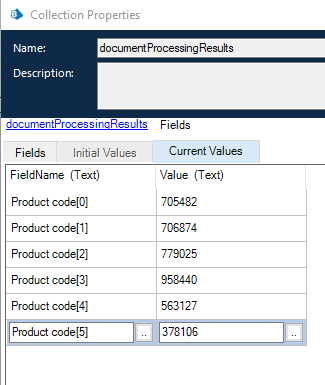
The **Fields** collection contains the following fields:
| Field | Data type | Description |
| ------------- | --------- | --------------------------------------------------------------------------------------------------------------------------------------------------------------------------------------------------------------------------------------------------------------------------- |
| **FieldName** | `Text` | The name of the field. A repeatable field has a postfix that counts each occurrence, for example `Line Items[2]::Total Price`. Double colons separate nesting levels (for fields in a group, or cells in a table column). For repeating fields, the postfix starts at zero. |
| **Value** | `Text` | Field value. |
 The **ResultFiles** collection contains the following fields:
| Field | Data type | Description |
| ------------ | --------- | -------------------------------- |
| **Name** | `Text` | Exported file name. |
| **FilePath** | `Text` | Absolute path to the saved file. |
## How the action monitors a transaction
When you call the action and processing has already completed, the results are saved to the output parameters.
If the transaction is still processing, the action requests the status at the interval set in the **delay** parameter. It repeats until processing completes or the **maxMonitoringTimeout** is reached. Manual review is a special case, described under [Process skill](#process-skill).
Transaction processing can fail, for example because of a corrupted or unsupported input file. In that case, the action throws an exception.
## Results by skill type
The results returned by the action vary with the skill applied to the document.
### Classification skill
For a classification skill (for example, Vantage Classifier), **documentProcessingResults** contains, for each document: **Id**, **ClassificationResults**, **ClassName**, **IsClassificationConfident**, **ExtractedData**, and **ResultFiles** (a JSON file with the classification results data).
### Document skill
For a document skill (for example, Invoice US), **documentProcessingResults** contains, for each document: **Id**, **ExtractedData**, **Fields**, and **ResultFiles**. **ResultFiles** contains two JSON files: the first holds all document data, and the second holds the extracted field values and any rule errors. The name of the second file ends with `_fields.json`.
### OCR skill
For an OCR skill, **documentProcessingResults** contains, for each document: **Id**, **ResultFiles** (in the export format configured in the OCR skill), and **DocumentFullText** (if export to TXT is enabled in the skill).
### Process skill
For a process skill, the results depend on the activities in the skill and their settings, in particular the **Output** activity. For more information, see [Process skill](/vantage/documentation/skill-designer/process/process-skill).
* If the process skill has a **Classify** activity and an **Extract** activity, you get the results for both a classification skill and a document skill.
* If the process skill has multiple **Classify** or **Extract** activities, you get the results for the last activity of each type. In the following diagram, the JSON file returned by the process skill contains the extraction results from the highlighted **Extract** activity.
The **ResultFiles** collection contains the following fields:
| Field | Data type | Description |
| ------------ | --------- | -------------------------------- |
| **Name** | `Text` | Exported file name. |
| **FilePath** | `Text` | Absolute path to the saved file. |
## How the action monitors a transaction
When you call the action and processing has already completed, the results are saved to the output parameters.
If the transaction is still processing, the action requests the status at the interval set in the **delay** parameter. It repeats until processing completes or the **maxMonitoringTimeout** is reached. Manual review is a special case, described under [Process skill](#process-skill).
Transaction processing can fail, for example because of a corrupted or unsupported input file. In that case, the action throws an exception.
## Results by skill type
The results returned by the action vary with the skill applied to the document.
### Classification skill
For a classification skill (for example, Vantage Classifier), **documentProcessingResults** contains, for each document: **Id**, **ClassificationResults**, **ClassName**, **IsClassificationConfident**, **ExtractedData**, and **ResultFiles** (a JSON file with the classification results data).
### Document skill
For a document skill (for example, Invoice US), **documentProcessingResults** contains, for each document: **Id**, **ExtractedData**, **Fields**, and **ResultFiles**. **ResultFiles** contains two JSON files: the first holds all document data, and the second holds the extracted field values and any rule errors. The name of the second file ends with `_fields.json`.
### OCR skill
For an OCR skill, **documentProcessingResults** contains, for each document: **Id**, **ResultFiles** (in the export format configured in the OCR skill), and **DocumentFullText** (if export to TXT is enabled in the skill).
### Process skill
For a process skill, the results depend on the activities in the skill and their settings, in particular the **Output** activity. For more information, see [Process skill](/vantage/documentation/skill-designer/process/process-skill).
* If the process skill has a **Classify** activity and an **Extract** activity, you get the results for both a classification skill and a document skill.
* If the process skill has multiple **Classify** or **Extract** activities, you get the results for the last activity of each type. In the following diagram, the JSON file returned by the process skill contains the extraction results from the highlighted **Extract** activity.
 * If the **PDF** option is enabled in the **Exported Data Settings** dialog of an **Output** activity, the results contain the JSON file with the extraction results and the document image exported to a PDF file with a text layer.
* If the process skill contains a **Review** activity and a document requires manual review, processing is suspended and the action returns **manualReviewLink**. After the manual review and transaction processing complete, call the action again to get the results.
## Related topics
* [StartTransaction action](/vantage/connectors/blue-prism/actions/start-transaction)
* [GetTransactionResult action](/vantage/connectors/blue-prism/actions/get-transaction-result)
* [DeleteTransaction action](/vantage/connectors/blue-prism/actions/delete-transaction)
* If the **PDF** option is enabled in the **Exported Data Settings** dialog of an **Output** activity, the results contain the JSON file with the extraction results and the document image exported to a PDF file with a text layer.
* If the process skill contains a **Review** activity and a document requires manual review, processing is suspended and the action returns **manualReviewLink**. After the manual review and transaction processing complete, call the action again to get the results.
## Related topics
* [StartTransaction action](/vantage/connectors/blue-prism/actions/start-transaction)
* [GetTransactionResult action](/vantage/connectors/blue-prism/actions/get-transaction-result)
* [DeleteTransaction action](/vantage/connectors/blue-prism/actions/delete-transaction)