> ## Documentation Index
> Fetch the complete documentation index at: https://docs.abbyy.com/llms.txt
> Use this file to discover all available pages before exploring further.
# StartTransaction action
> The StartTransaction action creates a transaction to process documents with an ABBYY Vantage skill in the Blue Prism connector, and returns the transaction identifier.
The **StartTransaction** action creates a transaction to process a document with an ABBYY Vantage skill.
## Action parameters
| Parameter | Direction | Data type | Description |
| ------------------------------------- | --------- | ------------ | ------------------------------------------------------------------------------------------------------------------ |
| **skill** | In | `Text` | ABBYY Vantage skill name or skill identifier. |
| **transactionRegistrationParameters** | In | `Collection` | Optional. Collection of registration parameters for the new transaction. |
| **inputFiles** | In | `Collection` | Collection of input files for the new transaction. To add a single file, populate the collection with one element. |
| **transactionId** | Out | `Text` | Transaction identifier. |
The **transactionRegistrationParameters** collection contains the following fields:
| Field | Data type | Description |
| --------- | --------- | ----------------------------- |
| **Key** | `Text` | Registration parameter key. |
| **Value** | `Text` | Registration parameter value. |
The **inputFiles** collection contains the following fields:
| Field | Data type | Description |
| ------------------------------ | ------------ | --------------------------------------------------------------- |
| **FilePath** | `Text` | Path to the input file. Make sure this field has no empty rows. |
| **Index** | `Number` | Optional. Transaction input file order index. |
| **FileRegistrationParameters** | `Collection` | Optional. File registration parameter collection. |
The **FileRegistrationParameters** collection contains the following fields:
| Field | Data type | Description |
| --------- | --------- | ---------------------------------- |
| **Key** | `Text` | File registration parameter key. |
| **Value** | `Text` | File registration parameter value. |
## Prepare a collection for input files and registration parameters
Before you pass data to the **inputFiles** and **transactionRegistrationParameters** parameters, set up each collection so that its structure is valid.
Open the process in Blue Prism Process Studio.
Add a collection to the layout.
Open **Collection Properties**.
Import the collection fields for the **inputFiles** parameter of the **StartTransaction** action:
1. Click **Import**.
2. Select **Business Object: ABBYY Vantage Skills**.
3. Select **Action: StartTransaction**.
4. Select **Parameter: inputFiles (input)**.
5. Click **OK**. You can now specify this collection in the **inputFiles** input parameter of the **StartTransaction** action.
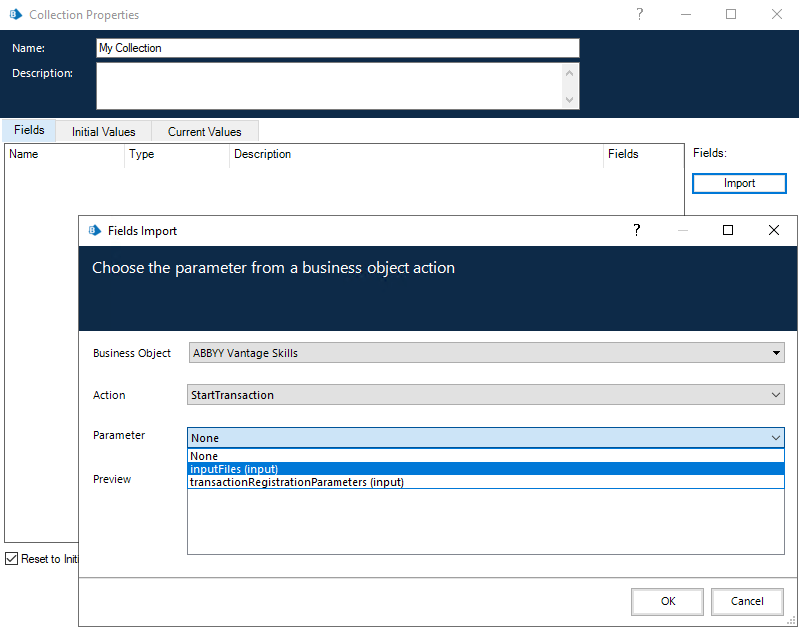 Populate the collection before you call the **StartTransaction** action.
To create a **transactionRegistrationParameters** collection, repeat these steps but select the **transactionRegistrationParameters (input)** parameter when you import the collection fields. You can also use the **transactionRegistrationParameters (input)** parameter to create a **FileRegistrationParameters** collection.
## Related topics
* [GetSkills action](/vantage/connectors/blue-prism/actions/get-skills)
* [GetTransactionResult action](/vantage/connectors/blue-prism/actions/get-transaction-result)
* [SaveTransactionResult action](/vantage/connectors/blue-prism/actions/save-transaction-result)
Populate the collection before you call the **StartTransaction** action.
To create a **transactionRegistrationParameters** collection, repeat these steps but select the **transactionRegistrationParameters (input)** parameter when you import the collection fields. You can also use the **transactionRegistrationParameters (input)** parameter to create a **FileRegistrationParameters** collection.
## Related topics
* [GetSkills action](/vantage/connectors/blue-prism/actions/get-skills)
* [GetTransactionResult action](/vantage/connectors/blue-prism/actions/get-transaction-result)
* [SaveTransactionResult action](/vantage/connectors/blue-prism/actions/save-transaction-result)