> ## Documentation Index
> Fetch the complete documentation index at: https://docs.abbyy.com/llms.txt
> Use this file to discover all available pages before exploring further.
# ABBYY Know Your Customer (KYC) Agent
> Automate identity verification and KYC compliance with the ABBYY Know Your Customer (KYC) Agent on IBM watsonx Orchestrate, powered by ABBYY Vantage and ABBYY Timeline.
The ABBYY Know Your Customer (KYC) Agent streamlines identity verification and regulatory compliance. It runs on IBM watsonx Orchestrate, where agentic AI validates requests and acts on them.
ABBYY Vantage (Document AI) extracts and structures key data from customer documents, and ABBYY Timeline (Process AI) tracks every step to surface bottlenecks and keep the process transparent. The result is faster onboarding and stronger compliance, with less manual effort.
## Why automate KYC
Manual KYC slows onboarding, raises costs, and creates compliance risk.
The KYC Agent removes that friction. It validates requests, applies business rules, extracts data automatically, and records every step for a complete, auditable view of each case.
## How the KYC Agent works
The KYC Agent coordinates ABBYY Vantage, ABBYY Timeline, and agentic AI in IBM watsonx Orchestrate across the full onboarding lifecycle.
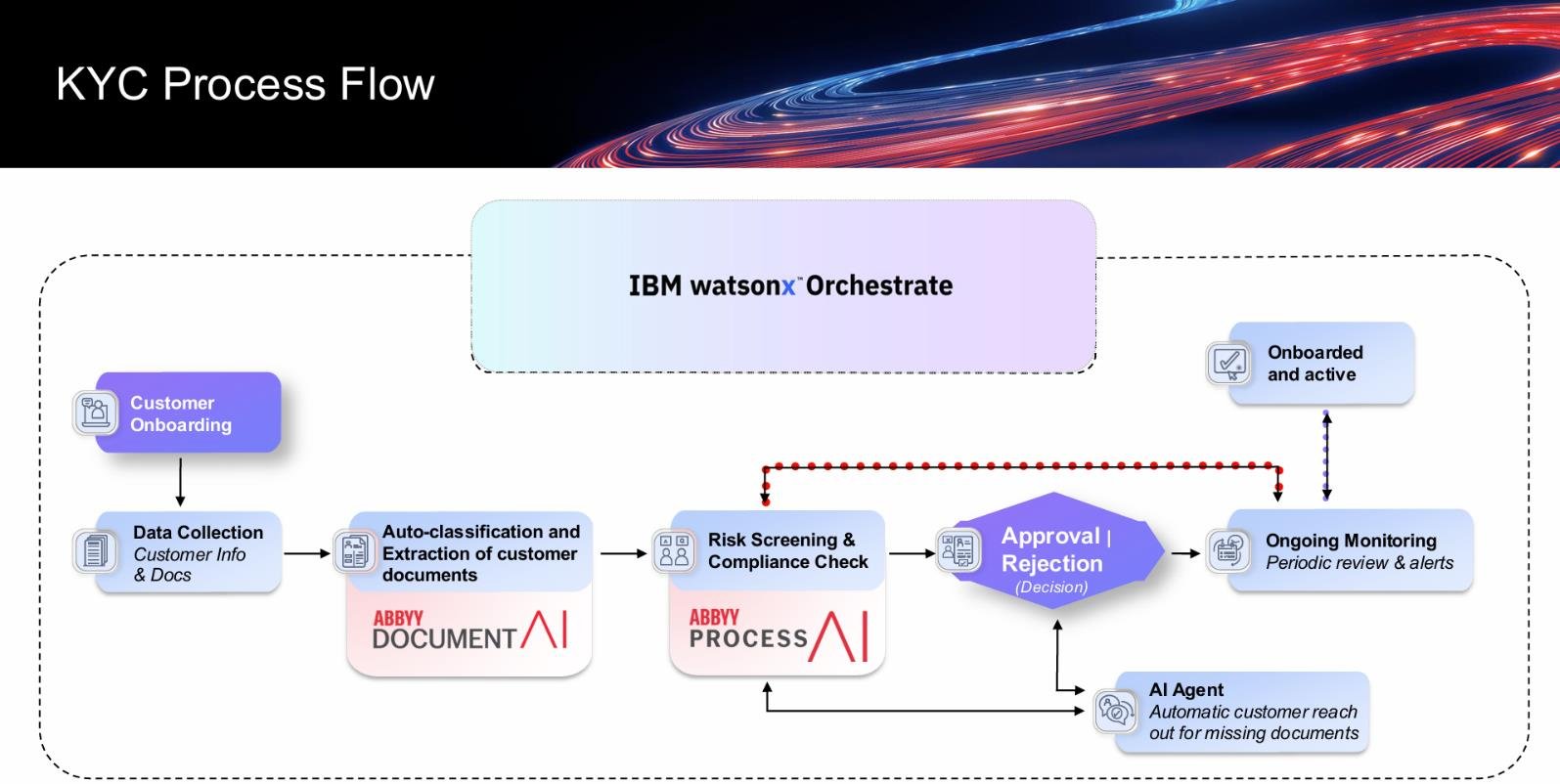 Each KYC case moves through the following stages.
| Stage | Description |
| ----------------------------- | ------------------------------------------------------------------------------------------------------------------------------------------------------------------------------------------------- |
| Initiation | The agent collects the information needed to start the KYC process. |
| Document submission | The agent requests and collects the KYC documents (such as ID, proof of address, and financial statements) and uploads them to ABBYY Vantage (Document AI). |
| Multi-document support | Users can submit several documents, such as identity documents, tax forms, and bank statements, combined into a single PDF. The agent classifies and processes each document within the workflow. |
| Session-based processing | Each chat session handles one KYC case and its document package. Start a new chat session for each new KYC request. |
| Classification and extraction | ABBYY Vantage classifies the documents, extracts and structures the key data fields, and prepares the output. |
| Data retrieval | The agent fetches the extracted output from ABBYY Vantage. |
| Validation and decision | Using agentic AI, the agent validates the data, applies business rules, and approves or rejects the request. |
| Process tracking | Each step is logged in ABBYY Timeline (Process AI) for visibility, monitoring, and compliance tracking. |
| Completion | The agent confirms the outcome to the user and closes the KYC process. |
## Solution benefits
| Benefit | Description |
| ---------------------- | ------------------------------------------------------------------------------------------------------------ |
| Streamlined onboarding | Automates the entire KYC journey, from document collection to approval. |
| Higher accuracy | ABBYY Vantage (Document AI) extracts and structures customer data with precision. |
| Smarter decisions | Agentic AI in watsonx Orchestrate validates inputs, applies rules, and takes the appropriate action. |
| End-to-end visibility | ABBYY Timeline (Process AI) tracks every step, highlighting bottlenecks and enabling continuous improvement. |
| Reduced manual effort | Minimizes repetitive tasks and manual errors, lowering operational costs. |
| Faster turnaround | Accelerates approvals for quicker customer onboarding. |
## Get started
Set up the KYC Agent in this order:
1. [System requirements](/vantage/connectors/ibm-watsonx-orchestrate/system-requirements)
2. [Set up ABBYY Vantage (Document AI)](/vantage/connectors/ibm-watsonx-orchestrate/set-up-vantage)
3. [Set up ABBYY Timeline (Process AI)](/vantage/connectors/ibm-watsonx-orchestrate/set-up-timeline)
4. [Set up IBM watsonx Orchestrate](/vantage/connectors/ibm-watsonx-orchestrate/set-up-watsonx-orchestrate)
5. [Configure the Microsoft Graph API](/vantage/connectors/ibm-watsonx-orchestrate/configure-microsoft-graph)
## Next steps
The event log columns the ABBYY Timeline project must use for KYC data ingestion.
Version history, new features, and known issues.
## Get help
If you run into issues while installing, configuring, or running the KYC Agent, use these ABBYY resources:
* **ABBYY documentation** – Configuration, APIs, authentication, best practices, and troubleshooting at [docs.abbyy.com](https://docs.abbyy.com/home).
* **ABBYY Support Portal** – Customers and partners with an active support agreement can submit tickets at [support.abbyy.com](https://support.abbyy.com/hc/en-us).
When you raise a support request, include a description of the issue along with your environment and configuration details so the ABBYY Support team can investigate it quickly.
Each KYC case moves through the following stages.
| Stage | Description |
| ----------------------------- | ------------------------------------------------------------------------------------------------------------------------------------------------------------------------------------------------- |
| Initiation | The agent collects the information needed to start the KYC process. |
| Document submission | The agent requests and collects the KYC documents (such as ID, proof of address, and financial statements) and uploads them to ABBYY Vantage (Document AI). |
| Multi-document support | Users can submit several documents, such as identity documents, tax forms, and bank statements, combined into a single PDF. The agent classifies and processes each document within the workflow. |
| Session-based processing | Each chat session handles one KYC case and its document package. Start a new chat session for each new KYC request. |
| Classification and extraction | ABBYY Vantage classifies the documents, extracts and structures the key data fields, and prepares the output. |
| Data retrieval | The agent fetches the extracted output from ABBYY Vantage. |
| Validation and decision | Using agentic AI, the agent validates the data, applies business rules, and approves or rejects the request. |
| Process tracking | Each step is logged in ABBYY Timeline (Process AI) for visibility, monitoring, and compliance tracking. |
| Completion | The agent confirms the outcome to the user and closes the KYC process. |
## Solution benefits
| Benefit | Description |
| ---------------------- | ------------------------------------------------------------------------------------------------------------ |
| Streamlined onboarding | Automates the entire KYC journey, from document collection to approval. |
| Higher accuracy | ABBYY Vantage (Document AI) extracts and structures customer data with precision. |
| Smarter decisions | Agentic AI in watsonx Orchestrate validates inputs, applies rules, and takes the appropriate action. |
| End-to-end visibility | ABBYY Timeline (Process AI) tracks every step, highlighting bottlenecks and enabling continuous improvement. |
| Reduced manual effort | Minimizes repetitive tasks and manual errors, lowering operational costs. |
| Faster turnaround | Accelerates approvals for quicker customer onboarding. |
## Get started
Set up the KYC Agent in this order:
1. [System requirements](/vantage/connectors/ibm-watsonx-orchestrate/system-requirements)
2. [Set up ABBYY Vantage (Document AI)](/vantage/connectors/ibm-watsonx-orchestrate/set-up-vantage)
3. [Set up ABBYY Timeline (Process AI)](/vantage/connectors/ibm-watsonx-orchestrate/set-up-timeline)
4. [Set up IBM watsonx Orchestrate](/vantage/connectors/ibm-watsonx-orchestrate/set-up-watsonx-orchestrate)
5. [Configure the Microsoft Graph API](/vantage/connectors/ibm-watsonx-orchestrate/configure-microsoft-graph)
## Next steps
The event log columns the ABBYY Timeline project must use for KYC data ingestion.
Version history, new features, and known issues.
## Get help
If you run into issues while installing, configuring, or running the KYC Agent, use these ABBYY resources:
* **ABBYY documentation** – Configuration, APIs, authentication, best practices, and troubleshooting at [docs.abbyy.com](https://docs.abbyy.com/home).
* **ABBYY Support Portal** – Customers and partners with an active support agreement can submit tickets at [support.abbyy.com](https://support.abbyy.com/hc/en-us).
When you raise a support request, include a description of the issue along with your environment and configuration details so the ABBYY Support team can investigate it quickly.