> ## Documentation Index
> Fetch the complete documentation index at: https://docs.abbyy.com/llms.txt
> Use this file to discover all available pages before exploring further.
# Set up ABBYY Vantage for the KYC Agent
> Create a Public API client, build the KYC Document Skills, obtain the Skill ID, and collect the ABBYY Vantage values that the IBM watsonx Orchestrate connections need.
The KYC Agent uses ABBYY Vantage (Document AI) to classify and extract data from customer documents. Set up ABBYY Vantage by creating a Public API client, building the KYC Document Skills, and collecting the values that the IBM watsonx Orchestrate connections need.
## Create a Public API client in ABBYY Vantage
A Public API client lets IBM watsonx Orchestrate authenticate to ABBYY Vantage over OAuth 2.0.
Log in to your ABBYY Vantage environment.
Go to **Admin & Configuration** and select **Public API Clients**.
Create a new API client, and then record the generated **Client ID** and **Client Secret**.
Assign the **Skill User** role to the client.
In the **OAuth 2.0 Flows Settings**, enable **Allow client credentials flow**.
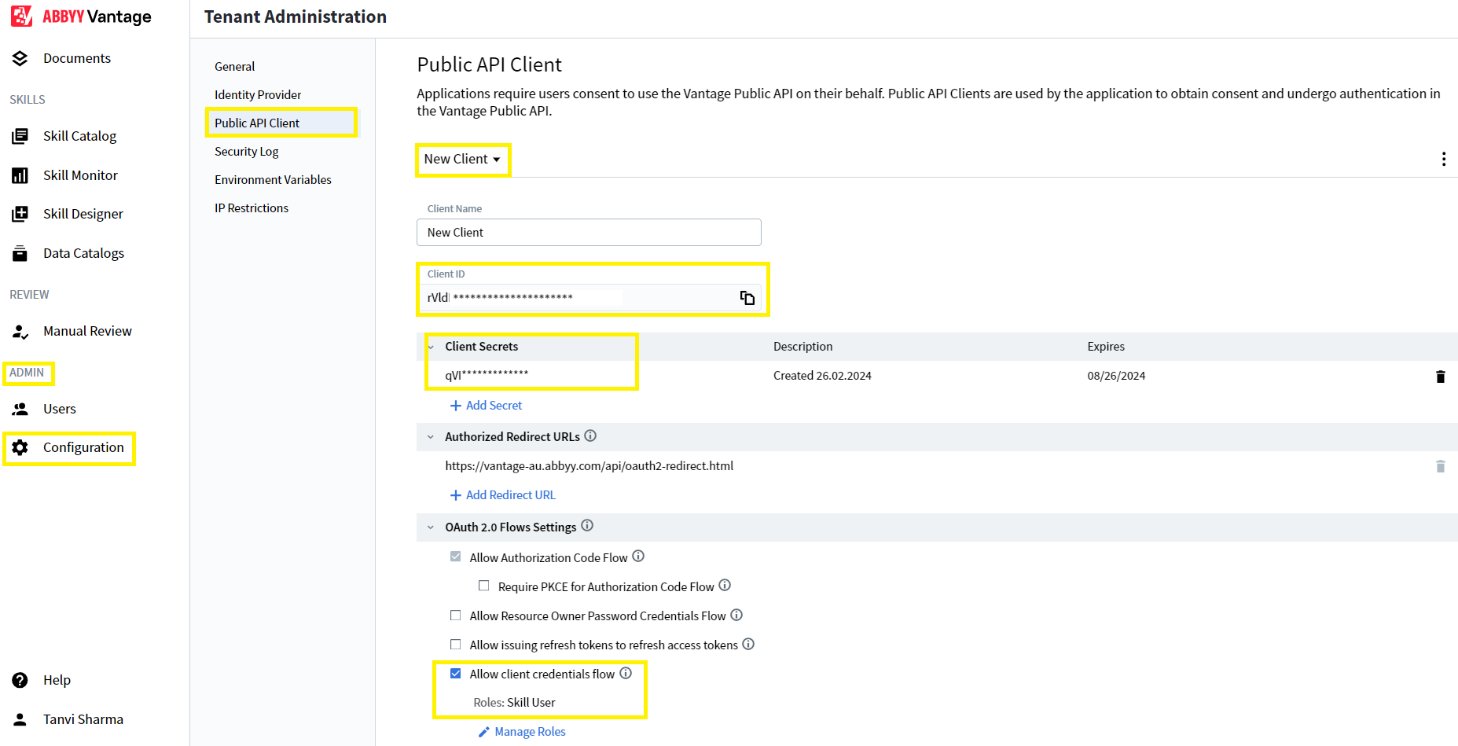 Use these credentials to populate the `abbyy_vantage_oauth_abbyy_e073d849` connection in IBM watsonx Orchestrate.
For more information, see [Configure a Public API client](/vantage/documentation/tenant-admin/tenant-management/configure-client).
## Create the KYC Document Skills
Create or import the Document Skills that the KYC workflow needs, such as:
* Identity proof documents
* Bank statement
* Tax forms
Configure the classification and extraction activities in a Process Skill, and then publish the Skill to your ABBYY Vantage environment.
Use these credentials to populate the `abbyy_vantage_oauth_abbyy_e073d849` connection in IBM watsonx Orchestrate.
For more information, see [Configure a Public API client](/vantage/documentation/tenant-admin/tenant-management/configure-client).
## Create the KYC Document Skills
Create or import the Document Skills that the KYC workflow needs, such as:
* Identity proof documents
* Bank statement
* Tax forms
Configure the classification and extraction activities in a Process Skill, and then publish the Skill to your ABBYY Vantage environment.
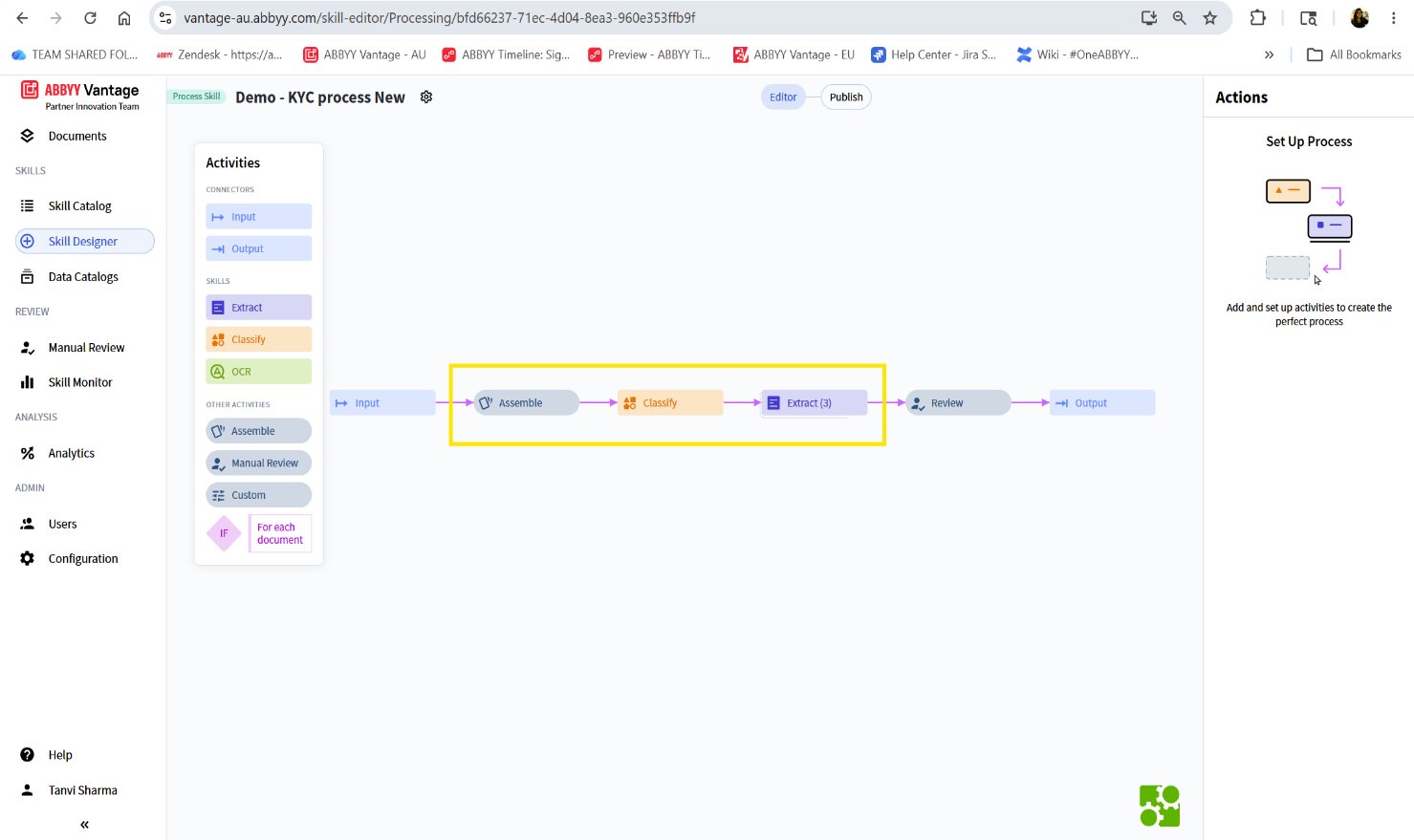 You can also use the pre-trained, out-of-the-box Document Skills that are available for data extraction.
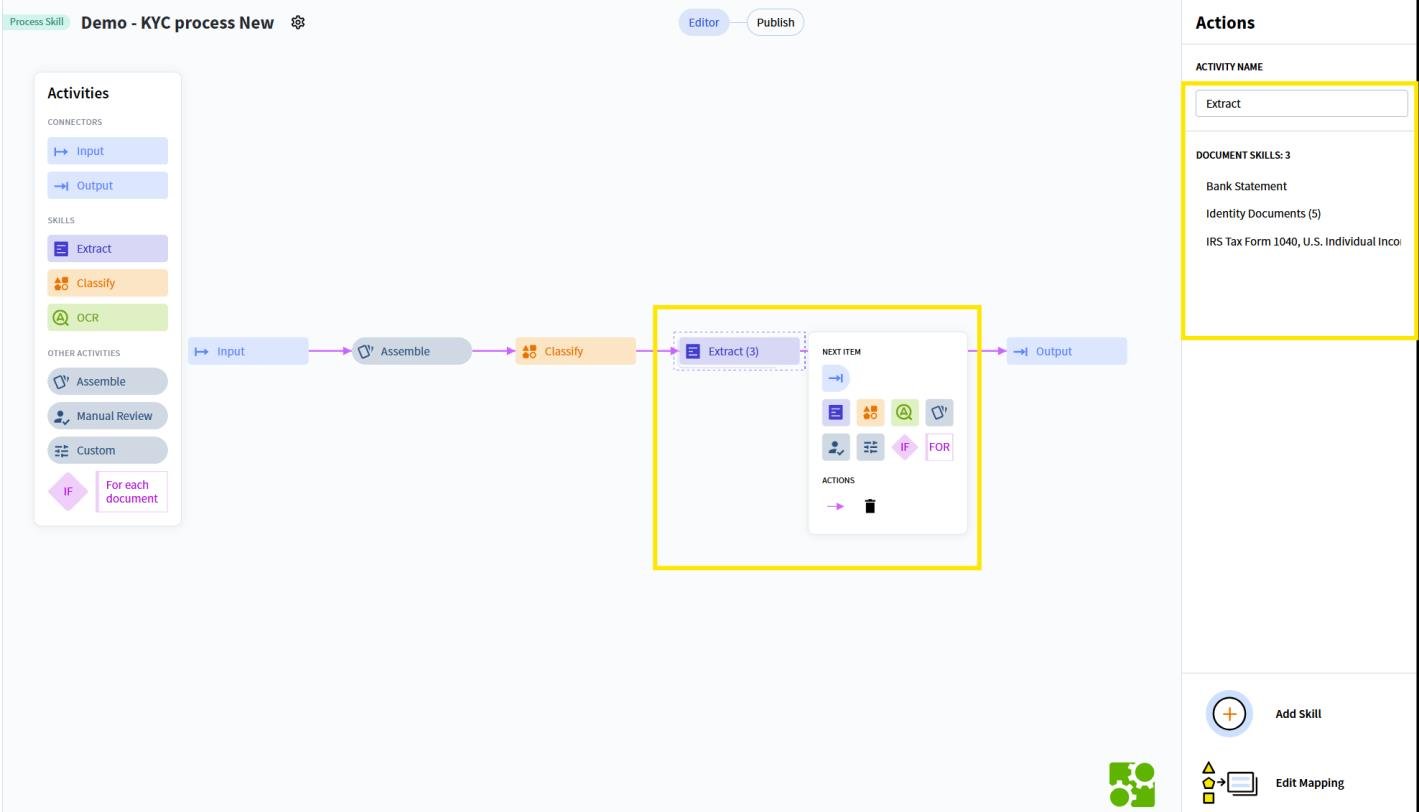 For more information about building skills, see [Skill Designer](/vantage/documentation/skill-designer/skill-designer).
## Obtain the ABBYY Vantage Skill ID
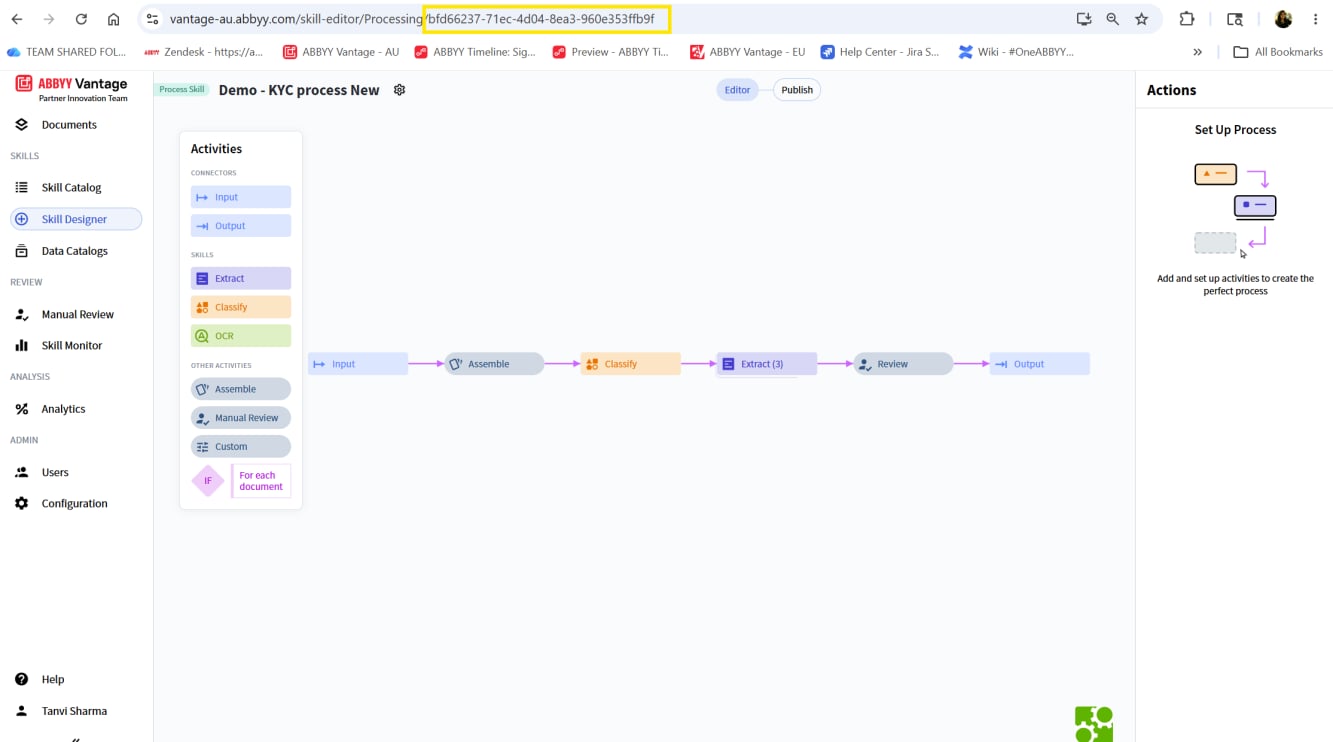
After you publish the Skill, get its Skill ID from the ABBYY Vantage URL. The Skill ID is the identifier at the end of the skill editor address.
```text theme={null}
https://vantage-au.abbyy.com/skill-editor/Processing/bfd66237-71ec-4d04-8ea3-960e353ffb9f
```
In this example, the Skill ID is `bfd66237-71ec-4d04-8ea3-960e353ffb9f`.
For more information about building skills, see [Skill Designer](/vantage/documentation/skill-designer/skill-designer).
## Obtain the ABBYY Vantage Skill ID
After you publish the Skill, get its Skill ID from the ABBYY Vantage URL. The Skill ID is the identifier at the end of the skill editor address.
```text theme={null}
https://vantage-au.abbyy.com/skill-editor/Processing/bfd66237-71ec-4d04-8ea3-960e353ffb9f
```
In this example, the Skill ID is `bfd66237-71ec-4d04-8ea3-960e353ffb9f`.
 ## Collect the ABBYY Vantage configuration values
Gather the following values from your ABBYY Vantage environment. You enter them into the IBM watsonx Orchestrate connections in the next step.
| Value | Description |
| ------------- | ---------------------------------------------------------------------- |
| Server URL | ABBYY Vantage environment URL. Example: `https://vantage-au.abbyy.com` |
| Client ID | Public API Client ID |
| Client Secret | Public API Client Secret |
| Skill ID | Published Skill ID |
## Map the values to the IBM watsonx Orchestrate connections
Enter the collected values into the two IBM watsonx Orchestrate connections:
* `abbyy_vantage_oauth_abbyy_e073d849` – The ABBYY Vantage server URL, Client ID, Client Secret, and token endpoint.
* `abbyy_key_value_abbyy_e073d849` – The `vantage_skill_id`. The remaining key-value entries come from ABBYY Timeline setup.
For the full connection reference, see [System requirements](/vantage/connectors/ibm-watsonx-orchestrate/system-requirements). To finish configuring the connections, see [Set up IBM watsonx Orchestrate](/vantage/connectors/ibm-watsonx-orchestrate/set-up-watsonx-orchestrate).
## Next steps
Continue to [Set up ABBYY Timeline (Process AI)](/vantage/connectors/ibm-watsonx-orchestrate/set-up-timeline).
## Collect the ABBYY Vantage configuration values
Gather the following values from your ABBYY Vantage environment. You enter them into the IBM watsonx Orchestrate connections in the next step.
| Value | Description |
| ------------- | ---------------------------------------------------------------------- |
| Server URL | ABBYY Vantage environment URL. Example: `https://vantage-au.abbyy.com` |
| Client ID | Public API Client ID |
| Client Secret | Public API Client Secret |
| Skill ID | Published Skill ID |
## Map the values to the IBM watsonx Orchestrate connections
Enter the collected values into the two IBM watsonx Orchestrate connections:
* `abbyy_vantage_oauth_abbyy_e073d849` – The ABBYY Vantage server URL, Client ID, Client Secret, and token endpoint.
* `abbyy_key_value_abbyy_e073d849` – The `vantage_skill_id`. The remaining key-value entries come from ABBYY Timeline setup.
For the full connection reference, see [System requirements](/vantage/connectors/ibm-watsonx-orchestrate/system-requirements). To finish configuring the connections, see [Set up IBM watsonx Orchestrate](/vantage/connectors/ibm-watsonx-orchestrate/set-up-watsonx-orchestrate).
## Next steps
Continue to [Set up ABBYY Timeline (Process AI)](/vantage/connectors/ibm-watsonx-orchestrate/set-up-timeline).