> ## Documentation Index
> Fetch the complete documentation index at: https://docs.abbyy.com/llms.txt
> Use this file to discover all available pages before exploring further.
# Map Fields activity
> Map Fields activity binds ABBYY Vantage extracted field values to UiPath variables, with type mappings for text, dates, checkmarks, groups, and tables.
**Map Fields** is typically the final Vantage activity in a UiPath workflow: it takes the **Extracted Data** from **Get Results** and binds individual fields to UiPath variables that downstream activities can use. You define the mapping in the **Designer** panel.
## Activity properties
| Group | Property | Type | Description |
| ------------------- | -------------- | -------- | -------------------------------------------------------------------------------------------------------------------------------------------------------------------------------------------------------------------------------------------------------------- |
| Connection Settings | Skill Name | `String` | The name of the Vantage Document skill. |
| Input | Extracted Data | `String` | Accepts a JSON string containing the extracted data. Pass to this property the value of the `ExtractedData` property of the particular `DocumentResult` received in the **Get Results** activity. To pass values between the properties, use UiPath variables. |
The Map Fields activity can only be used inside a configured Vantage Scope activity.
When configuring the activity, set the **Password** or **Client Secret** property on the Vantage Scope activity (depending on your authentication flow) so the connector can retrieve the skill list. Switch to the **Secure Password** or **Secure Client Secret** property once your workflow is configured — see [Vantage Scope activity](/vantage/connectors/uipath/activities/vantage-scope).
### Before you map
At runtime, the **Extracted Data** property must receive the `ExtractedData` value from the `DocumentResult` that **Get Results** returned for the Document skill this Map Fields activity is configured for.
Before passing the data to Map Fields:
* Confirm the document's Document skill matches the one configured in Map Fields. Use the `ClassName` property of the `DocumentResult` to identify the document type.
* For `ClassName` to populate, configure class-to-skill mapping in the **Extract** activity of the Process skill — the class name must equal the Document skill name.
For more information about setting up the Extract activity, see [Map Document skills to classes](/vantage/documentation/skill-designer/process/extract-activity).
To map ABBYY Vantage fields to UiPath variables:
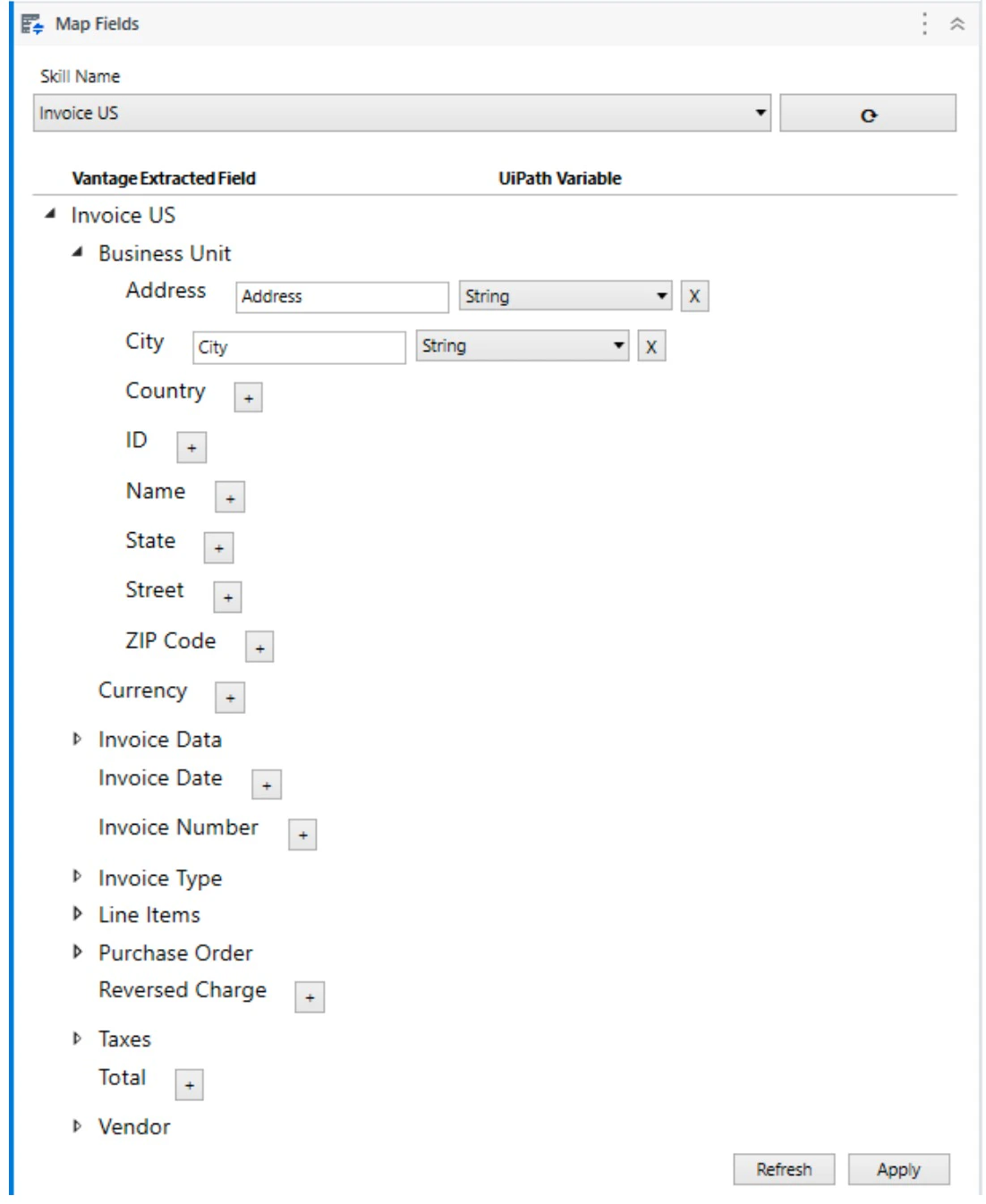
Open the **Map Fields** activity in the **Designer** panel and click the button to the right of the drop-down list under **Skill Name** to load the list of available skills.
Expand the **Skill Name** drop-down list and select the Document skill whose extracted field values must be saved to UiPath variables.
You can only choose a Document skill.
Click the **Refresh** button. A field tree appears in the **Vantage Extracted Field** column.
Expand the tree and click the **Plus** button next to a field you want to map. In the **UiPath Variable** column, a UiPath variable name and type appear. By default the variable name matches the Vantage field name, but you can change it if required.
Ensure that the UiPath variable names specified in the Map Fields activity match the Variables Naming Convention configured in your UiPath process. If variable names do not follow the naming rules, they are displayed with a warning symbol in the UiPath variable list. For more about Variables Naming Convention, see the [UiPath documentation](https://docs.uipath.com/).
Repeat the previous step for the other fields you need to map. You can specify already-existing UiPath variables — in that case, make sure the variable type matches the one recommended in the table below.
After mapping your document fields to UiPath variables, click **Apply** to save the changes. When the **Map Fields** activity is called at runtime, variable values are filled in with the extracted data.
The specified UiPath variables will be created in the Sequence closest to the Map Fields activity (for example, in Flowchart).
The **Skill Name** parameter accepts a UiPath `String` variable. Selecting a Document skill from the drop-down writes the new value to the variable. Expressions and references to other variables are not supported.
## Field type mapping
The table below shows what type of UiPath variable corresponds to each ABBYY Vantage field type:
| ABBYY Vantage Field Type | UiPath Variable Type |
| --------------------------------------------------------- | -------------------- |
| Text | `String` |
| Date | `String` |
| Number | `String` |
| Money | `String` |
| Barcode | `String` |
| Checkmark | `Boolean` |
| Checkmark group (can be obtained as separated checkmarks) | `FieldList` |
| Group | `FieldList` |
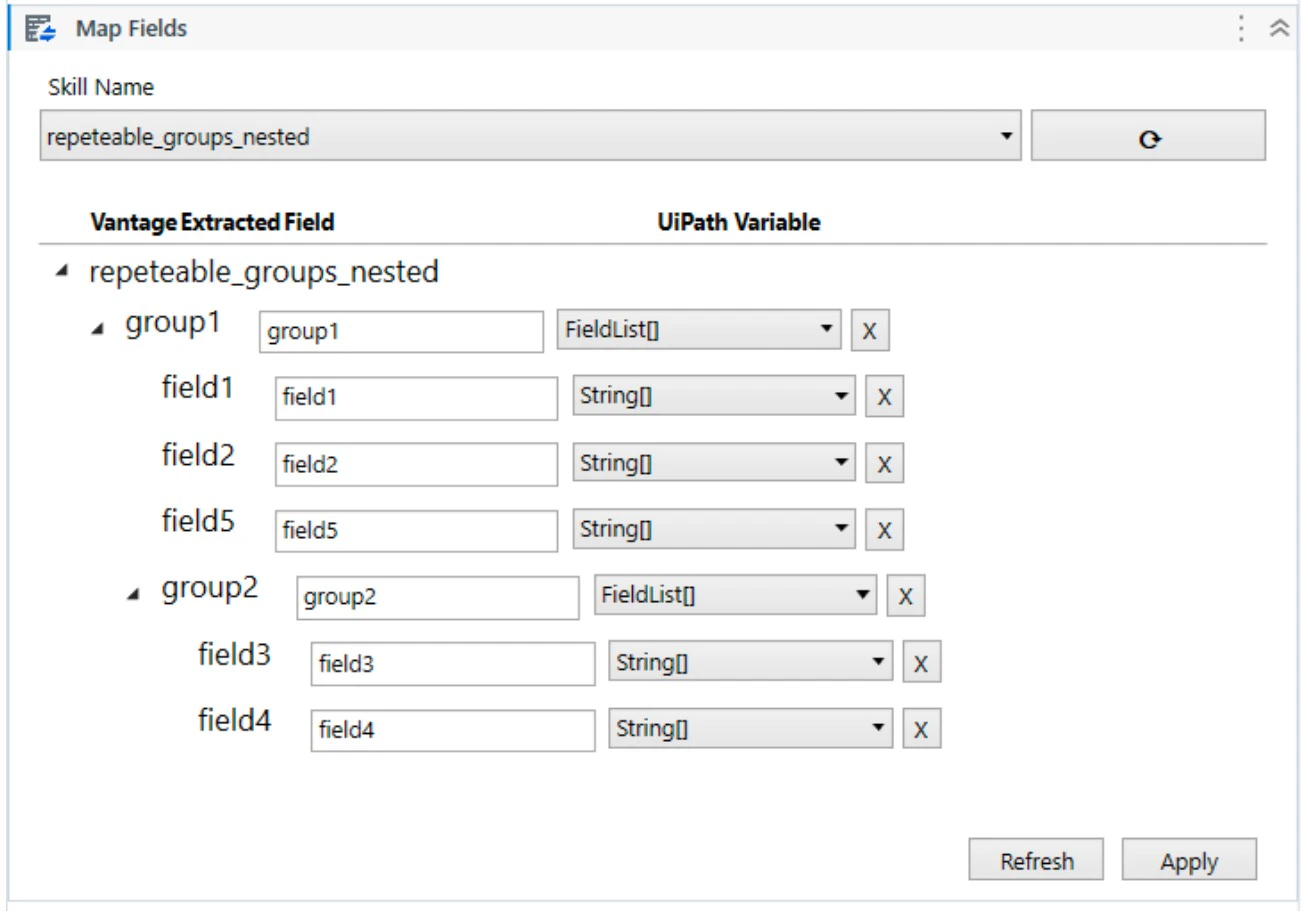
| Group (for repeatable groups) | `FieldList[]` |
| Table | `FieldList[]` |
Repeating leaf fields (such as `Text`) and table columns map to `String[]`. Repeatable groups — including those nested inside other repeatable groups — map to `FieldList[]`. Within a repeatable group, you can also map individual child fields to simple types.
### GroupItem
`GroupItem` is a structure containing one instance of some repeating object (field or group of fields).
| Method/Property | Parameter | Type | Description |
| --------------- | ------------------------------------------------------- | --------------------------------------- | ---------------------------------------------------------------------------------------------------------- |
| Keys | | `IEnumerable` | Key values. Each value is the name of a specific nesting level. |
| Values | | `IEnumerable>` | Set of field values of nesting levels. |
| Count | | `Integer` | Number of nested fields. |
| ContainsKey | `Key: String` | `Boolean` | Specifies if a nested field exists. |
| TryGetValue | `Key: String, Value: IReadOnlyList` | `Boolean` | Specifies if a value exists. If there is a value, returns `True` and the value, otherwise returns `False`. |
| this\[] | `Name: String` | `IReadOnlyList` | Returns the value of the specified nested field. |
| Find | `Name: String` | `IEnumerable` | Finds all nested fields of any nesting level with the specified name. |
| Filter | `Predicate: (Name: String, Node: FieldList) => Boolean` | `IEnumerable` | Finds all nested fields of any nesting level that satisfy the predicate. |
| Descendents | `NameItems: Params String[]` | `IEnumerable` | Finds all nested fields of any nesting level whose name matches the `nameItems` parameter. |
### FieldList
`FieldList` is a structure that corresponds to a field or group of fields (repeating fields or repeating groups with the same name) and contains the values (multiple instances possible) of the fields or groups.
| Method/Property | Parameter | Type | Description |
| --------------- | ------------------------------------------------------- | ------------------------ | ----------------------------------------------------------------------------------------- |
| Values | | `IEnumerable
 ### GroupItem
`GroupItem` is a structure containing one instance of some repeating object (field or group of fields).
| Method/Property | Parameter | Type | Description |
| --------------- | ------------------------------------------------------- | --------------------------------------- | ---------------------------------------------------------------------------------------------------------- |
| Keys | | `IEnumerable
### GroupItem
`GroupItem` is a structure containing one instance of some repeating object (field or group of fields).
| Method/Property | Parameter | Type | Description |
| --------------- | ------------------------------------------------------- | --------------------------------------- | ---------------------------------------------------------------------------------------------------------- |
| Keys | | `IEnumerable