> ## Documentation Index
> Fetch the complete documentation index at: https://docs.abbyy.com/llms.txt
> Use this file to discover all available pages before exploring further.
# Understand generated rules
> Read auto-generated code for NLP search-element properties — full-path references, name simplification, and rule-by-rule explanation in Advanced Designer.
When you create an element and set up its properties in the **Properties** pane, the program will automatically generate code for these properties. This section will help you understand the auto-generated code, so that you can modify it if needed.
## Search element structure
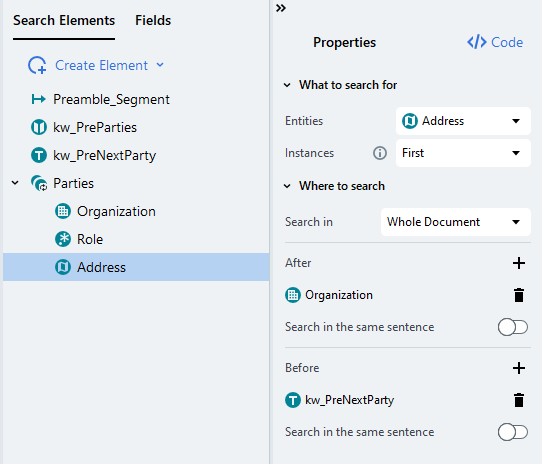 The automatically generated code for the `Parties.Address` search element will look like this:
## Auto-generated rule
```
~Root.Parties.Address,
t1 : Root.Parties.Organization,
t2 : Root.kw_PreNextParty
[ t: @NERAddress( same, right_to( t1 ), left_to( t2 ) ) ~@Root.Parties.Address ]+
=>
Root.Parties.Address( t );
```
As you can see, the auto-generated code always refers to each search element using the full path to make sure there is no name conflict. In this case, we can [trim down the element names](/vantage/documentation/advanced-designer/activities/nlp-extraction-rules/code-syntax/basic-concepts#referencing-search-elements), removing Root from each.
## Rule with shorter element names
```
~Parties.Address,
t1 : Parties.Organization,
t2 : kw_PreNextParty
[ t: @NERAddress( same, right_to( t1 ), left_to( t2 ) ) ~@Parties.Address ]+
=>
Parties.Address( t );
```
We can now break down the meaning of each statement:
## Rule explained
```
// Check that the Address search element hasn't been found yet, because we need only the first instance
~Parties.Address,
// Get the Organization search element and the next party keyword search element. They were found before Address
t1 : Parties.Organization,
t2 : kw_PreNextParty
// Find the token sequence that contains one NERAddress named entity
// ("same" keyword specifies that only one NERAddress should be matched if there are several)
// The address should be located after organization name and before the keyword for the next party
// The + sign means that the token sequence may consist of several words
// The ~@Parties.Address condition at the end ensures
// that the address won't be matched on the same tokens again
[ t: @NERAddress( same, right_to( t1 ), left_to( t2 ) ) ~@Parties.Address ]+
=>
Parties.Address( t );
```
The automatically generated code for the `Parties.Address` search element will look like this:
## Auto-generated rule
```
~Root.Parties.Address,
t1 : Root.Parties.Organization,
t2 : Root.kw_PreNextParty
[ t: @NERAddress( same, right_to( t1 ), left_to( t2 ) ) ~@Root.Parties.Address ]+
=>
Root.Parties.Address( t );
```
As you can see, the auto-generated code always refers to each search element using the full path to make sure there is no name conflict. In this case, we can [trim down the element names](/vantage/documentation/advanced-designer/activities/nlp-extraction-rules/code-syntax/basic-concepts#referencing-search-elements), removing Root from each.
## Rule with shorter element names
```
~Parties.Address,
t1 : Parties.Organization,
t2 : kw_PreNextParty
[ t: @NERAddress( same, right_to( t1 ), left_to( t2 ) ) ~@Parties.Address ]+
=>
Parties.Address( t );
```
We can now break down the meaning of each statement:
## Rule explained
```
// Check that the Address search element hasn't been found yet, because we need only the first instance
~Parties.Address,
// Get the Organization search element and the next party keyword search element. They were found before Address
t1 : Parties.Organization,
t2 : kw_PreNextParty
// Find the token sequence that contains one NERAddress named entity
// ("same" keyword specifies that only one NERAddress should be matched if there are several)
// The address should be located after organization name and before the keyword for the next party
// The + sign means that the token sequence may consist of several words
// The ~@Parties.Address condition at the end ensures
// that the address won't be matched on the same tokens again
[ t: @NERAddress( same, right_to( t1 ), left_to( t2 ) ) ~@Parties.Address ]+
=>
Parties.Address( t );
```