> ## Documentation Index
> Fetch the complete documentation index at: https://docs.abbyy.com/llms.txt
> Use this file to discover all available pages before exploring further.
# Manage fields in activities
> Add, configure, and organize fields for activity setup in Advanced Designer using the Manage Fields dialog — field types, nesting depth, and visibility.
If you need to add new fields when setting up an activity (for example, a new field to record an extraction result) use the **Manage Fields** command in the main menu. In the dialog box that opens, you can see the field structure with a description of all the fields (including hidden fields) extracted by the skill. Fields can be moved around in the structure using the following buttons: **Move up**, **Move down**, **Move to group**, and **Delete**.
New fields that you add to the activity will be automatically enabled.
Field types available in the **Manage Fields** dialog box are the same as in Vantage:
* **Text** field of one of four types: **Text**, **Date**, **Amount of money**, or **Number**
* **Table** with columns represented as child text fields
A Table field can only contain text columns and doesn't support nesting. To extract a table that contains other types of data or a table with nested tables, use a Group field with multiple items instead.
* **Barcode**
* **Checkmark**
* **Checkmark Group**
* **Image**
* **Group**
## Field settings
The following settings are accessible directly from the **Manage Fields** dialog box:
* If you create a service field for transferring data between activities, you can hide it from the **Fields** tab, from the data form in Vantage, and from manual review by enabling the **Use in this activity** property.
* You can enable and disable multiple items for any field except **Table**, **Checkmark Group**, and their child fields. If you change the **Allow Multiple Items** setting for a field that is used in an Extraction rules activity, also adjust the field mapping in this activity accordingly.
To view and edit other settings, click the settings button next to a field. Some of the settings can only be edited in the data form on the Fields tab.
## Field nesting
The maximum nesting depth is three levels, and no more than two elements in a branch can have multiple items.
A table is essentially a group with text fields that can have multiple items, meaning that you can create the following structures:
| Field structure | Fields that may have multiple items |
| :----------------------------------------------------------------------------------------------------------------------------------------------------------------------------------------------------------------------------------------------------------------------------------------------------------------------------------------------------------------------------------------------------------------------------------------------------------------------------------------------------------------------------------------------------------------------------------------------------------------------------------------------------------------------------------------------------------------------------------------------------------------------------------------------------------------------------------------------------------------------------------------------------------------------------------------------------------------------------------------------------------------------------------------------------------------------------------------------------------------------------------------------------------------------------------------------------------------------------------------------------------------------------------------------------------------------------------------------------------------------------------------------------------------------------------------------------------------------------------------------------------------------------------------------------------------------------------------------------- | :----------------------------------------------------------------------------------------------------------------------------------------------------- |
| 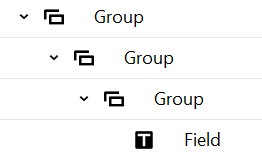 | One of the following: Any two groups; The field and any one group |
|
| One of the following: Any two groups; The field and any one group |
| 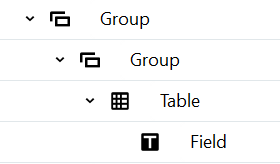 | Any one group (the table acts as the second group with multiple items). **Note:** Enabling multiple items for a field inside a table is not supported. |