> ## Documentation Index
> Fetch the complete documentation index at: https://docs.abbyy.com/llms.txt
> Use this file to discover all available pages before exploring further.
# Results tab
> View field extraction statistics, accuracy metrics, and per-activity results to evaluate and improve your Document skill quality.
The **Results** tab shows field extraction statistics for a skill. Analyzing these statistics helps you understand where extraction quality can be improved.
Before publishing a skill, check the field extraction quality to confirm the skill is set up correctly. To test a skill, click **Test Skill** — Advanced Designer compares the reference labeling with the extraction results.
The **Fields** column lists every field the skill extracts. Fields belonging to a group appear under a collapsed drop-down named after the group.
Documents with unconfirmed labeling are excluded from test results. Reference labeling generated automatically from predicted labeling is unconfirmed until you copy predicted labeling to reference using the **Copy Predicted Labeling to Reference** shortcut menu command. Check the labeling status on the **Documents** tab; confirm labeling on the **Fields** tab.
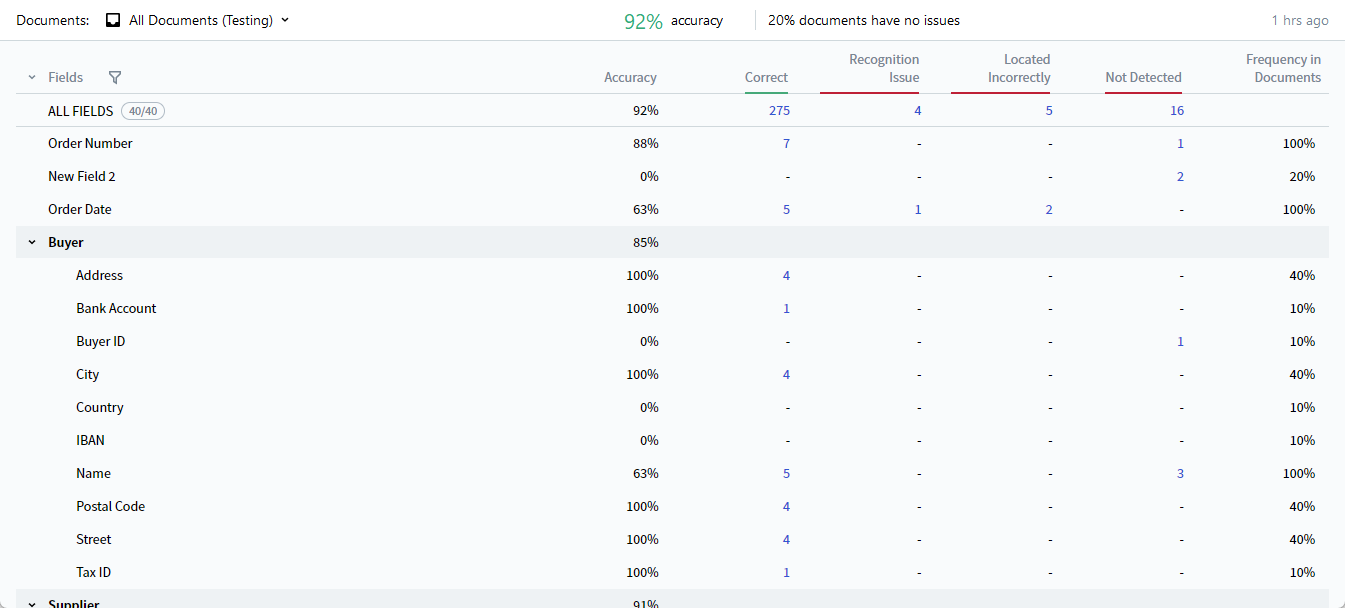 ## Field extraction statistics
The following statistics are available per field and aggregated in the **ALL FIELDS** row:
| Column | Description |
| :------------------------- | :----------------------------------------------------------------------------------------------------------------- |
| **Accuracy** | Percentage of correctly extracted values. |
| **Correct** | Number of field instances whose extracted value matched the reference value. |
| **Recognition Issues** | Number of field instances detected in the document but not recognized correctly. |
| **Located Incorrectly** | Number of field instances whose regions were detected in locations different from those specified in the labeling. |
| **Not Detected** | Number of undetected field instances. |
| **Frequency in Documents** | Percentage of documents containing the field. |
Accuracy is calculated as:
```
Accuracy = Correct / (Correct + Recognition Issues + Located Incorrectly + Not Detected)
```
For the **ALL FIELDS** row, the denominator aggregates across all fields.
By default, these statistics display for all fields. To hide fields and view statistics for a subset only, click the filter icon at the top of the **Fields** column and select the fields you want.
## Comparison mode
Click any value in the **Correct**, **Recognition Issues**, **Located Incorrectly**, or **Not Detected** column to switch to comparison mode, which displays the reference and predicted labeling side by side on the document image. This helps you spot errors in reference labeling and identify problem fields that may need the activity reconfigured.
## Activity-specific statistics
Field extraction statistics are also available for individual activities on the **Results** tab in the Activity Editor. Activity statistics cover only the fields extracted by that activity. Use them to evaluate whether each activity is set up correctly and improve overall extraction quality.
## Related topics
Upload documents and organize them into sets.
Create skill fields and label documents.
Build the document processing flow.
## Field extraction statistics
The following statistics are available per field and aggregated in the **ALL FIELDS** row:
| Column | Description |
| :------------------------- | :----------------------------------------------------------------------------------------------------------------- |
| **Accuracy** | Percentage of correctly extracted values. |
| **Correct** | Number of field instances whose extracted value matched the reference value. |
| **Recognition Issues** | Number of field instances detected in the document but not recognized correctly. |
| **Located Incorrectly** | Number of field instances whose regions were detected in locations different from those specified in the labeling. |
| **Not Detected** | Number of undetected field instances. |
| **Frequency in Documents** | Percentage of documents containing the field. |
Accuracy is calculated as:
```
Accuracy = Correct / (Correct + Recognition Issues + Located Incorrectly + Not Detected)
```
For the **ALL FIELDS** row, the denominator aggregates across all fields.
By default, these statistics display for all fields. To hide fields and view statistics for a subset only, click the filter icon at the top of the **Fields** column and select the fields you want.
## Comparison mode
Click any value in the **Correct**, **Recognition Issues**, **Located Incorrectly**, or **Not Detected** column to switch to comparison mode, which displays the reference and predicted labeling side by side on the document image. This helps you spot errors in reference labeling and identify problem fields that may need the activity reconfigured.
## Activity-specific statistics
Field extraction statistics are also available for individual activities on the **Results** tab in the Activity Editor. Activity statistics cover only the fields extracted by that activity. Use them to evaluate whether each activity is set up correctly and improve overall extraction quality.
## Related topics
Upload documents and organize them into sets.
Create skill fields and label documents.
Build the document processing flow.