> ## Documentation Index
> Fetch the complete documentation index at: https://docs.abbyy.com/llms.txt
> Use this file to discover all available pages before exploring further.
# Edit a skill
> Open a skill in the Skill Designer to modify it, and manage pending changes from the Skill Catalog.
Edit an existing skill in the Skill Designer, and manage pending changes from the Skill Catalog.
Availability of this feature depends on your role. For more information, see [Role-based access control](/vantage/documentation/tenant-admin/tenant-management/role-based-access).
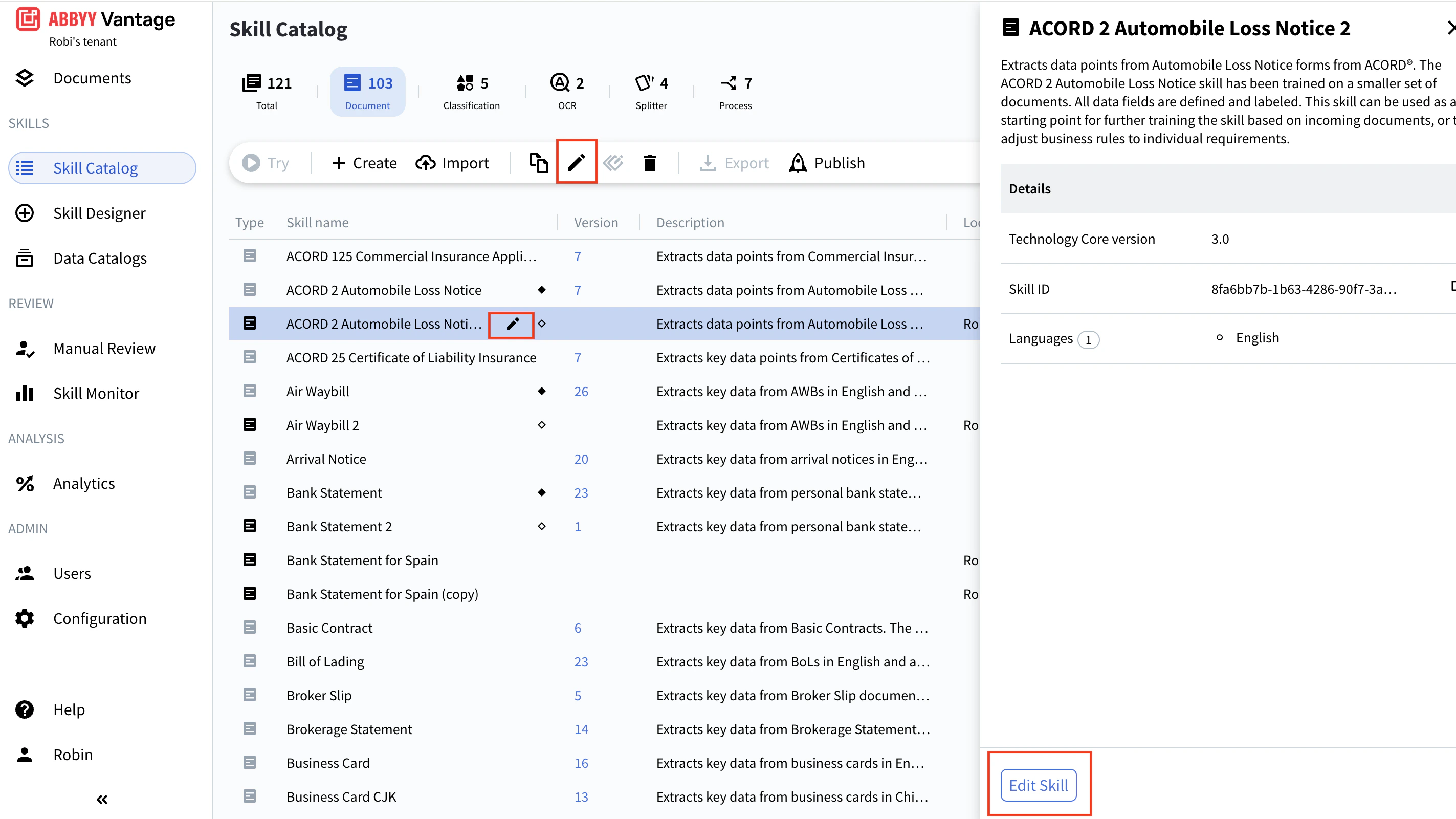
To open a skill for editing, do one of the following:
* In the toolbar, select the skill and click the **Edit Skill** icon.
* In the skill list, click the **Edit Skill** icon next to the skill name.
* In the Preview pane, click **Edit Skill** at the bottom.
 For more information, see [Skill Designer](/vantage/documentation/skill-designer/skill-designer).
The Skill Catalog shows the name of the user currently editing a skill next to the skill name. Only one user can edit a skill at a time. While a skill is being edited, other users can still use its most recently published version.
When you're done, [publish the skill](/vantage/documentation/skill-catalog/publish-skill).
## Discard pending changes
Use **Discard changes** to cancel any pending changes to a skill. After you discard changes, the most recently published version remains in the Skill Catalog. If the skill hasn't been published yet, discarding changes removes it from the Skill Catalog entirely.
To discard pending changes, select the skill in the Skill Catalog and click **Discard changes** in the toolbar.
## Read-only skills
Read-only skills (Vantage built-ins and third-party skills) can't be edited directly. Depending on the skill type, you have these options:
* **Document skills** — create a derived skill and edit the derivative. See [Create a derived skill](/vantage/documentation/skill-catalog/derived-skills/derived-skills).
* **Classification, OCR, and Process skills** — duplicate the skill and edit the copy. See [Duplicate a skill](/vantage/documentation/skill-catalog/duplicate-skill).
* **Splitter skills** — edit in Advanced Designer.
## Related topics
Discover, publish, and reuse skills across your tenant.
Assign a version number to a skill and make it available in the Skill Catalog.
Create an editable copy of a custom skill.
Build a new skill on top of a read-only or third-party skill.
Permanently remove a skill and all its versions from the Skill Catalog.
Search, filter, and preview skills before opening them.
For more information, see [Skill Designer](/vantage/documentation/skill-designer/skill-designer).
The Skill Catalog shows the name of the user currently editing a skill next to the skill name. Only one user can edit a skill at a time. While a skill is being edited, other users can still use its most recently published version.
When you're done, [publish the skill](/vantage/documentation/skill-catalog/publish-skill).
## Discard pending changes
Use **Discard changes** to cancel any pending changes to a skill. After you discard changes, the most recently published version remains in the Skill Catalog. If the skill hasn't been published yet, discarding changes removes it from the Skill Catalog entirely.
To discard pending changes, select the skill in the Skill Catalog and click **Discard changes** in the toolbar.
## Read-only skills
Read-only skills (Vantage built-ins and third-party skills) can't be edited directly. Depending on the skill type, you have these options:
* **Document skills** — create a derived skill and edit the derivative. See [Create a derived skill](/vantage/documentation/skill-catalog/derived-skills/derived-skills).
* **Classification, OCR, and Process skills** — duplicate the skill and edit the copy. See [Duplicate a skill](/vantage/documentation/skill-catalog/duplicate-skill).
* **Splitter skills** — edit in Advanced Designer.
## Related topics
Discover, publish, and reuse skills across your tenant.
Assign a version number to a skill and make it available in the Skill Catalog.
Create an editable copy of a custom skill.
Build a new skill on top of a read-only or third-party skill.
Permanently remove a skill and all its versions from the Skill Catalog.
Search, filter, and preview skills before opening them.