> ## Documentation Index
> Fetch the complete documentation index at: https://docs.abbyy.com/llms.txt
> Use this file to discover all available pages before exploring further.
# Publish a skill
> Learn how to publish a skill in ABBYY Vantage to assign it a version number and make it available for document processing in the Skill Catalog.
After creating or importing a skill, you must publish it before it can be used. Unpublished skills have no version number, can't process documents, and other users can't edit them.
Availability of this feature depends on your role. For more information, see [Role-based access control](/vantage/documentation/tenant-admin/tenant-management/role-based-access).
Only the user who most recently edited the skill can publish it.
In the Skill Catalog, select the skill (click anywhere except the skill name), and then click **Publish** in the Skill Catalog toolbar. The **Publish** tab opens in Skill Designer.
* **Name of your skill** — The skill name.
* **Describe your skill** — The skill's purpose and any details that help other users understand it.
* **Describe changes in this version** — A summary of the changes made in this version.
* **Select keywords** — Keywords to help users find the skill in the Skill Catalog.
* **Upload demo documents** — Sample documents showing what the skill is designed to process. These appear in the skill preview window and are used when trying a skill.
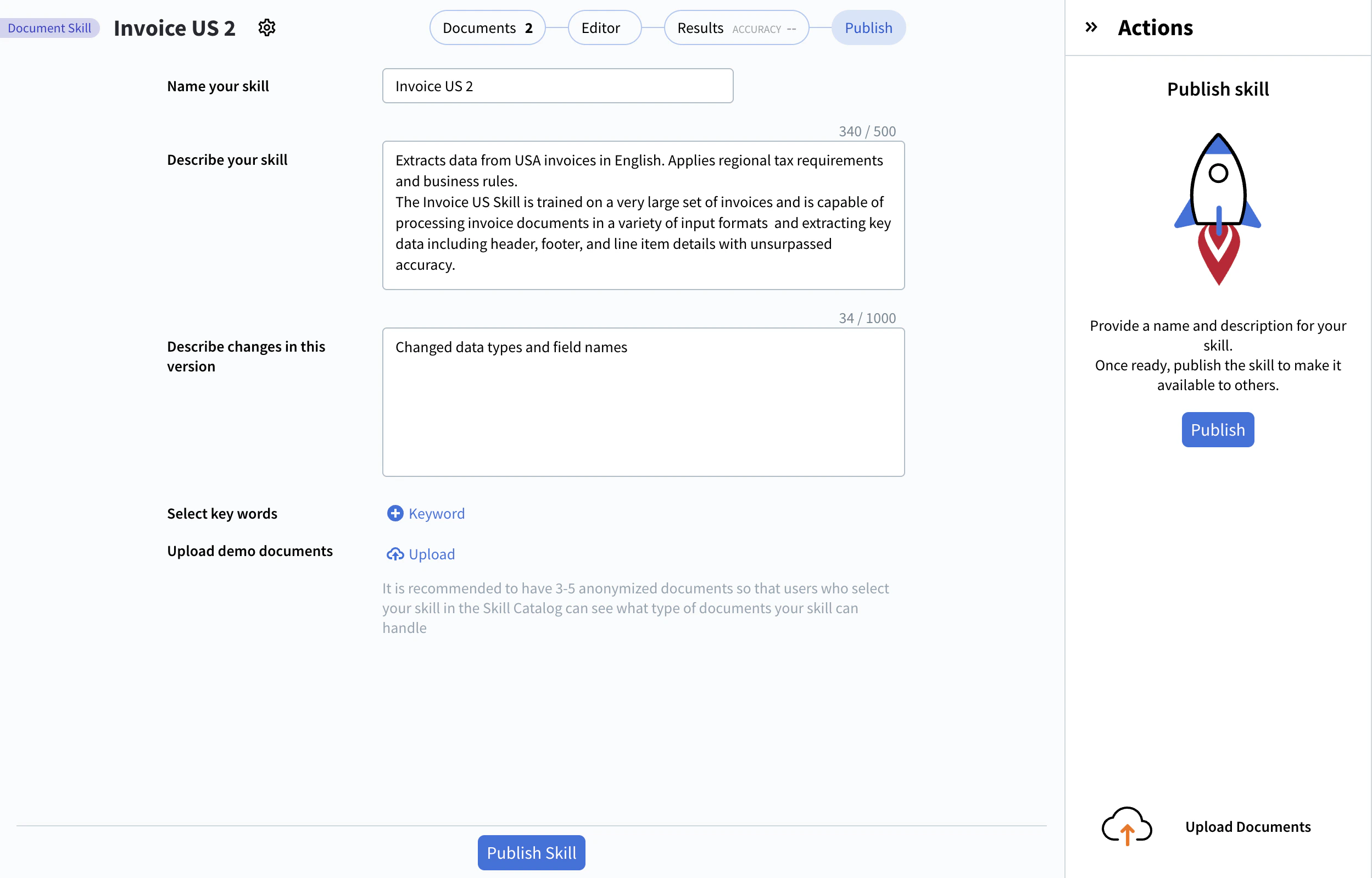 Click **Publish Skill** at the bottom of the Skill Designer window or in the **Actions** pane. The version number increments automatically. If you're editing an existing skill, the most recently published version remains available to others until you publish your changes. For more information, see [Skill versions](/vantage/documentation/skill-versions).
## Related topics
Discover, publish, and reuse skills across your tenant.
Modify a published skill and publish a new version.
Run sample documents through a skill from the Skill Catalog.
Track, compare, and revert published skill versions.
Create a new skill from the Skill Catalog or Skill Designer.
Click **Publish Skill** at the bottom of the Skill Designer window or in the **Actions** pane. The version number increments automatically. If you're editing an existing skill, the most recently published version remains available to others until you publish your changes. For more information, see [Skill versions](/vantage/documentation/skill-versions).
## Related topics
Discover, publish, and reuse skills across your tenant.
Modify a published skill and publish a new version.
Run sample documents through a skill from the Skill Catalog.
Track, compare, and revert published skill versions.
Create a new skill from the Skill Catalog or Skill Designer.