> ## Documentation Index
> Fetch the complete documentation index at: https://docs.abbyy.com/llms.txt
> Use this file to discover all available pages before exploring further.
# Skill Catalog
> View, manage, and organize your ABBYY Vantage skills from a single location.
The Skill Catalog is where you view and manage all your ABBYY Vantage skills. Skills are displayed as a list sorted by name.
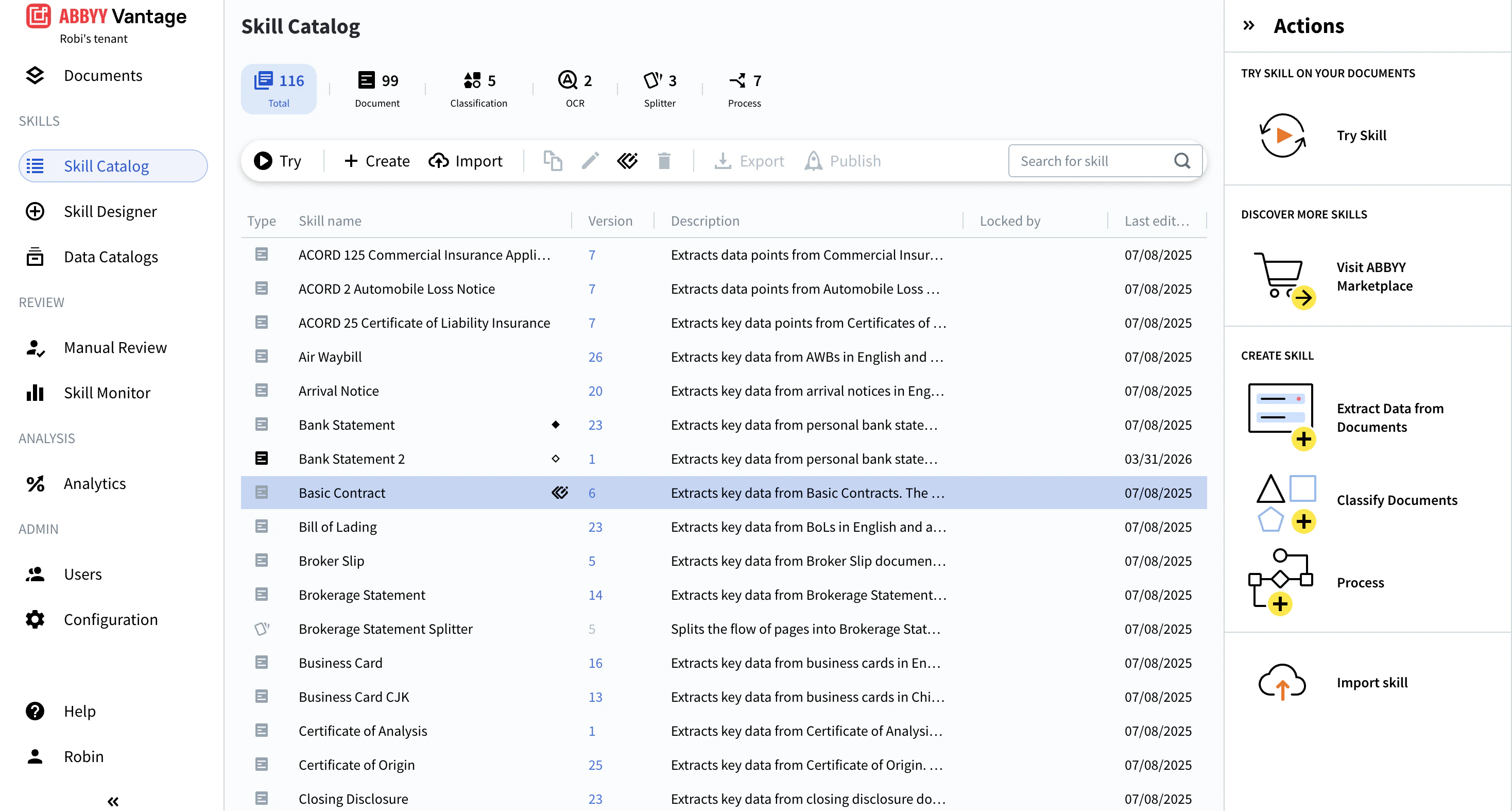 Each row in the list shows the following details:
* Skill type — shown as an icon, with separate marks for base skills and their derived skills
* Skill name
* Version number
* Description
* The user currently editing the skill (**Locked by**)
* Date last edited
Version numbers are only shown for published skills. For more information, see [Skill versions](/vantage/documentation/skill-versions).
For OCR skills, the skill details panel also displays the configured PDF Processing Mode. This field is informational only and cannot be edited from the Skill Catalog. To change the PDF Processing Mode, open the skill for editing.
## Skill types
ABBYY Vantage supports the following skill types:
Extract field values from structured and semi-structured documents of a single type.
Identify the document type so the right skill processes it.
Extract text from document images and export to multiple formats.
Split a flow of pages into separate documents ready for processing.
Coordinate multi-step document workflows by chaining skills.
## Filter the list
To filter the list by skill type, click a skill-type tab at the top of the page. See [Find a skill](/vantage/documentation/skill-catalog/finding-skill) for details.
## What you can do
Search, filter, and preview skills before opening them.
Run sample documents through a skill from the Skill Catalog.
Create a new skill from the Skill Catalog or Skill Designer.
Create an editable copy of a custom skill.
Modify a skill in the Skill Designer and manage pending changes.
Build a new skill on top of a read-only or third-party skill.
Bring an exported skill ZIP into your tenant.
Package a skill as a ZIP file for sharing or transfer.
Assign a version number to a skill and make it available in the Skill Catalog.
Permanently remove a skill and all its versions from the Skill Catalog.
Each row in the list shows the following details:
* Skill type — shown as an icon, with separate marks for base skills and their derived skills
* Skill name
* Version number
* Description
* The user currently editing the skill (**Locked by**)
* Date last edited
Version numbers are only shown for published skills. For more information, see [Skill versions](/vantage/documentation/skill-versions).
For OCR skills, the skill details panel also displays the configured PDF Processing Mode. This field is informational only and cannot be edited from the Skill Catalog. To change the PDF Processing Mode, open the skill for editing.
## Skill types
ABBYY Vantage supports the following skill types:
Extract field values from structured and semi-structured documents of a single type.
Identify the document type so the right skill processes it.
Extract text from document images and export to multiple formats.
Split a flow of pages into separate documents ready for processing.
Coordinate multi-step document workflows by chaining skills.
## Filter the list
To filter the list by skill type, click a skill-type tab at the top of the page. See [Find a skill](/vantage/documentation/skill-catalog/finding-skill) for details.
## What you can do
Search, filter, and preview skills before opening them.
Run sample documents through a skill from the Skill Catalog.
Create a new skill from the Skill Catalog or Skill Designer.
Create an editable copy of a custom skill.
Modify a skill in the Skill Designer and manage pending changes.
Build a new skill on top of a read-only or third-party skill.
Bring an exported skill ZIP into your tenant.
Package a skill as a ZIP file for sharing or transfer.
Assign a version number to a skill and make it available in the Skill Catalog.
Permanently remove a skill and all its versions from the Skill Catalog.