> ## Documentation Index
> Fetch the complete documentation index at: https://docs.abbyy.com/llms.txt
> Use this file to discover all available pages before exploring further.
# Set up a Classification skill
> Train, configure, and publish a Classification skill so Vantage can route each incoming document to the correct process.
Set up a Classification skill to train Vantage on your document types so each incoming file can be routed to the correct downstream process.
A Classification skill classifies each document separately. Every uploaded file should contain images for a single document only.
## Prerequisites
* A Classification skill [created](/vantage/documentation/skill-catalog/create-skill) and opened in the Skill Designer.
* Permission to train and publish skills in your tenant.
## Setup process
Upload and mark your documents, then train the classifier. See [Train a classifier](/vantage/documentation/skill-designer/classification/train-classifier).
[Analyze the classification statistics](/vantage/documentation/skill-designer/classification/analyze-classifier-result) and correct any errors that might be causing a decrease in classification accuracy.
Repeat steps 1 and 2 until accuracy meets your requirements.
[Publish](/vantage/documentation/skill-catalog/publish-skill) the skill to the [Skill Catalog](/vantage/documentation/skill-catalog/skill-catalog).
## Set up a recognition language
When processing a document, Vantage selects a processing language from a list of specified languages. When setting up a new skill, four languages are selected by default: English, French, German, and Spanish.
To modify the recognition language list, click the skill settings icon to the right of the skill name in the Skill Designer. Languages in the settings dialog are sorted alphabetically, with the selected languages displayed at the top. At least one language must be selected. If the language you need isn't listed, see [languages supported by Classification skills](/vantage/documentation/tenant-admin/supported-languages).
The number of selected languages can affect document processing speed. If you know exactly which languages Vantage will encounter in your documents, restrict the list to just those.
You can modify a skill's recognition languages even after the skill has been trained. To apply your changes, upload the documents again and retrain the skill.
## Set up Online learning mode
**Online learning** collects documents into a training set and then continues to train the skill using those documents. Enable it for skills that are producing poor classification results. For details, see [Enabling Online learning](/vantage/documentation/runtime/online-learning/enable-online-learning).
Online learning can slow down processing and requires a Manual Review step in the parent Process skill.
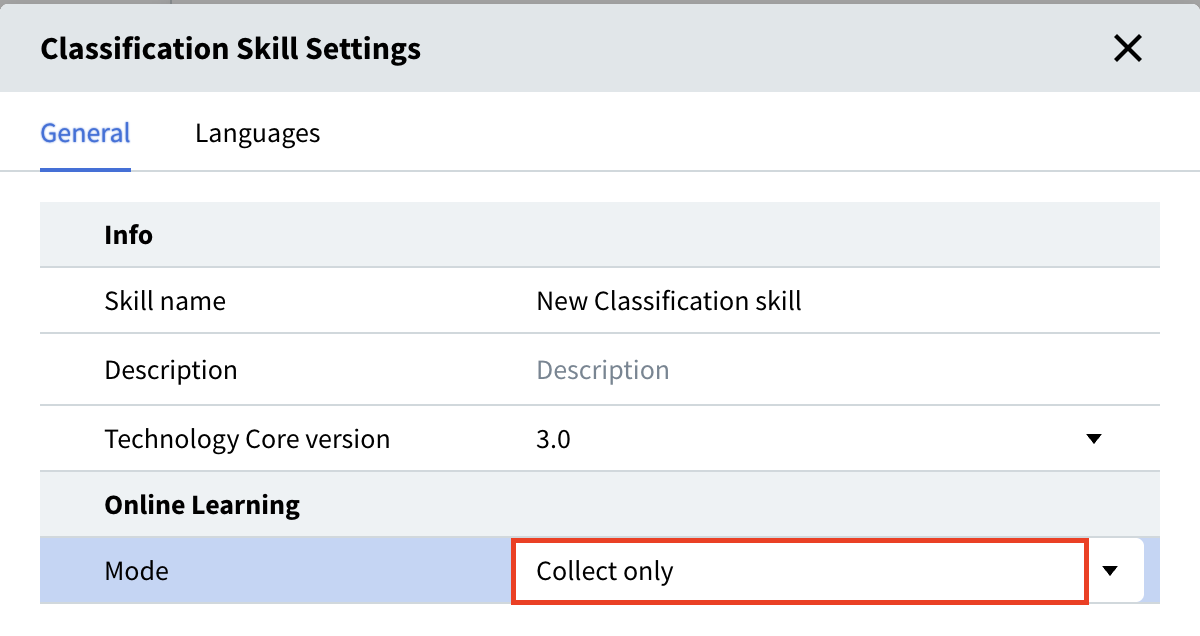
Two Online learning modes are available in **Classification Skill Settings**:
* **Collect and learn** (default) — collects documents and retrains the skill automatically as they arrive.
* **Collect only** — collects documents without retraining. Useful when you want to review additions to the training set before retraining.
To collect documents without training, click the skill settings icon to the right of the skill name in the Skill Designer and select **Collect only** in the settings dialog.
 ## Related topics
See the full list of recognition languages available for Classification skills.
Continuously improve a published Classification skill by retraining it on new production documents.
## Related topics
See the full list of recognition languages available for Classification skills.
Continuously improve a published Classification skill by retraining it on new production documents.