> ## Documentation Index
> Fetch the complete documentation index at: https://docs.abbyy.com/llms.txt
> Use this file to discover all available pages before exploring further.
# Text field
> Add a Text field to a Document skill, set its data type, and configure recognition properties such as fonts, regular expressions, and date/number/money rules.
A Text field extracts a string value from a document — for example, a name, address, ID, or other text. The field's data type (Text, Date, Number, or Money) determines how Vantage recognizes and validates the value.
## Add a Text field
You can add a Text field in two ways.
### Mark a region on the document image
Click a value (highlighted green on hover), or drag a rectangle around it. The new field appears in the data form.
### Add an empty field and mark its region
Click **Add Field** in the toolbar, and then drag a rectangle around the value on the image. The data inside the region becomes the field value.
To rename a field, double-click the name in the data form, or click the name in the field properties. Triple-click to select the entire name. To open field properties, click **Field options**.
## Add multiple regions to one field
Some values span multiple lines or pages, so a single field may need several regions.
To add multiple regions to a new field:
Use either method above.
Hold **Shift** and click or drag additional regions for the same field.
To add regions to an existing field, select the field in the data form, then click or drag its location on the image. If the value spans multiple words, select them all as a single region.
Regions can span multiple pages or sit inside another region. A nested region is highlighted in a darker color; when focused, it's highlighted in yellow.
## General properties
| Property | Description |
| :----------------------- | :------------------------------------------------------------------------------------------------------------------------------------------------------------------------- |
| **Field name** | Unique within the skill. Cannot contain: `. , / : * ? " < > \|`. Maximum length: 90 characters. |
| **Data type** | The kind of data the field contains. Affects recognition accuracy. See [Data types](#data-types) for options. |
| **Allow multiple items** | Whether the field repeats (for example, multiple child names or account numbers). |
| **Required field** | If enabled and the field is empty after extraction, the document goes to manual review with an error. |
| **Key field** | Marks the value as searchable — used to look up documents. |
| **Dimension field** | Exposes the value as a reporting dimension in Skill Monitor. Note: The value is truncated to 100 characters in the reporting database (but remains as is in the document). |
### Data types
| Data type | Description |
| :--------- | :--------------------------------------------------------------------------------------------------------------------------------------------------------------------------------------------------------------------------------------------------------------- |
| **Text** | May contain Latin and Cyrillic letters, digits, hieroglyphics, and special characters. |
| **Date** | A date and time in any format. Accepted separators: dot (`.`), space, hyphen (`-`), backslash (`\`), and forward slash (`/`). |
| **Number** | May contain digits, decimal separators, and the percent character (`%`). Accepted decimal separators: dot (`.`), comma (`,`), hyphen (`-`), equals sign (`=`), space. Accepted thousands separators: dot (`.`), comma (`,`), single quotation mark (`'`), space. |
| **Money** | A number value with a currency symbol. The symbol can appear before or after the amount. |
The lowercase "l" (L), uppercase "I" (i), and digit "1" can look identical. In **Number** or **Money** fields, an ambiguous character is recognized as "1" because letters aren't allowed.
## Appearance settings
These properties describe the appearance of characters expected in the field.
* **Text origin** — Whether the field contains only printed characters, only handwritten characters, or both. If you add the field by dragging a rectangle, Vantage infers this value from the characters it finds. If you add the field with **Add Field**, the value defaults to **Printed**. See [supported languages for handwritten text recognition](/vantage/documentation/tenant-admin/technical-specs/languages#handwritten-text).
* **Eliminate field background** — Improves recognition when the field has a frame, boxes for individual characters, or placeholder text. If you enable this option, upload the blank form document that serves as the background template and label the corresponding field on the blank form. The blank form appears in the Document Set, marked with an icon.
* **Special fonts** — Improves recognition accuracy when the field uses a specific font. You can select more than one font.
Handwritten text recognition is enabled for new Document skills by default. To toggle it, click the skill settings icon to the right of the skill name, open the **Languages** tab, and select or clear **Handwritten** in the **Text Appearance** section.
### Supported fonts
| Font | Description | Font sample |
| :----------------- | :-------------------------------------------------------------------------------------------------------------------------------------------------------------- | :--------------------------------------------------------------------------------------------------------------------------------------------------------------------------------------------------------------------------------------------------------------------------------------------------------------------------------------------------------------------------------------------------------------------------------------------------------------------------------------------------------------------------------------------------------------------------------------------------------------------------------------------------------------------------------------------------------------------------------------------------------------------------------------------------------------------------------------------------------------------------------------------------------------------------------------------------------------------------------------------------------------------------------------------------------------------------------------------------------------------------------------------------------------------------------------------------------------------------------------------------------------------------------------------------------------------------------------------------------------------------------------------------------------------------------------------------------------------------------------------------------------------------------------------------------------------------------------------------------------------------------------------------------------------------------------------------------------------------------------------------- |
| **Fax** | A font typically used by fax machines. |  |
| **Gothic** | Texts printed in Gothic type. |
|
| **Gothic** | Texts printed in Gothic type. | 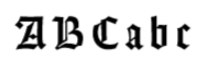 |
| **Index** | A special set of characters that includes only digits written in ZIP-code style. |
|
| **Index** | A special set of characters that includes only digits written in ZIP-code style. | 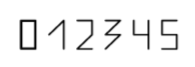 |
| **Matrix printer** | Texts printed on a dot-matrix printer. |
|
| **Matrix printer** | Texts printed on a dot-matrix printer. | 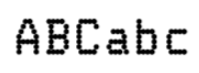 |
| **MICR CMC-7** | A special MICR barcode font (CMC-7). |
|
| **MICR CMC-7** | A special MICR barcode font (CMC-7). |  |
| **MICR E-13B** | Numeric characters printed with magnetic ink. MICR (Magnetic Ink Character Recognition) characters appear on a variety of documents, including personal checks. |
|
| **MICR E-13B** | Numeric characters printed with magnetic ink. MICR (Magnetic Ink Character Recognition) characters appear on a variety of documents, including personal checks. | 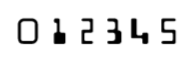 |
| **OCR-A** | A monospaced font designed for optical character recognition. Widely used by banks, credit card companies, and similar businesses. |
|
| **OCR-A** | A monospaced font designed for optical character recognition. Widely used by banks, credit card companies, and similar businesses. |  |
| **OCR-B** | A font designed for optical character recognition. |
|
| **OCR-B** | A font designed for optical character recognition. | 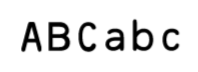 |
| **Receipt** | For text of low quality, typically in a monospaced or normal font used on receipts. |
|
| **Receipt** | For text of low quality, typically in a monospaced or normal font used on receipts. | 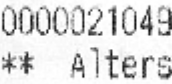 |
| **Typewriter** | Typewritten texts. |
|
| **Typewriter** | Typewritten texts. | 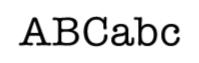 |
## Properties by data type
Additional properties depend on the data type.
### Text
**Value** settings:
* **Maximum length** — The maximum number of characters allowed. If the extracted value exceeds this length, Vantage displays an error. If the process has a manual review stage, the document goes to manual review.
* **Regular expression** — A pattern that narrows the valid character set for the field, which can improve extraction accuracy. For example, you can force every character to be recognized as a digit, match a specific phone number format, or validate that a field contains a numeric weight with units.
**Example 1** — Phone numbers like `1-(234)-567-8900` or `2 (987) 654 3211`:
```
/^(1|2)(\-|\s)\([\d]{3}\)(\-|\s)[\d]{3}(\-|\s)[\d]{4}$/
```
**Example 2** — Weight values like `50lb`, `50lbs`, `50Lb`, `50Lbs`, `50 lb`, or `50 lbs`:
```
/^[\d]*(\s)?(L|l)b(s)?$/
```
Regular expressions do not affect text recognition in PDF documents.
### Date
**Value may include** settings:
* **Time** — Allow a time value. If disabled, time is not extracted.
* **Day of week** — Allow a day of the week in the field. If disabled, a day of the week is not extracted.
* **Month by name** — Allow the month to be spelled out as a word.
#### Acceptable order of components
Select one or more date formats: **Day-Month-Year**, **Month-Day-Year**, or **Year-Month-Day**. If the detected format doesn't match any selected format, the document goes to manual review.
#### Acceptable date
Specify a valid date range as a number of months before and after the day the document was processed. Use integers. A rule checks whether the extracted date falls within the range; out-of-range dates go to manual review.
### Number
**Value** settings specify what kind of number the detected value is (integer or decimal) and what number formats are accepted in the field. Values that don't meet the requirements send the document to manual review.
* **Integers only** — The value must be an integer. Any separators in the detected number are treated as thousands separators.
* **Fractional part may contain more than two digits** — Enable when the decimal part is expected to have more than two digits. Accepted decimal separators: dot (`.`), comma (`,`), hyphen (`-`), equals sign (`=`), space.
* **May have negative values** — Allow negative values, denoted by a minus sign or brackets.
* **May include '%' symbol** — Allow a percentage character before or after the value.
#### Number must be within interval
Set a minimum and maximum value (integers or decimals, positive or negative). A rule checks whether the value falls within the range; out-of-range values send the document to manual review.
**Money** fields use the same properties as **Number**, except the percentage character is not allowed.
## Related topics
* [Label documents in Skill Designer](/vantage/documentation/skill-designer/document/labeling-documents)
* [Supported Recognition Languages](/vantage/documentation/tenant-admin/technical-specs/languages)
|
## Properties by data type
Additional properties depend on the data type.
### Text
**Value** settings:
* **Maximum length** — The maximum number of characters allowed. If the extracted value exceeds this length, Vantage displays an error. If the process has a manual review stage, the document goes to manual review.
* **Regular expression** — A pattern that narrows the valid character set for the field, which can improve extraction accuracy. For example, you can force every character to be recognized as a digit, match a specific phone number format, or validate that a field contains a numeric weight with units.
**Example 1** — Phone numbers like `1-(234)-567-8900` or `2 (987) 654 3211`:
```
/^(1|2)(\-|\s)\([\d]{3}\)(\-|\s)[\d]{3}(\-|\s)[\d]{4}$/
```
**Example 2** — Weight values like `50lb`, `50lbs`, `50Lb`, `50Lbs`, `50 lb`, or `50 lbs`:
```
/^[\d]*(\s)?(L|l)b(s)?$/
```
Regular expressions do not affect text recognition in PDF documents.
### Date
**Value may include** settings:
* **Time** — Allow a time value. If disabled, time is not extracted.
* **Day of week** — Allow a day of the week in the field. If disabled, a day of the week is not extracted.
* **Month by name** — Allow the month to be spelled out as a word.
#### Acceptable order of components
Select one or more date formats: **Day-Month-Year**, **Month-Day-Year**, or **Year-Month-Day**. If the detected format doesn't match any selected format, the document goes to manual review.
#### Acceptable date
Specify a valid date range as a number of months before and after the day the document was processed. Use integers. A rule checks whether the extracted date falls within the range; out-of-range dates go to manual review.
### Number
**Value** settings specify what kind of number the detected value is (integer or decimal) and what number formats are accepted in the field. Values that don't meet the requirements send the document to manual review.
* **Integers only** — The value must be an integer. Any separators in the detected number are treated as thousands separators.
* **Fractional part may contain more than two digits** — Enable when the decimal part is expected to have more than two digits. Accepted decimal separators: dot (`.`), comma (`,`), hyphen (`-`), equals sign (`=`), space.
* **May have negative values** — Allow negative values, denoted by a minus sign or brackets.
* **May include '%' symbol** — Allow a percentage character before or after the value.
#### Number must be within interval
Set a minimum and maximum value (integers or decimals, positive or negative). A rule checks whether the value falls within the range; out-of-range values send the document to manual review.
**Money** fields use the same properties as **Number**, except the percentage character is not allowed.
## Related topics
* [Label documents in Skill Designer](/vantage/documentation/skill-designer/document/labeling-documents)
* [Supported Recognition Languages](/vantage/documentation/tenant-admin/technical-specs/languages)