> ## Documentation Index
> Fetch the complete documentation index at: https://docs.abbyy.com/llms.txt
> Use this file to discover all available pages before exploring further.
# For Each Document activity
> Use the For Each Document activity to run inner activities against one transaction document at a time.
The For Each Document activity is a container that runs its inner activities against one transaction document at a time. You can place any of the following inside it:
* [Extract activity](/vantage/documentation/skill-designer/process/extract-activity)
* [Classify activity](/vantage/documentation/skill-designer/process/classify-activity)
* [OCR activity](/vantage/documentation/skill-designer/process/ocr-activity)
* [Custom activity](/vantage/documentation/skill-designer/process/custom-activity/custom-activity)
* [Condition activity](/vantage/documentation/skill-designer/process/condition-activity/condition-activity)
Other activity types can't be placed inside a For Each Document activity, and For Each Document activities can't be nested.
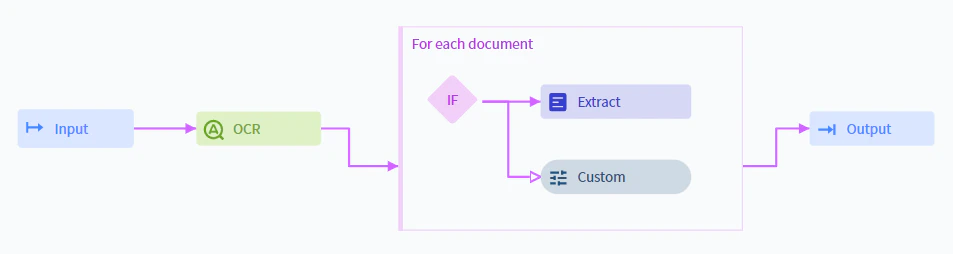 In the usual Process skill workflow, each transaction has a single collection of documents. Inside a For Each Document activity, that collection is split into one collection per document, and the container processes each in turn. In the example above, each transaction document is evaluated by the Condition activity individually and then routed to either the Extract activity or the Custom activity.
## Related topics
Extract field values from documents using a Document skill.
Identify document types and route each document to the correct downstream process.
Specify pre-recognition options and run full-text recognition on documents.
Run custom JavaScript against documents during processing.
Branch the workflow based on extracted values and processing state.
Build a Process skill from a preset workflow or from scratch and configure each activity.
In the usual Process skill workflow, each transaction has a single collection of documents. Inside a For Each Document activity, that collection is split into one collection per document, and the container processes each in turn. In the example above, each transaction document is evaluated by the Condition activity individually and then routed to either the Extract activity or the Custom activity.
## Related topics
Extract field values from documents using a Document skill.
Identify document types and route each document to the correct downstream process.
Specify pre-recognition options and run full-text recognition on documents.
Run custom JavaScript against documents during processing.
Branch the workflow based on extracted values and processing state.
Build a Process skill from a preset workflow or from scratch and configure each activity.