> ## Documentation Index
> Fetch the complete documentation index at: https://docs.abbyy.com/llms.txt
> Use this file to discover all available pages before exploring further.
# Skill versions
> Manage skill versions in ABBYY Vantage: view, edit, copy, import, export, and delete versions, control retention, and revert to previous releases.
Each time you publish a skill, Vantage assigns a new version number. Versioning lets you keep multiple variants of one skill rather than creating new skills for each change.
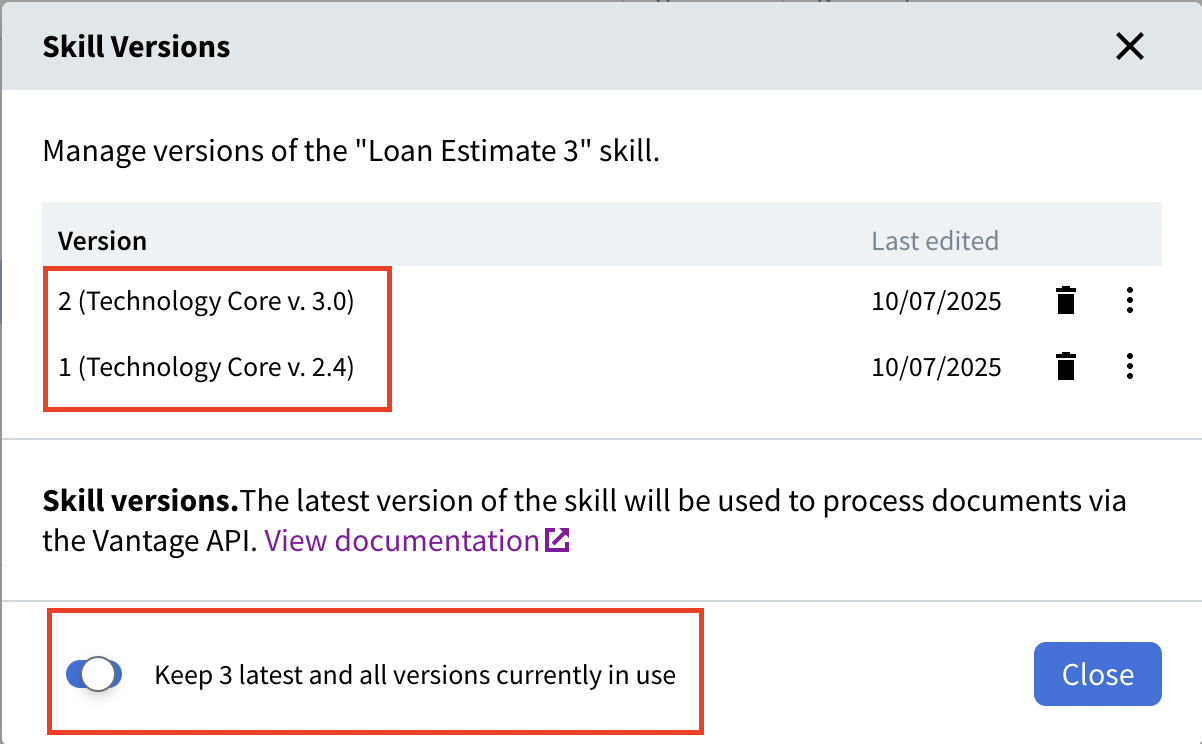
The **Version** column shows each skill's version number. Click the version number to open a dialog box with information about the existing versions of the skill.
 Before publishing a new version of a skill, check its extraction statistics. If the new version performs worse than the previous version, you may prefer not to publish it. To revert, go to the **Skill Catalog**, select the skill, and click **Discard changes** on the toolbar. If you have already published, you can roll back to the previous version of the Technology Core. For more information, see [Revert to a previous version of the Technology Core](/vantage/documentation/technology-core-versions#revert-to-a-previous-version-of-the-technology-core).
## Version retention
Vantage increments the version number each time you publish the skill. By default, the last three versions of the skill are always stored — all older versions not being used in other skills and transactions are automatically deleted.
To change this behavior, turn off the **Keep 3 latest and all versions currently in use** toggle. When this option is disabled, no skill versions are deleted automatically.
## Edit a skill version
When editing a skill, its editable version appears in the **Skill Versions** dialog box. A skill can only have one editable version at a time.
Before publishing a new version of a skill, check its extraction statistics. If the new version performs worse than the previous version, you may prefer not to publish it. To revert, go to the **Skill Catalog**, select the skill, and click **Discard changes** on the toolbar. If you have already published, you can roll back to the previous version of the Technology Core. For more information, see [Revert to a previous version of the Technology Core](/vantage/documentation/technology-core-versions#revert-to-a-previous-version-of-the-technology-core).
## Version retention
Vantage increments the version number each time you publish the skill. By default, the last three versions of the skill are always stored — all older versions not being used in other skills and transactions are automatically deleted.
To change this behavior, turn off the **Keep 3 latest and all versions currently in use** toggle. When this option is disabled, no skill versions are deleted automatically.
## Edit a skill version
When editing a skill, its editable version appears in the **Skill Versions** dialog box. A skill can only have one editable version at a time.
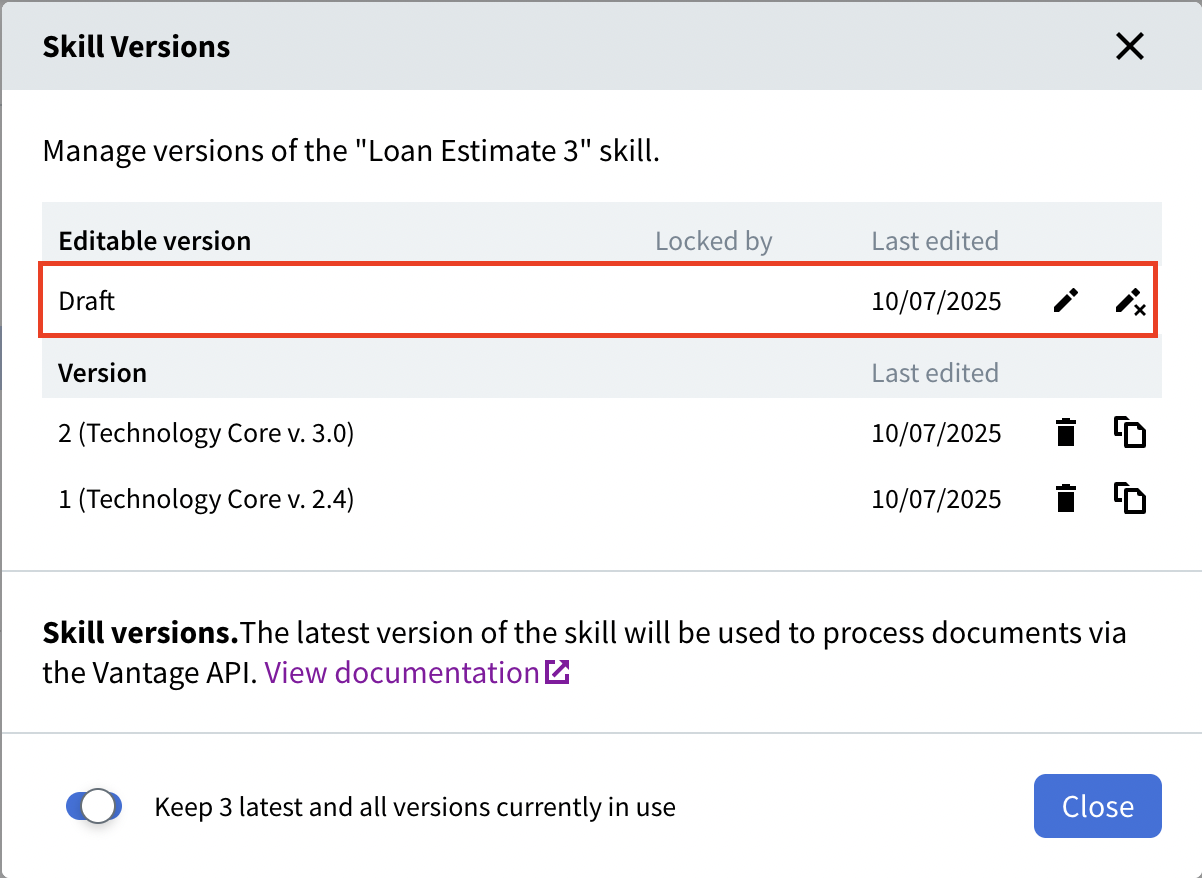 By default, the latest version of the skill is selected for editing. To edit a different version, click the more options icon next to the version number and select **Edit skill**.
## Copy a skill version
To create a new skill from an existing version instead of a new version of the current skill, select **Duplicate skill** from the more options menu.
By default, the latest version of the skill is selected for editing. To edit a different version, click the more options icon next to the version number and select **Edit skill**.
## Copy a skill version
To create a new skill from an existing version instead of a new version of the current skill, select **Duplicate skill** from the more options menu.
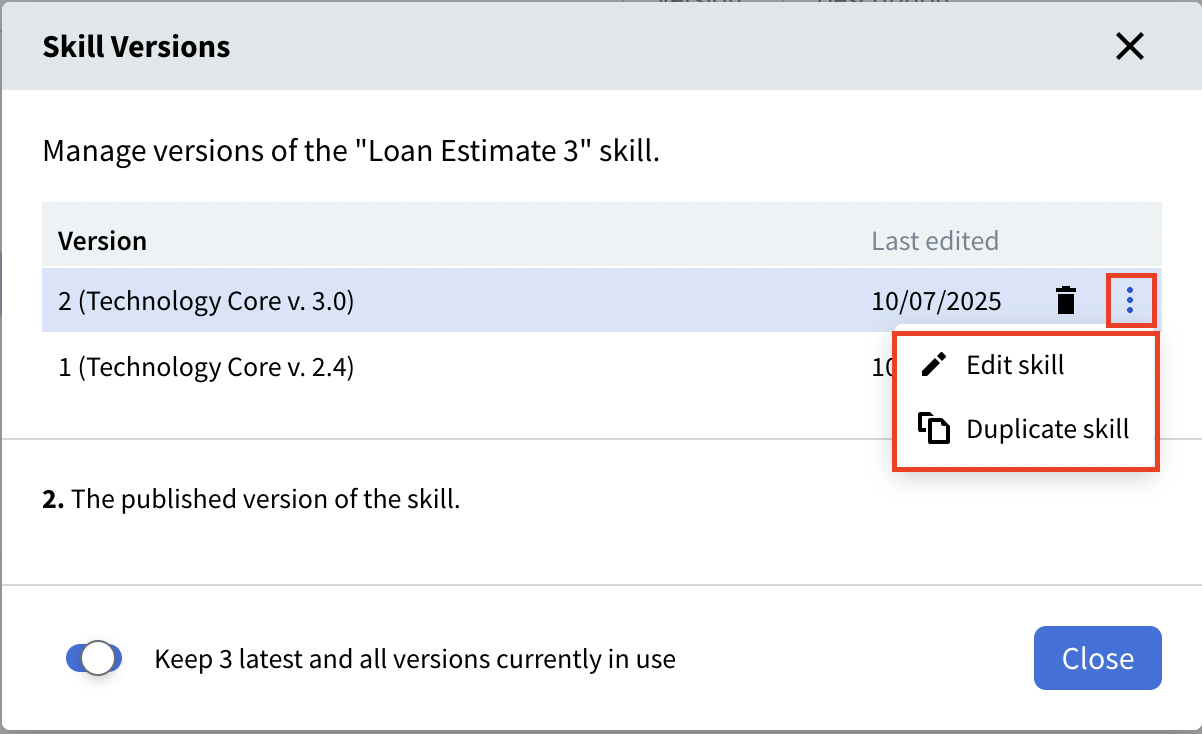 Duplicating a skill copies its latest version by default. To copy a different version, click the copy icon or **Duplicate skill** next to the version number.
## Import and export skill versions
When importing a skill that already exists in the tenant, you can either import it as a new skill or create a new version of the existing skill. The new version number continues from the highest version that has ever been assigned to that skill, even if some have been deleted.
A skill from another tenant is always imported with its own version number.
When exporting a skill, its latest version is exported by default. To export a different version, you must first duplicate the required version (by clicking either the copy icon or **Duplicate skill** next to the version number) and export it.
## Skill versions in the Vantage API and online learning
When processing a document via the Vantage API, the latest version of a skill is always used.
For a Process skill, you must specify the version of each skill used in Classify and Extract activities. If **Online learning** is enabled for those activities, the specified versions are what get trained.
## Delete skill versions
You can delete any version of a skill that is not used by other skills or transactions. To delete a skill version, click the delete icon next to the version number.
When you delete a skill, all of its versions are deleted. Deleted versions cannot be restored.
Vantage retains deleted version numbers so they're never reused. For example, if version 3 (the latest) is deleted, the next published version will be version 4.
## Related topics
Discover, publish, and reuse skills across your tenant.
Assign a version number to a skill and make it available in the Skill Catalog.
Modify a skill in the Skill Designer and manage pending changes.
Create an editable copy of a custom skill.
Permanently remove a skill and all its versions from the Skill Catalog.
Choose the engine version that powers a skill.
Duplicating a skill copies its latest version by default. To copy a different version, click the copy icon or **Duplicate skill** next to the version number.
## Import and export skill versions
When importing a skill that already exists in the tenant, you can either import it as a new skill or create a new version of the existing skill. The new version number continues from the highest version that has ever been assigned to that skill, even if some have been deleted.
A skill from another tenant is always imported with its own version number.
When exporting a skill, its latest version is exported by default. To export a different version, you must first duplicate the required version (by clicking either the copy icon or **Duplicate skill** next to the version number) and export it.
## Skill versions in the Vantage API and online learning
When processing a document via the Vantage API, the latest version of a skill is always used.
For a Process skill, you must specify the version of each skill used in Classify and Extract activities. If **Online learning** is enabled for those activities, the specified versions are what get trained.
## Delete skill versions
You can delete any version of a skill that is not used by other skills or transactions. To delete a skill version, click the delete icon next to the version number.
When you delete a skill, all of its versions are deleted. Deleted versions cannot be restored.
Vantage retains deleted version numbers so they're never reused. For example, if version 3 (the latest) is deleted, the next published version will be version 4.
## Related topics
Discover, publish, and reuse skills across your tenant.
Assign a version number to a skill and make it available in the Skill Catalog.
Modify a skill in the Skill Designer and manage pending changes.
Create an editable copy of a custom skill.
Permanently remove a skill and all its versions from the Skill Catalog.
Choose the engine version that powers a skill.