> ## Documentation Index
> Fetch the complete documentation index at: https://docs.abbyy.com/llms.txt
> Use this file to discover all available pages before exploring further.
# Technology Core versions
> Understand the ABBYY Vantage Technology Core: how OCR and extraction engine versions are tied to skills, and how to update or revert the core a skill uses.
The Technology Core is a set of technology-related workers for document processing, OCR, classification, data extraction, and other features. All skills in Vantage use a specific version of the Technology Core.
You can find the Technology Core version used by a particular skill version in the **Version** column in the **Skill Versions** dialog box:
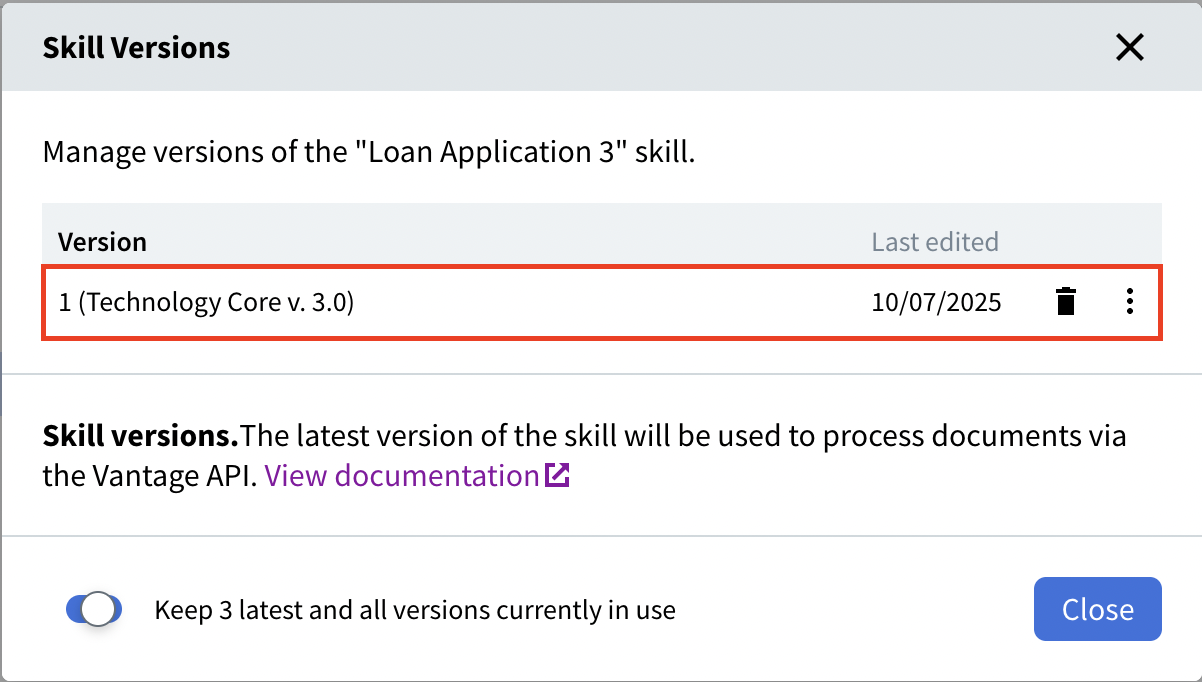 Each version of a skill uses one version of the Technology Core. Different versions of the same skill can use different Technology Core versions.
We recommend using the latest Technology Core version (currently 3.0) for all skills unless you have a specific need for an earlier version.
All Document skills used in a Process skill **must** use the same Technology Core version. If your Process skill already includes Document skills built on Technology Core 2.4 or 2.0, select the corresponding version from the drop-down when creating any new Document skills.
New versions of the Technology Core may be introduced in future Vantage releases, bringing new technology features.
## Update the Technology Core
When a new version of the Technology Core becomes available, an arrow icon appears next to the name and version number of the skill:
Each version of a skill uses one version of the Technology Core. Different versions of the same skill can use different Technology Core versions.
We recommend using the latest Technology Core version (currently 3.0) for all skills unless you have a specific need for an earlier version.
All Document skills used in a Process skill **must** use the same Technology Core version. If your Process skill already includes Document skills built on Technology Core 2.4 or 2.0, select the corresponding version from the drop-down when creating any new Document skills.
New versions of the Technology Core may be introduced in future Vantage releases, bringing new technology features.
## Update the Technology Core
When a new version of the Technology Core becomes available, an arrow icon appears next to the name and version number of the skill:
 You can click this icon to update the skill directly. A new version of the skill appears in the list, using the new Technology Core.
### Update requirements by skill type
| Skill type | How to update |
| :------------------------------------------------- | :------------------------------------------------------------------------------------------------------------------------------------------------------------ |
| Document skill, Classification skill, or OCR skill | Edit, train, and publish the skill. |
| Process skill | Ensure all skills used in the Process skill flow have been updated to the same new Technology Core version first. |
| Skills created in Advanced Designer | Update in Advanced Designer only. See [Upgrading to a new version of the Technology Core](/vantage/documentation/advanced-designer/upgrading-to-new-version). |
### Update via Skill Settings
Open your skill for editing.
On the **Skill Designer** page, click the skill settings icon next to the name of the skill. In the dialog box that opens, select a Technology Core version from the drop-down list.
You can click this icon to update the skill directly. A new version of the skill appears in the list, using the new Technology Core.
### Update requirements by skill type
| Skill type | How to update |
| :------------------------------------------------- | :------------------------------------------------------------------------------------------------------------------------------------------------------------ |
| Document skill, Classification skill, or OCR skill | Edit, train, and publish the skill. |
| Process skill | Ensure all skills used in the Process skill flow have been updated to the same new Technology Core version first. |
| Skills created in Advanced Designer | Update in Advanced Designer only. See [Upgrading to a new version of the Technology Core](/vantage/documentation/advanced-designer/upgrading-to-new-version). |
### Update via Skill Settings
Open your skill for editing.
On the **Skill Designer** page, click the skill settings icon next to the name of the skill. In the dialog box that opens, select a Technology Core version from the drop-down list.
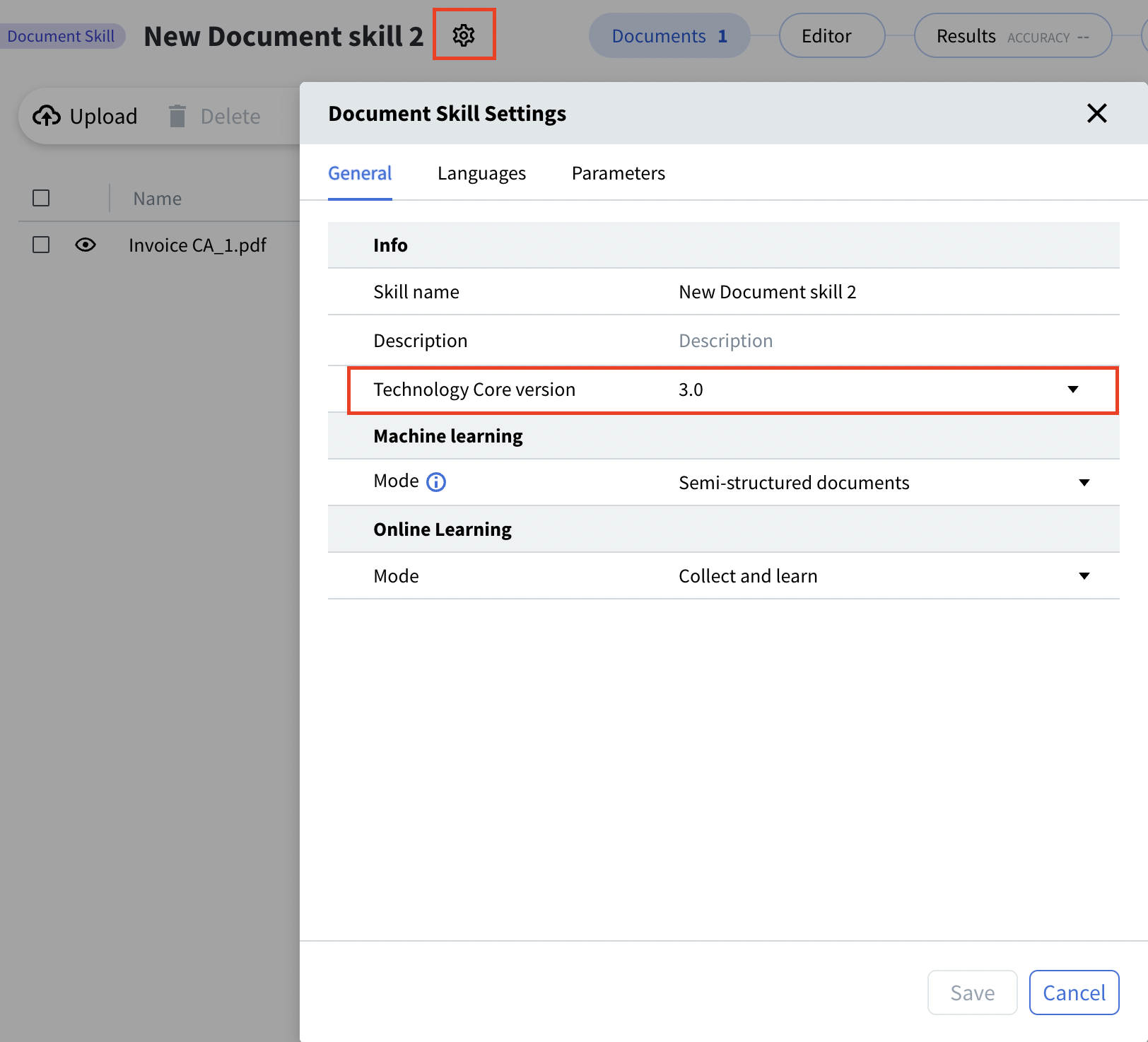 Save, train, and publish the skill. The updated skill appears in the list, using the new Technology Core version.
Before publishing a skill with an updated Technology Core, check its extraction statistics. If the new version performs worse than the previous version, you may prefer not to publish. To revert, go to the **Skill Catalog**, select the skill, and click **Discard changes** on the toolbar.
## Revert to a previous version of the Technology Core
To revert a skill to an earlier Technology Core version, you have two options:
* **Republish an earlier version:** Open the earlier version of the skill and republish it to restore its associated Technology Core version. Note that the skill's version number will be updated.
* **Delete the current version:** Delete the current version of the skill, which automatically reverts to the previous version that uses the earlier Technology Core.
## Import Technology Core versions
Skills imported with an unsupported Technology Core version must be retrained and republished to be usable.
## Related topics
Discover, publish, and reuse skills across your tenant.
How Vantage versions skills and how to view, edit, and delete versions.
Assign a version number to a skill and make it available in the Skill Catalog.
Modify a skill in the Skill Designer and manage pending changes.
Upgrade skills authored in Advanced Designer to a new Technology Core version.
Save, train, and publish the skill. The updated skill appears in the list, using the new Technology Core version.
Before publishing a skill with an updated Technology Core, check its extraction statistics. If the new version performs worse than the previous version, you may prefer not to publish. To revert, go to the **Skill Catalog**, select the skill, and click **Discard changes** on the toolbar.
## Revert to a previous version of the Technology Core
To revert a skill to an earlier Technology Core version, you have two options:
* **Republish an earlier version:** Open the earlier version of the skill and republish it to restore its associated Technology Core version. Note that the skill's version number will be updated.
* **Delete the current version:** Delete the current version of the skill, which automatically reverts to the previous version that uses the earlier Technology Core.
## Import Technology Core versions
Skills imported with an unsupported Technology Core version must be retrained and republished to be usable.
## Related topics
Discover, publish, and reuse skills across your tenant.
How Vantage versions skills and how to view, edit, and delete versions.
Assign a version number to a skill and make it available in the Skill Catalog.
Modify a skill in the Skill Designer and manage pending changes.
Upgrade skills authored in Advanced Designer to a new Technology Core version.