> ## Documentation Index
> Fetch the complete documentation index at: https://docs.abbyy.com/llms.txt
> Use this file to discover all available pages before exploring further.
# Setting up an External Identity Provider for a tenant
> Enable an External Identity Provider (OAuth 2.0 or SAML 2.0) on your ABBYY Vantage tenant, configure email domains, and set default roles for new users.
Once you've prepared an External Identity Provider (see [Configuring an OAuth 2.0 External Identity Provider](/vantage/documentation/tenant-admin/tenant-management/oauth-2-0) or [Configuring a SAML 2.0 External Identity Provider](/vantage/documentation/tenant-admin/tenant-management/saml-2-0)) and [tested it](/vantage/documentation/tenant-admin/tenant-management/testing-external-auth), connect it to your Vantage tenant.
This setup requires the **Tenant Administrator** role.
When you enable an External Identity Provider, the **Resource Owner Password Credentials** authentication flow stops working for this tenant.
## Connect an External Identity Provider to your tenant
In Vantage, click **Configuration** in the left pane, then click **Identity Provider**.
In the top drop-down, select **External Identity Provider**.
In the **Protocol** field, select **OAuth 2.0** or **SAML 2.0**. The settings panel updates with protocol-specific fields. See [OAuth 2.0 fields](#oauth-2-0-fields) or [SAML 2.0 fields](#saml-2-0-fields) for details on each field.
Enter the values from the provider you prepared earlier.
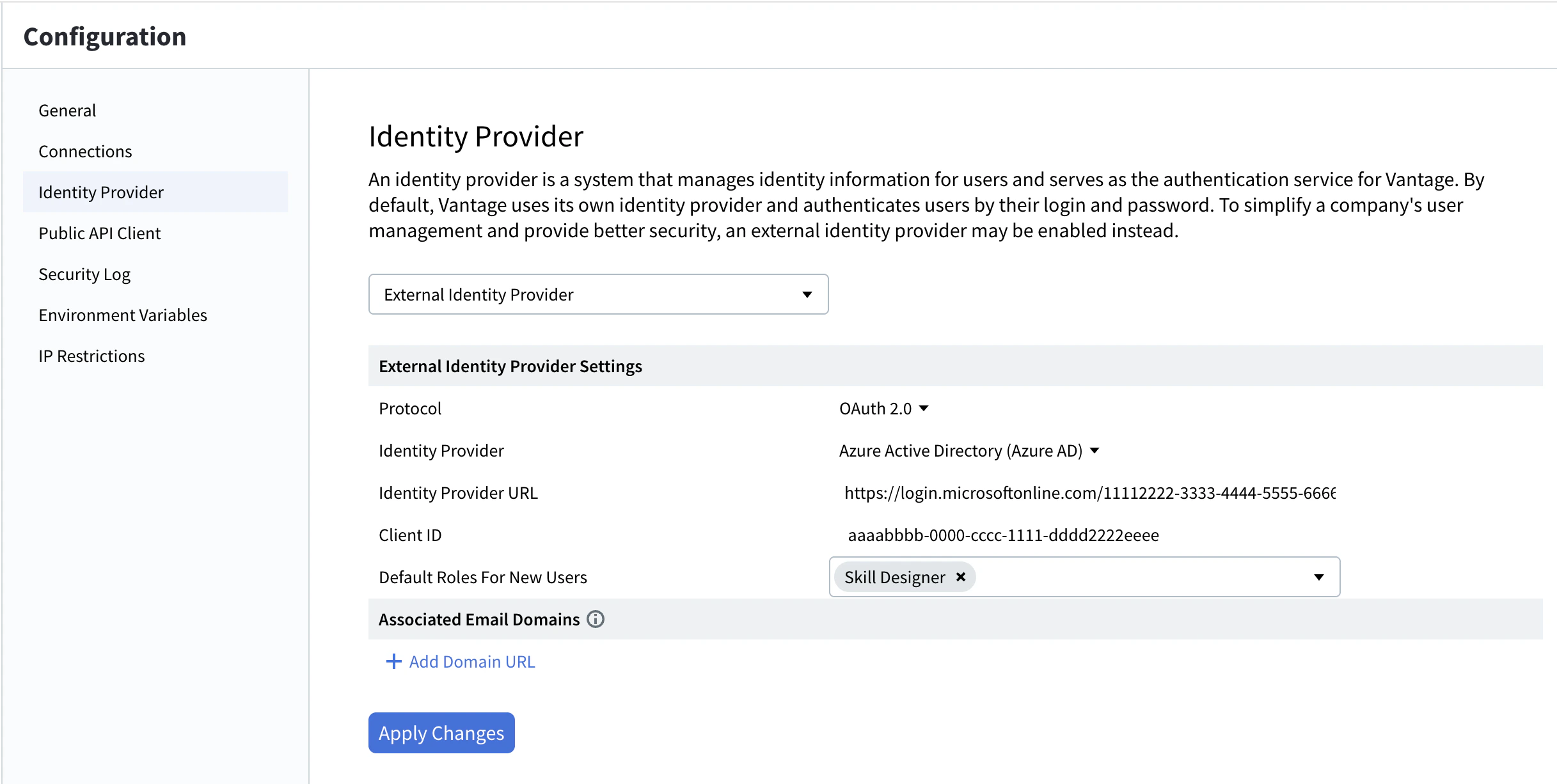 Under **Associated Email Domains**, click **+ Add Domain URL**, enter the domain (for example, `example.com`) in the **Domain URL** field, and click **Apply**. Repeat to add more. For more information, see [Associated email domains](/vantage/documentation/tenant-admin/tenant-management/email-domains).
Click **Apply Changes**.
**Reverting to the Vantage Identity Provider.** To undo, select **Vantage** in the top drop-down and click **Apply Changes**. You can do this as long as your current session (access token) hasn't expired. If it has expired, you'll need to sign in through the configured External Identity Provider to regain access — contact your System Administrator if you're locked out.
## OAuth 2.0 fields
| Field | Description |
| :--------------------------- | :-------------------------------------------------------------------------------------------------------------------------------------------------------------------------------------------------------- |
| **Identity Provider** | The type of provider. Choose **Active Directory Federation Services (AD FS)**, **Azure Active Directory (Azure AD)**, or **Other** for any OAuth 2.0-compatible provider. |
| **Identity Provider URL** | URL of the Identity Provider. In Azure, find it in the **Endpoints** section of your registered application. |
| **Client ID** | Client identifier of the application registered in your Identity Provider. |
| **Client Secret** | *(Visible only when **Identity Provider** is set to **Other**.)* The client secret of the registered application. |
| **Associated Email Domains** | Email domains whose users can sign in to this tenant, even if they don't have a Vantage account yet. See [Associated email domains](/vantage/documentation/tenant-admin/tenant-management/email-domains). |
## SAML 2.0 fields
| Field | Description |
| :----------------------------------- | :---------------------------------------------------------------------------------------------------------------------------------------------------------------------------------------------------------------------------------------------------------------------------------------------------------------------------------------------------- |
| **Federation Metadata Document URL** | URL of your Identity Provider's SAML 2.0 federation metadata document. |
| **Application ID URI** | *(Optional.)* A custom URI that identifies your Vantage application to the Identity Provider (for example, `api://`). If left empty, the obsolete default `api://platform.abbyy.cloud/{tenantId}` is used, where `tenantId` is the Vantage tenant identifier in GUID format without hyphens (for example, `117489fc1aea41658369d4d18d6557ga`). |
| **Associated Email Domains** | Email domains whose users can sign in to this tenant, even if they don't have a Vantage account yet. See [Associated email domains](/vantage/documentation/tenant-admin/tenant-management/email-domains). |
## Setting up default roles for new users
When users are created automatically through an External Identity Provider, Vantage assigns them the default roles you configure here.
In Vantage, click **Configuration** in the left pane, then click **Identity Provider** and select **External Identity Provider** from the top drop-down.
In the **Default Roles For New Users** field, select one or more roles to automatically assign to new users.
Click **Apply Changes**.
For each selected role, the **Allow all current and further skills** toggle is on by default, giving new users access to every skill in the tenant. You can adjust this later for individual users from the **Users** page. See [Role-based access control](/vantage/documentation/tenant-admin/tenant-management/role-based-access) for details on each role.
## Configuring a SAML 2.0 External Identity Provider from an XML file
The Vantage UI accepts a **Federation Metadata Document URL** but not raw metadata XML. If your Identity Provider only exposes the metadata as an XML file with no hosted URL, contact [ABBYY support](https://support.abbyy.com/) for assistance.
## Related topics
Overview of OAuth 2.0 and SAML 2.0 provider setup
AD FS or Azure AD with OAuth 2.0
AD FS or Azure AD with SAML 2.0
Verify the External Identity Provider before users sign in
Allow users from specific email domains to sign in
Under **Associated Email Domains**, click **+ Add Domain URL**, enter the domain (for example, `example.com`) in the **Domain URL** field, and click **Apply**. Repeat to add more. For more information, see [Associated email domains](/vantage/documentation/tenant-admin/tenant-management/email-domains).
Click **Apply Changes**.
**Reverting to the Vantage Identity Provider.** To undo, select **Vantage** in the top drop-down and click **Apply Changes**. You can do this as long as your current session (access token) hasn't expired. If it has expired, you'll need to sign in through the configured External Identity Provider to regain access — contact your System Administrator if you're locked out.
## OAuth 2.0 fields
| Field | Description |
| :--------------------------- | :-------------------------------------------------------------------------------------------------------------------------------------------------------------------------------------------------------- |
| **Identity Provider** | The type of provider. Choose **Active Directory Federation Services (AD FS)**, **Azure Active Directory (Azure AD)**, or **Other** for any OAuth 2.0-compatible provider. |
| **Identity Provider URL** | URL of the Identity Provider. In Azure, find it in the **Endpoints** section of your registered application. |
| **Client ID** | Client identifier of the application registered in your Identity Provider. |
| **Client Secret** | *(Visible only when **Identity Provider** is set to **Other**.)* The client secret of the registered application. |
| **Associated Email Domains** | Email domains whose users can sign in to this tenant, even if they don't have a Vantage account yet. See [Associated email domains](/vantage/documentation/tenant-admin/tenant-management/email-domains). |
## SAML 2.0 fields
| Field | Description |
| :----------------------------------- | :---------------------------------------------------------------------------------------------------------------------------------------------------------------------------------------------------------------------------------------------------------------------------------------------------------------------------------------------------- |
| **Federation Metadata Document URL** | URL of your Identity Provider's SAML 2.0 federation metadata document. |
| **Application ID URI** | *(Optional.)* A custom URI that identifies your Vantage application to the Identity Provider (for example, `api://`). If left empty, the obsolete default `api://platform.abbyy.cloud/{tenantId}` is used, where `tenantId` is the Vantage tenant identifier in GUID format without hyphens (for example, `117489fc1aea41658369d4d18d6557ga`). |
| **Associated Email Domains** | Email domains whose users can sign in to this tenant, even if they don't have a Vantage account yet. See [Associated email domains](/vantage/documentation/tenant-admin/tenant-management/email-domains). |
## Setting up default roles for new users
When users are created automatically through an External Identity Provider, Vantage assigns them the default roles you configure here.
In Vantage, click **Configuration** in the left pane, then click **Identity Provider** and select **External Identity Provider** from the top drop-down.
In the **Default Roles For New Users** field, select one or more roles to automatically assign to new users.
Click **Apply Changes**.
For each selected role, the **Allow all current and further skills** toggle is on by default, giving new users access to every skill in the tenant. You can adjust this later for individual users from the **Users** page. See [Role-based access control](/vantage/documentation/tenant-admin/tenant-management/role-based-access) for details on each role.
## Configuring a SAML 2.0 External Identity Provider from an XML file
The Vantage UI accepts a **Federation Metadata Document URL** but not raw metadata XML. If your Identity Provider only exposes the metadata as an XML file with no hosted URL, contact [ABBYY support](https://support.abbyy.com/) for assistance.
## Related topics
Overview of OAuth 2.0 and SAML 2.0 provider setup
AD FS or Azure AD with OAuth 2.0
AD FS or Azure AD with SAML 2.0
Verify the External Identity Provider before users sign in
Allow users from specific email domains to sign in