The element’s search area may contain several objects or sets of objects that all correspond to the element. In this case, FlexiLayout Studio formulates a hypothesis for each detected object.
How hypothesis quality is calculated
The quality of a hypothesis measures how well the detected object matches the description in the corresponding element. It is a numerical value from 0 to 1. FlexiLayout Studio calculates the quality of a hypothesis as Pre-search quality × Post-search quality, where:- Pre-search quality – The quality of the settings made in the Properties dialog box and in the Advanced pre-search relations field.
- Post-search quality – The result of applying the conditions specified in the Advanced post-search relations field.
Null hypotheses
For optional elements, FlexiLayout Studio formulates a null hypothesis. A null hypothesis is a hypothesis that FlexiLayout Studio formulates when it detects no objects corresponding to an optional element in the search area. If FlexiLayout Studio does not find any objects corresponding to an optional element, it does not stop matching the FlexiLayout. Instead, it formulates a null hypothesis and assigns it a quality that you set when creating the optional element.Hypotheses: a practical example
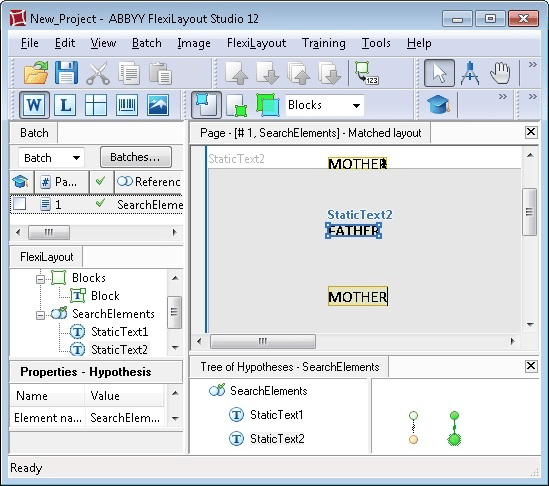
Suppose you need to create two elements to find two static texts on your images. The first static text is “mother”, the second is “father”, and the text “father” is always located below the text “mother”. Create two Static Text elements. The first, StaticText1, looks for the text “mother”, and the second, StaticText2, looks for the text “father”. Assume that both elements are optional and that the quality of the null hypothesis for each of them is set to 0.97. No constraints are set on the search area for StaticText1. Because the text “father” is always located below the text “mother”, you can specify that StaticText2 must always be located below StaticText1. To do this, type the corresponding constraint on the Relations tab in the Properties dialog box of the StaticText2 element:Below: SearchElements.StaticText1;.
The following figure shows the results of matching the FlexiLayout with an image on which the word “mother” occurs twice (above and below the word “father”) and one OCR error has been made in the word “mother” located above the word “father”.