Creating and editing named parameters
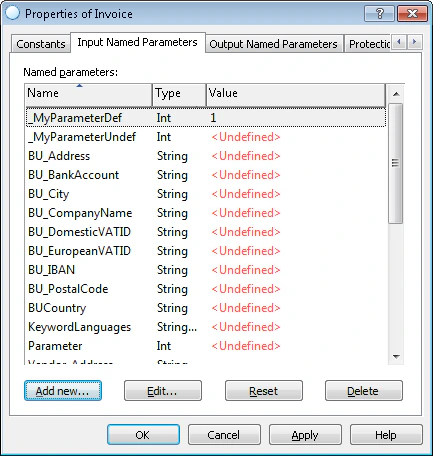
To create a new named parameter, open the properties dialog box of a FlexiLayout, select the Named parameters tab and click the Add new… button.See FlexiLayout properties dialog box
See FlexiLayout properties dialog box

- Name
This property cannot be changed after it is specified. - Type
Named parameters can be one of three types: String, StringArray or Int. This property cannot be changed after is specified. - Value
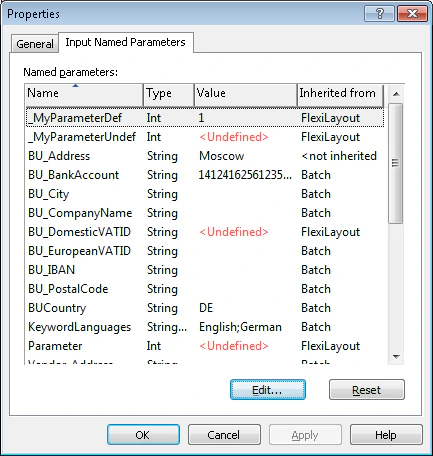
This property can be changed for individual batches and pages. If the value of a named parameter is not specified in the FlexiLayout, its value in the Value column will be displayed as <Undefined>.
See batch properties dialog box

Option | Description |
Add new… | Creates a new named parameter. Note. Only available for FlexiLayouts. |
Edit… | Edits a named parameter. |
Reset | Resets the value of a named parameter. |
Delete | Deletes a named parameter. Note. Only available for FlexiLayouts |
Copy | Copies a named parameter. Note. Only available on the shortcut menu of a named parameter. |
Paste | Pastes the copied named parameter. Note. Only available on the shortcut menu of a named parameter. |
The following methods can be used to call a named parameter from a script:
- GetNamedParameterString for named parameters of the String type;
- GetNamedParameterStringArray for named parameters of the StringArray type;
- GetNamedParameterInt for named parameters of the Int type.