
FuzzyRect type.
Internal and external rectangles
As the following figure shows, in the general case, when constraints are set for all the boundaries, there is a part of the search area that must fall within any hypothesis for the element. This part forms the internal rectangle. The maximum-size circumscribing rectangle of the possible hypothesis forms the external rectangle.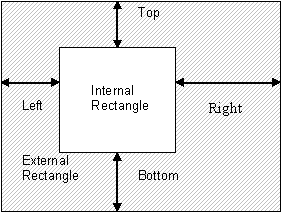
InternalRect: [L2, T2, R1, B1], ExternalRect: [L1, T1, R2, B2].
If no constraints are set for the boundaries of the search area, the internal rectangle degenerates and makes no geometric sense. In this case, L1=R1, L2=R2, T1=B1, T2=B2.
Search area with no boundary constraints
Suppose that no constraints have been specified for the search area. Then, if the maximum and minimum allowed number of pages is 1, the fuzzy rectangle of the search area is created as follows:Union and intersection of fuzzy rectangles
Fuzzy rectangles can be united and intersected. When two fuzzy rectangles are intersected, their corresponding boundaries intersect: the right boundary of one rectangle intersects with the right boundary of the other, the left with the left, and so on. This creates new ranges for the boundaries:InternalRect: [L2’, T2’, R1’, B1’], ExternalRect: [L1’, T1’, R2’, B2’].
If, as a result of the intersection, at least one of the conditions for creating the fuzzy rectangle (L1 <= L2, T1 <= T2, R1 <= R2, B1 <= B2) is not met, the resulting fuzzy rectangle is nullified: InternalRect: [0, 0, 0, 0], ExternalRect: [0, 0, 0, 0].
Usually an empty fuzzy rectangle is created as a result of contradictory conditions, for example, if you attempt to intersect two fuzzy rectangles whose external boundaries do not intersect.
Fuzzy rectangles are united in the same way: first, the ranges of each boundary are united. As a result of uniting the two ranges, a minimum range is created that contains both specified ranges. After the boundaries have been united, a new fuzzy rectangle is formed.
In practice, you most often encounter fuzzy rectangles with a degenerate internal rectangle. Only rarely do you need to set constraints on a specific boundary. However, the search area for an element is always represented by a fuzzy rectangle and an array of excluded rectangles.