
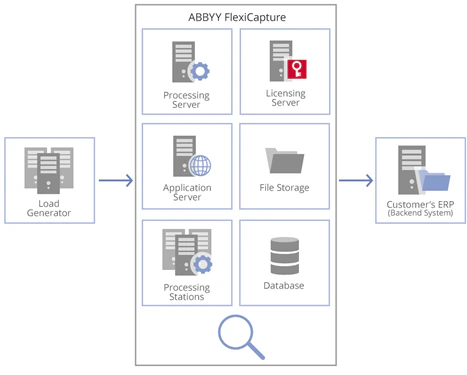
Processing workflow
Input images are processed automatically by the System, in this order:- Import from a Scanning Station
- Pre-processing
- Recognition
- Export
- Processed stage
Test project and input batch
The SingleEntryPoint shipped with ABBYY FlexiCapture is used for performance testing as standard. It contains 5 Document Definitions: 4 flexible ones (Letters, Contracts, Prices, Invoices) and 1 fixed (Banking), which includes 3 sections and annex pages. Input images arrive for processing as separate sets of pages. The batch used in the test as a standard contains 69 pages (27 documents). Depending on the goals of testing, the color mode and the number of images in the batch may vary. At the Recognition stage, they are assembled into documents after the Document Definitions are applied. Processed documents are received in the shared SMB folder:- Extracted data exported as CSV files
- Images saved as color TIFF files
Monitored parameters
The system is constantly monitored during tests. In addition to the counters, these parameters are also controlled:- The input flow rate in pages/second and pages/24 hours
- The System performance in pages/second and pages/24 hours
- The average time for processing one batch
- The automated cleanup performance in pages/24 hours
Test duration
Each testing setup should run for at least 8 hours at a constant workload. Typical testing periods are:- Express testing: 24 hours
- Standard testing: 72 hours
- Stability testing: 1 to 2 weeks
Testing with the verification stage
With the verification stage, the workflow runs in this order:- Import from a Scanning Station
- Pre-processing
- Recognition
- Verification
- Export
- Processed stage
- The number of verifiers
- The time to get a task, in seconds
- The time to save verification results, in seconds