Download
FlexiCapture 12 Release 4 Update 9, build 12.0.4.1209.Distributed package
Complete package for an enterprise client/server deployment, comprising the FlexiCapture servers plus all processing and verification stations.
Developer’s package
Installs Project Setup Station, FlexiLayout Studio, FCAdminTool, and License Manager to enable development of FlexiCapture projects for the Cloud.
Features
- Updated the code signing certificate for the FlexiCapture Windows binaries. (664295, 664297)
- Raised the ICAAS document assembly limit from 30 pages to 100 pages. (666848, 667822)
- Removed the client secret dependency from Microsoft OAuth2 processing.
- Updated the web help links in all FlexiCapture components to point to docs.abbyy.com.
Improvements
- Updated the code signing certificate for the FlexiCapture Windows binaries.
- Removed the client secret dependency from Microsoft OAuth2 processing.
- Upgraded the ICAAS Function Apps runtime environment to .NET 10 Isolated.
- Moved the FlexiCapture documentation to docs.abbyy.com.
Image import profiles that use IMAP or GraphMail need to be signed in again after the release. This one-time login ensures that the token refresh works seamlessly and imports continue without repeated login prompts.
Fixes
-
Fixed a collation conflict in
dbo.User_GetAvailableafter a database upgrade. (667101, 668220) - Fixed an issue where exception queue tasks became inaccessible in the web verification station after Send to Stage. (672932)
- Fixed an issue where the Prefer PDF text layer if available option was not applied during recognition. (574484, 656210)
-
Fixed an
Access deniederror that occurred when a Senior Verification Operator filtered batches. (656997, 657148, 679273) -
Fixed a
500 Sharing Violationerror that occurred during export. (627018, 655856, 667234, 676906, 630499) - Fixed an issue where old full-width numbers appeared unexpectedly during editing in the web verification station with the CJK IME editor. (677555)
Important installation notes
Microsoft Defender SmartScreen may prevent the FlexiCapture installer from starting
When you run the FlexiCapture installer, Windows may displayWindows protected your PC and Microsoft Defender SmartScreen prevented an unrecognized app from starting.
The installer in this release is signed with a refreshed ABBYY code signing certificate. SmartScreen builds trust for a newly signed file based on how widely it has been downloaded, so a recently issued signature is flagged as unrecognized until that reputation accumulates. The warning stops appearing as reputation builds.
Workaround: Confirm the signature, and then run the installer.
1
Verify that the file is genuine
Right-click the installer, select Properties, and open the Digital Signatures tab. Confirm that ABBYY is listed as the signer.
2
Run the installer
In the warning, select More info, and then select Run anyway.
The installer can stop on Windows Server 2025 when it deploys distributed components
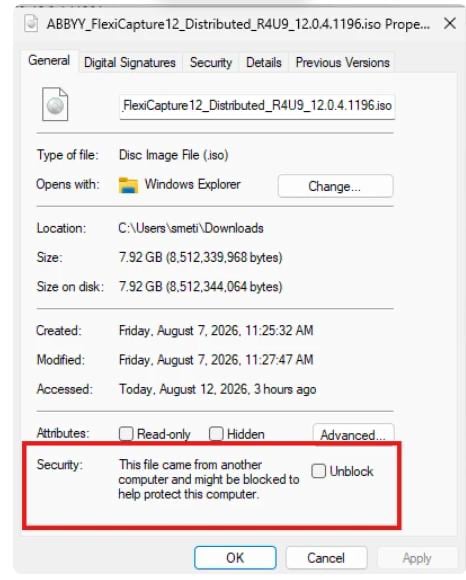
Windows marks files downloaded from the internet as untrusted. On Windows Server 2025, this can stop the installer when it deploys distributed components, and the installation wizard does not continue. Workaround: Unblock the downloaded file before you run it.1
Open the file properties
Right-click the downloaded file and select Properties.
2
Unblock the file
On the General tab, select the Unblock checkbox, and then select Apply.