先决条件
- 在配置身份之前,请确保您拥有一个 Vantage 租户标识符。要获取租户标识符,请在 ABBYY Vantage 中单击 Configuration。该标识符位于 General 选项卡上。
- 创建一个重定向 URI 以接收身份验证响应。URI 为:
https://<your-vantage-url>/auth2/Saml2/Acs - 创建一个应用注册 (参见下文中的说明) 。注册应用程序会在您的应用程序与外部身份提供商之间建立信任关系。
创建应用程序
- 打开 Azure Portal 并完成身份验证。在左侧窗格中选择 Azure Active Directory。
- 在右侧窗格中选择 App registrations,然后单击 New registration。

- 填写必填字段:
- a. 指定一个名称。
- b. 选择 Accounts in this organizational directory only。
- c. 为每个需要使用此账户进行身份验证的 Vantage URL 指定一个 URI:
https://<your-vantage-url>/auth2/Saml2/Acs

- 单击 Register。
设置 Azure Active Directory
-
在 Expose an API 选项卡中,设置 Application ID URI。根据 Microsoft Entra identifier URI restrictions,请使用
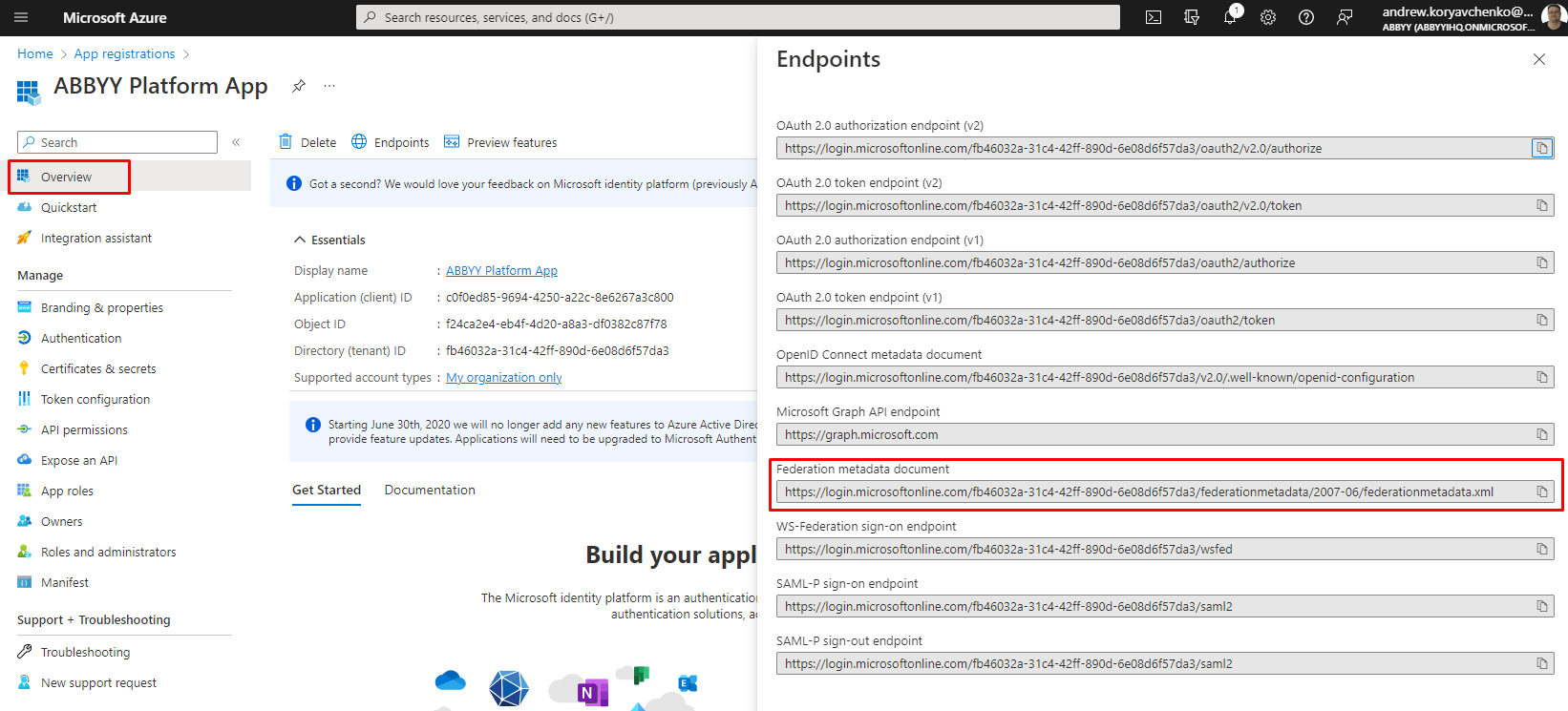
api://<appId>格式,其中 appId 为应用注册中的 Application ID (例如:api://a37892f6-c2e9-4092-b804-d054741da4da) 。请将此值复制下来,因为在 Vantage 中配置 External Identity Provider 时会用到它。 - 选择 Overview 选项卡并单击 Endpoints。复制 Federation metadata document 字段的值。