
How fuzzy intervals work
Suppose you have a fuzzy interval[f1,f2,f3,f4] and the length of the detected string of characters (or the length of the detected space) is L. The quality of the hypothesis depends on where L falls relative to the four boundary values.
The quality of the hypothesis for the detected object is multiplied by the value of the Character count property. The value of this property is selected depending on the length of the detected object.
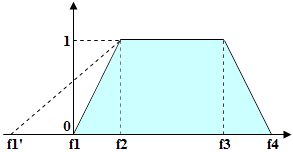
The quality of any chain of hypotheses for several elements is calculated by multiplying the hypotheses for each element. If the chain is relatively long and the quality estimates of the constituent hypotheses are too low as a result of too strict constraints, the resulting quality of the entire chain may be too low.
Guidelines for setting intervals
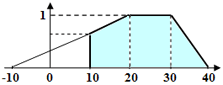
Make sure that the selected hypothesis has the highest quality estimate possible. On the other hand, you need to be able to distinguish hypotheses by their qualities, so as to be able to select the best one. Therefore, set up fuzzy intervals so that acceptable hypotheses are not penalized too much. You can also use negative values for the left boundary of the fuzzy interval, even though in reality there are no strings of negative length. This makes the dependence of quality in the range from0 to 1 less steep, which reduces the penalty.
To also set a lower limit for the length, type an expression on the Advanced tab. For example, if the string cannot be shorter than 10 characters and the fuzzy interval for the length is [-10,20,30,40], type Value.Length >= 10 in the Advanced post-search relations pane.
Fuzzy interval visual editor
ABBYY FlexiLayout Studio offers a visual editor to make specifying fuzzy intervals easier. Open the fuzzy interval editor in one of the following ways:- From the Properties dialog box of a Character String element, on the Character String tab, click the browse button (
 ).
). - From the main menu, select Tools → Fuzzy Interval Editor.