
- A personal scanner, through a thin or local rich client
- A network scanner, which sends images to a folder or an email inbox
- A mobile app
Input flow and bandwidth
For performance, the total input flow matters more than the total number of scanning clients. Input flow has two parts:- The average and peak number of pages processed per hour or per 24 hours
- The size of each page, which depends on its color mode
- Using the NLB Affinity setting for the cluster (the software level)
- Routing network connections to specific cluster nodes (the hardware level)
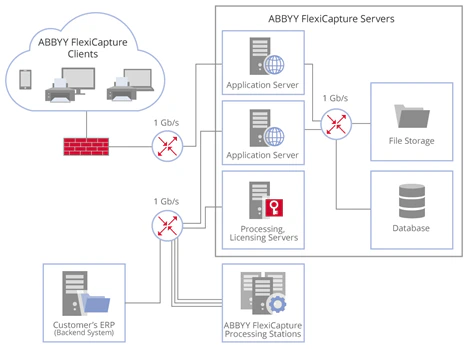
What Scanning Stations support
- Automatic resumption of image uploads to the Application Server after a network connection failure. This helps mitigate traffic spikes from Scanning Stations.
- Centralized configuration of options for scanning, image enhancement, and export to the Application Server. For example, you can set the color mode of scanned images. You can also detect and delete the empty pages produced by duplex scanning, which reduces the input flow.
- Scheduling of image uploads to the Application Server to balance network loads. For example, you can assign different upload times to different regional offices.