- Adding scanning clients, verification clients, and Processing Stations
- Adding power to the machines that host the Application, Processing, Licensing, and Database servers and the FileStorage
- Spreading those server roles across several machines
System monitoring and bottleneck detection shows you whether the current hardware still meets your target performance, and when it is time to scale up.
Demo
Demo is a typical configuration for demonstrations or pilot projects, and is not recommended for production-scale projects. All the System components are installed on a virtual machine or deployed on a PC.
You can use MS SQL Express as the database server and install it on the same machine as the FlexiCapture servers. Instead of a separate FileStorage, you can store files directly in the database. Operators and Processing Stations can also share that machine.
Medium
Medium is a typical configuration for commercial projects. Each server component is installed on a dedicated machine, so you can scale each one independently.Deployment guidelines
Separate the Application Server
Install the Application Server on a dedicated machine. It scales differently from the Database, Processing, and Licensing servers.You can install the Application Server, Processing Server, and Licensing Server on one computer. That gives you server redundancy but not Application Server scalability.
Choose a clustering technology
The Application Server and the Processing and Licensing Servers use different clustering technologies:- The Application Server is a web service in IIS; its scaling and reliability are achieved by clustering that uses Microsoft Network Load Balancing technology. All cluster nodes are peers running in active-active mode and can be switched off at any time.
- The Processing Server and Licensing Server are Windows services; their reliability is achieved by creating an active-passive cluster based on Microsoft Failover Cluster technology.
Place the Database Server
Install the Database Server on a dedicated machine, because it consumes a large share of the host’s resources. If you do combine it with other FlexiCapture servers, restrict its CPU and RAM use. Put the database files on a physically separate HDD as well, so it does not degrade the neighboring server.Choose FileStorage hardware
For small loads, you can use fast HDDs on the Application Server machine as the FileStorage. Use 15,000 RPM or faster SATA2 disks, in at least RAID1 for redundancy or RAID10 for better performance. Local HDDs become a bottleneck as page volume grows, especially for grayscale or color images. You also cannot scale them on the fly, because adding disks means taking the System down. For anything larger, use external storage such as NAS or SAN. The Application Server needs read-write access to it at 1 Gb/s over LAN, SCSI, Fibre Channel, or a similar interface. External storage scales smoothly.Network layout
The following diagram shows a typical FlexiCapture network configuration in an enterprise environment.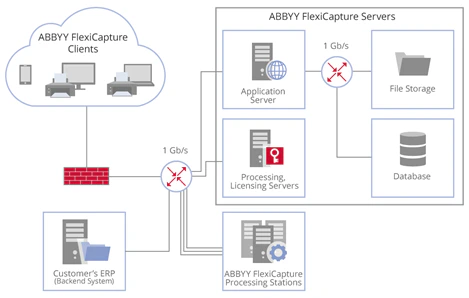
Application Server
- CPU: 8 physical cores, 2.4 GHz or faster
- 16 GB RAM
- HDD: 100 GB
- 2 NICs, 1 Gb/s: one to connect to the LAN and one to connect to the Database Server
- FileStorage: if a SAN is used, connect it using SCSI, Fibre Channel, or InfiniBand
- OS: Windows 2012 or later
- Large binary body transfers
- Small SOAP/JSON service requests that need a fast response
- A fast network interface for connecting to clients
- A fast, stable connection to the FileStorage and Database Server
- A fast multi-core CPU:
- The higher the speed, the faster each request is handled
- The more physical cores there are, the more requests are handled at the same time
- Sufficient RAM, at least 2 GB per physical core
- With Microsoft Network Load Balancing, which clusters several computers in the Application Server role. For more information, see Failover configuration.
- At the hardware level, by connecting different ranges of clients to different machines in the Application Server role. For example, one machine can serve all automatic processing while another is exposed to external clients.
Processing Server and Licensing Server
- 4-core CPU, 2.4 GHz or faster
- 8 GB RAM
- HDD: 100 GB
- NIC: 1 Gb/s for connecting to the LAN
- OS: Windows 2012 or later
Database Server
Supported versions:- MS SQL Server 2014 or higher, Standard or Enterprise Edition
- Oracle 12c Enterprise Edition
Database Server hardware
For MS SQL Server:- CPU: 8 physical cores, 3.4 GHz or faster
- 16 GB RAM or more
- HDD: 400 GB
- OS: Windows 2012 or later
MS SQL Server settings
- Add as much RAM as possible to the Database Server machine, so that most of the database files sit in RAM and are read faster
- Use a fast HDD, preferably an SSD, for the part of the database that stays on disk
- Avoid database modes with transaction delays, such as mirroring
- Set the database recovery model to Simple
- Store the database and its log on separate disks
- Update indexes regularly for frequently changing tables (Document, Page, Batch, Task, and EventLog). Otherwise an index may grow larger than the data in its table
FileStorage
- NAS or SAN, connected via LAN, SCSI, Fibre Channel, or InfiniBand
- Read-write speed: from 100 MB/s, depending on your workload
- Capacity: from 5 TB, depending on your workload
FileStorage sizing
Two factors drive the read-write speed and the capacity you need. Size for both.Page throughput and color mode
Read-write speed depends on the average and peak pages processed per hour and per 24 hours, and on their color mode. Estimate the input flow in bytes per second from the typical file sizes for pages scanned in color, grayscale, and black-and-white. For more information, see Performance metrics. Images make up the majority of data transferred within the System. Analyze the processing workflow and define two values:- R, the number of stages where page images are downloaded from the Application Server
- W, the number of stages where page images are uploaded to the Application Server
At an average A4 grayscale file size of 3 MB:
- Input flow = 10,000 grayscale page images/hour = 2.8 grayscale images/s = 8.4 MB/s
- Required write speed = 1 × 8.4 MB/s = 8.4 MB/s
- Required read speed = 3 × 8.4 MB/s = 25.2 MB/s
How long documents stay in the System
Capacity depends on how long images remain in the System before they are deleted. For example, a customer processes 100,000 grayscale images in 24 hours. Under the Service-Level Agreement, the processing time is 2 days per document. Processed documents are then stored for 2 weeks, because the customer’s ERP system runs additional checks. If it finds any discrepancies, the documents are edited in FlexiCapture and uploaded to the ERP system again. Images are therefore stored for 2 + 14 = 16 days. At an average A4 grayscale file size of 3 MB, the System accumulates 16 × 100,000 × 3 MB = 4.8 TB of data.Large
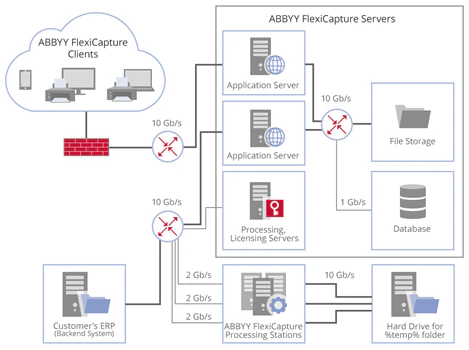
Use the Large configuration for more than 300,000 color pages per 24 hours. It reaches up to 3 million black-and-white pages or up to 1 million color pages in 24 hours. Every Medium recommendation applies to Large, but at this scale you have to follow all of them. Calculate the load on each part of the System and choose hardware powerful enough to carry it without overspending. Test the Internet connection and the backend connector to confirm they sustain the target performance. Plan for a 10 Gb/s network and a high-throughput FileStorage from the start. The following diagram shows one possible network architecture for the Large configuration.