
- System requirements for ABBYY FlexiCapture Distributed are not met
- The IIS server is not installed
- Insufficient hard drive space
- Insufficient permissions for installing to the specified directory
Logging
Installation can still fail after the system requirements are met and the user account holds all the required permissions. Enable installation logging to analyze and eliminate the errors.Log a setup.exe installation
Installing withsetup.exe enables logging automatically.
A failed installation stores its logs in the %temp% folder. A successful one stores them in the folder where the product is installed. For a distributed version, error information may sit in these files:
ABBYY FlexiCapture 12 Servers x64.logABBYY FlexiCapture 12 Stations x64.logABBYY FlexiCapture 12 Authentication Module.logAbbyyMsiLog.txt
ABBYY FlexiCapture 12 Verification Station x64.log and ABBYY FlexiCapture 12 Operator Station x64.log.
Examine the log files when an error occurs during installation. If you cannot fix the errors yourself, contact ABBYY Support and provide all the installation logs.
Log an .msi installation
Installing from an.msi file needs logging turned on by hand. Set these registry keys to enable it.
Analyze .msi installation logs
Analyze the logs with theWilogutl.exe utility, part of the Windows SDK.
1
Open the log file
Launch 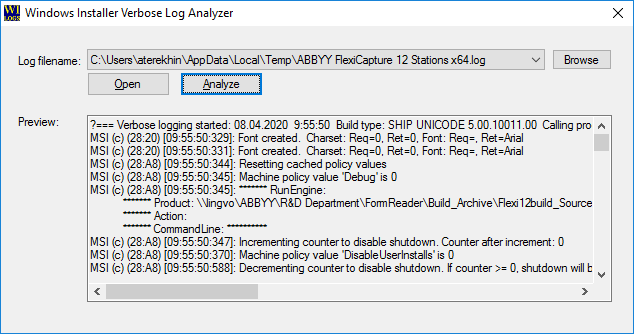
Wilogutl.exe and select the log file you want to examine.2
Analyze the log
Click Analyze.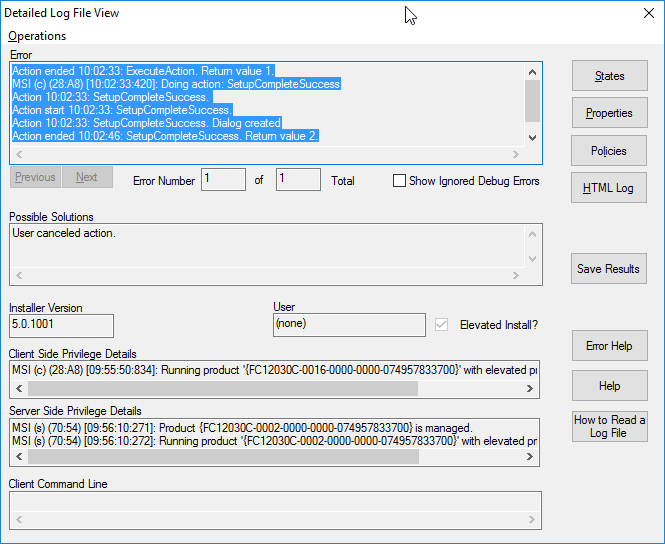
.msi installation errors.
Error when launching the Licensing Service
When installation reports that the Licensing Service could not be launched, analyze the licensing logs. They sit in theLicenses folder, by default C:\ProgramData\ABBYY\FlexiCapture\12.0\Licenses.
If the logs do not solve the problem, run extended diagnostics. Launch the licensing service locally with this command.
C:\ProgramData\ABBYY\FlexiCapture\12.0\Licenses.