
- The processing workflow, for example the number of stages
- The processing settings, such as image enhancement, recognition mode, and export settings
- The custom stage implementation, including custom engines, script rules, and access to external resources
- The hardware
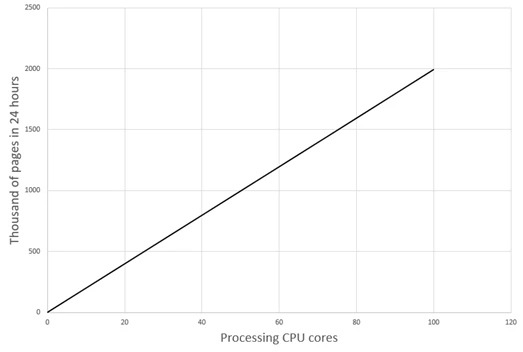
Dependence of performance on the number of processing cores
- The
SingleEntryPointDemo project, using unattended processing and export to PDF files - For black-and-white pages, 10-core processing stations at 2.4 GHz with 16 GB RAM, an SSD, and a 1 Gb/s NIC
Estimate the number of processing cores
Measure how long one core takes to process one page, and then divide your target volume by it.- Configure your project workflow, choose the Processing Station closest in hardware to your production setup, and create a typical batch of images.
- Measure how long it takes one core to process one batch. Processing a batch only once is not enough. FlexiCapture spreads the work across all available cores during the test, so the batch finishes faster than it would in production. In production, the other cores are busy with other batches. For a reliable figure, create several copies of your typical batch and process them all at once. Use at least as many copies as there are cores, and ideally N times more, where N ≥ 3. The time per batch per core is the total processing time divided by N. That also accounts for cores competing over the Station’s shared resources.
-
Calculate the number of cores you need:
where P is the number of pages to process, t is the time to process one page, and T is the time available.
Worked example
- An 8-core Processing Station with Hyper-Threading provides 16 logical cores (16 executive processes).
- Create 16 × 3 = 48 copies of a typical batch (×3 to reduce measurement error) and process them all at once.
- The run takes 15 minutes. Each core processes 3 batches, so one batch takes about 5 minutes.
- The batch has 69 pages, so one page takes about 4.35 seconds.
- To process 200,000 pages in 8 hours (28,800 seconds): N = (200,000 × 4.35) / 28,800 ≈ 31 cores.
- So 2 Processing Stations with 8 cores each and Hyper-Threading (32 logical cores in total) are enough for automatic processing.
Limiting factors
Two factors limit the useful number of processing cores in the System.Infrastructure load
The total load on the infrastructure may create bottlenecks:- On the FlexiCapture server hardware
- On the network
- On external shared resources (such as databases and external services) that are requested from custom processing scripts
Processing Server capacity
The Processing Server can serve only a limited number of processing cores. That number depends on the average time a core needs to perform a task. Task time in turn depends greatly on batch size in pages and on the customization you implement. Typically, with around 10 pages per batch, the Processing Server can serve 120 processing cores. Very fast custom scripts or one-page batches make the average task time drop sharply. That can slightly reduce the maximum number of cores the Server can serve. To detect this, monitor the number of free processing cores on the Processing Server. You have hit the limit when a queue of documents is waiting but the number of occupied cores has saturated and almost never rises. To resolve it:- Process the entire batch without splitting it into small tasks where possible (see the Stage Properties in the Workflow settings dialog).
- Process pages in bigger portions, in any of these ways:
- Increase the average number of pages per batch
- Merge several custom stages into one
- Move the customization into a standard stage, for example by adding it to a routing event in that stage’s script