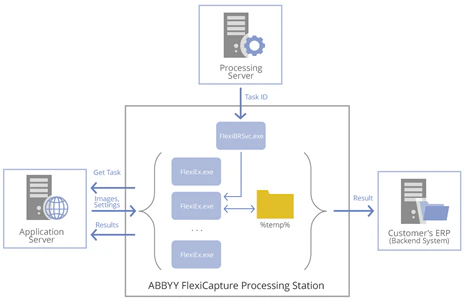
A Processing Station is a Windows service application. To process a task, a Station:
- Connects to the Processing Server, to get identifiers of tasks to process
- Connects to the Application Server via HTTP/HTTPS and downloads images, document data, and processing settings
- Initiates several executive processes to carry out processing tasks
- Uploads the results to either the Application Server or to a backend system (for example, an ERP system or DMS).
These processes intensively use the hard disk to save intermediate processing data to a temporary folder.
The hardware used for Processing Stations has a considerable impact on FlexiCapture performance.
Recommended hardware
A Processing Station requires:
- CPU: 8 physical cores with Hyper-Threading, 2.4 GHz or higher
- 16 GB RAM
- HDD: 150 GB
- NIC: 1 Gb/s
- OS: Windows 2012 or later
CPU and logical cores
A Station launches one executive process per CPU core, so more CPU cores allow more tasks to be processed simultaneously. For better CPU performance, use Hyper-Threading where technically possible.
Avoid using more than 16 logical CPU cores. Beyond that, multiple executive processes compete for hard disk time and CPU cache memory.
Memory
At least 2.5 GB of RAM per logical core is sufficient for processing.
Disk
The processing speed greatly depends on the CPU frequency and the hard disk read-write speed. Set up a fast hard drive for a Processing Station, or combine several drives into RAID0. Either gives executive processes faster access to temporary folders.
You may have more RAM than the recommended 2.5 GB per logical core. If so, create a virtual hard disk in RAM and put the temporary folder for executive processes there. This may boost processing speed by up to 30%.
There is no need to provide redundancy for the hard drives of the Processing Station. If one fails, only the results of the current processing are lost; the images are forwarded to another Processing Station and processed there. For this, you need at least 2 Processing Stations in the System.
Estimate the size of the temporary folder
Calculate the maximum hard disk space a temporary folder needs.
By default, the number of executive processes equals the number of logical CPU cores.
Worked example
Calculate the maximum size of a temporary folder where grayscale images are processed in 100-page batches on an 8-core Station with Hyper-Threading enabled:
- The size of a batch = 100 pages × 3 MB (the typical size of a grayscale page) = 300 MB.
- An 8-core computer with Hyper-Threading enabled provides 16 logical cores, so the Processing Station runs 16 simultaneous executive processes.
- The required space for the temporary folder is 300 MB × 16 executive processes = 4.8 GB.
- If the temporary folder is hosted in RAM, add the processing RAM to the folder size. That is 2.5 GB per logical core × 16 executive processes + 4.8 GB, or about 45 GB of RAM.