- Connect to an existing database
- Create a new database
An Operator who creates a database on the Application Server automatically receives Administrator permissions.
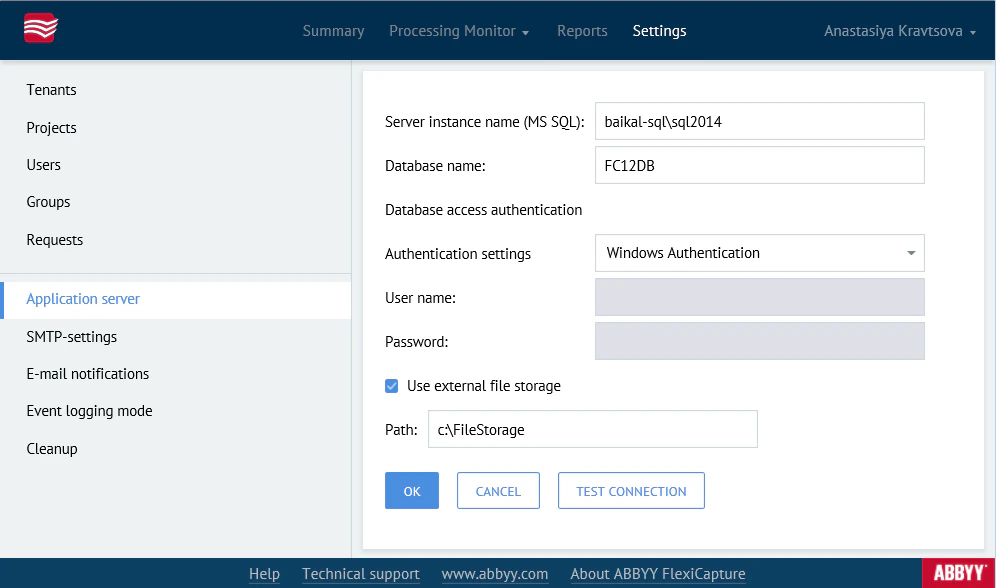
- Database type – MS SQL or Oracle.
- Server instance name –
<server_name>\<database management system>. - Database name – Required only for MS SQL. Database names must follow these rules:
- Include only Latin and Cyrillic characters, underscores (
_), the@and#characters, and digits. - Not start with a digit (avoid names that start with
@or#). - Not exceed 128 characters.
- Not be case-sensitive.
- Include only Latin and Cyrillic characters, underscores (
- Authentication settings – Select either Windows Authentication or Database Server Authentication. Use Database Server Authentication, because Windows Authentication can fail in some configurations. To check whether the selected connection type works, click Test connection.
- Use external file storage – ABBYY FlexiCapture stores project files in a file storage folder. Demo project files can be stored in the database, but other projects require a folder on the computer running the Application Server, unless the Application Server is deployed on a cluster. If you enable this option, specify the path to the folder where you want to store project files.