
This section is only available to users with ABBYY FlexiCapture administrator permissions.
Requirements and supported IP address formats
Note the following requirements:- A list of default tenant IP addresses cannot be used as a whitelist.
- ABBYY FlexiCapture Authentication Module is required.
If the computer running the Processing Server has both the IPv4 and IPv6 protocols enabled at the same time, you must also specify the address of the IPv6 node in the whitelist.
Enable the IP Whitelist feature
You can enable the IP Whitelist in either the dbo.Tenant table or the Administration and Monitoring Console.Enable the IP Whitelist in the dbo.Tenant table
To enable the IP Whitelist feature, set the fourth bit for the appropriate tenant in the Flags field of the dbo.Tenant table. The following instructions use Microsoft SQL Server as an example.1
Open SQL Server Management Studio
Open Microsoft SQL Server Management Studio.
2
Enable the IP Whitelist
Do one of the following:
-
Enter the following command:
- In the Flags field of the dbo.Tenant table, set the fourth bit for the required tenant.
3
Populate the IP whitelist
Populate the IP whitelist in the dbo.TenantWhiteIp table:
- In the TenantId column, specify the ID of the tenant.
- In the IP column, specify the whitelisted IP address or IP range for that tenant.
You can find the ID of a tenant in the dbo.Tenant table.
Enable the IP Whitelist in the Administration and Monitoring Console
1
Launch the console
Launch the Administration and Monitoring Console under the required tenant.
2
Open the IP Whitelist settings
Go to Settings > IP Whitelist.
3
Enable IP whitelisting
Select Enable IP whitelisting.
4
Specify the allowed IP addresses
In the Allowed IP address blocks field, specify the allowed IP addresses or range of addresses in CIDR format.
When you specify IP addresses in CIDR format, the program automatically calculates the range of IP addresses.
5
Save the settings
Click Save.
Using the Administration and Monitoring Console, you can whitelist IP addresses only within tenants, not in the main environment. You must have the ABBYY FlexiCapture administrator or tenant administrator role to whitelist IP addresses.
IPv6 protocol
If the computer running the Processing Server has both the IPv4 and IPv6 protocols enabled, you must also specify the address of the machine that has IPv6 enabled. Alternatively, you can disable the IPv6 protocol. For proxy connections, specify the IPv6 address of the proxy server in the IP whitelist. The following screenshot shows a sample IPv6 whitelist: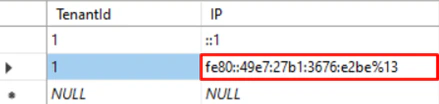
Get the IP whitelist using the ABBYY FlexiCapture API
To get the IP whitelist, use the GetWhiteIPList method:-1 to display the whitelisted addresses for all tenants.
The following PowerShell script shows a sample API call: