
先决条件
- 打开 Azure Portal 并完成身份验证。在左侧窗格中选择 Azure Active Directory。
- 在右侧窗格中选择 App registrations,然后单击 New registration。

- 填写必填字段:
- a. 指定名称。
- b. 选择 Accounts in this organizational directory only (ABBYY only - Single tenant)。
- c. 为每个应能使用此帐户进行身份验证的 Vantage URL 指定 URI:
https://<your-vantage-url>/auth2/signin-oidc

- 单击 Register。
配置 Azure Active Directory
- 在应用程序的 Overview 页面上,记录 Application ID URI 和 Directory (tenant) ID 的值,然后单击 Redirect URIs 的值。
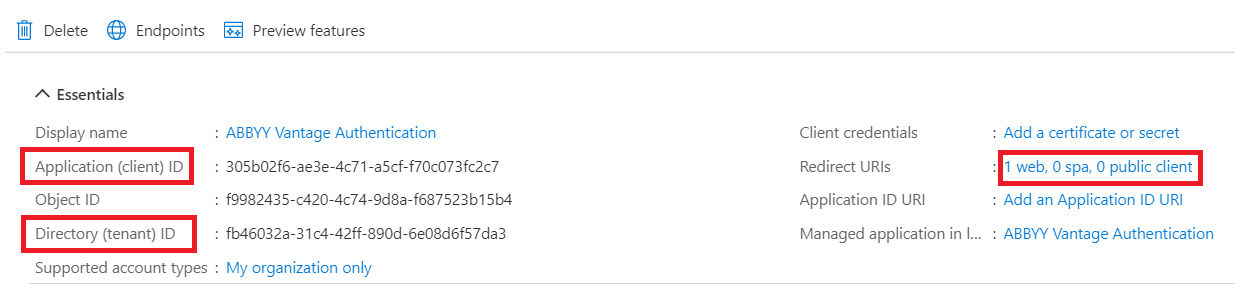
- 选择 Access tokens 和 ID tokens,然后单击 Save。

后续步骤
- 第一步中的 Application (Client) Id。
- 按以下格式提供的 Azure Active Directory URL:
https://login.microsoftonline.com/<Directory (tenant) ID>。