
Assign roles and grant access rights
An administrator assigns roles such as scanning operator or verification operator. Within each assigned role, they grant access rights to projects and to individual batch types.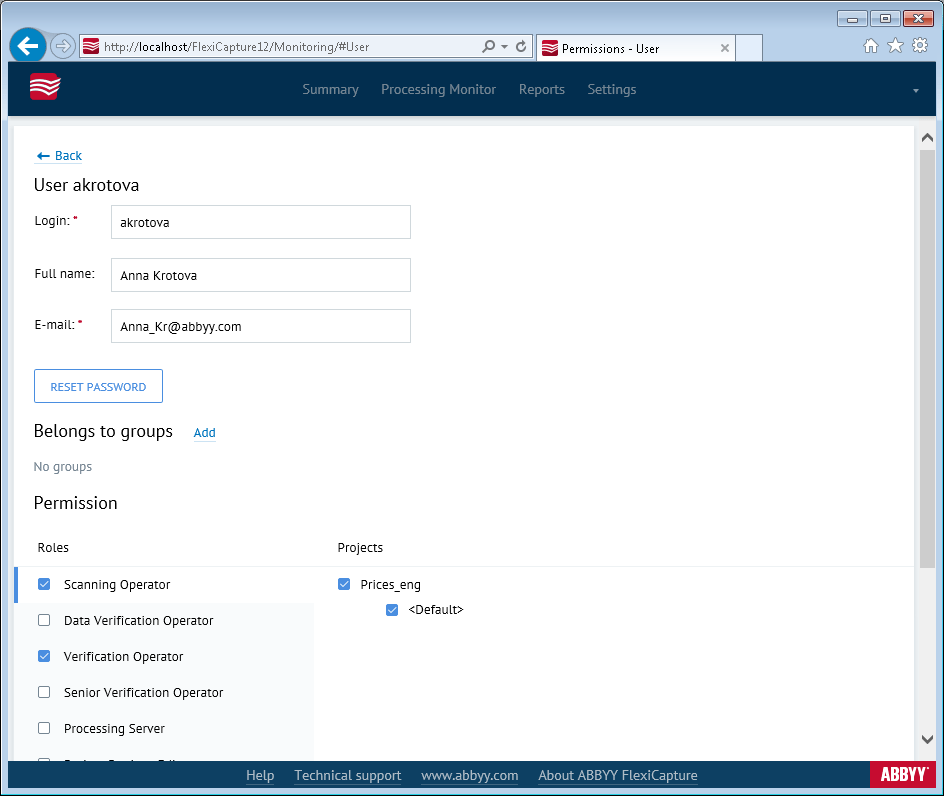
Granting rights to a project covers every batch type configured in that project at the time. Batch types added later need their rights granted separately.
Roles that apply to all projects at once
The Administrator, Processing Server, and Monitoring Operator roles are assigned across all projects at once. Assign the Processing Server role only to the user whose account runs the Processing Server. For more information, see Set up the Processing Server.Grant rights to a Web Capture Operator
For the Web Capture Operator role, the lists of projects and batch types can come up empty. Rights for this role can only be granted to projects that use the for Web Capture station or Advanced for Web Capture station workflow scheme.Reset a user’s password
Click Reset password to issue the user a temporary password. The temporary password is always the wordpassword, and the user must change it at their next sign-in.
A missing Reset password button means the user already has a temporary password.