Raster dot size
- If the field borders are raster dots, the thickness of the raster line (the raster size) must be 0.39 pt.
- The optimal distance between the raster dots is five times their size.
The dots most likely to be glued together are those in the corners of character cells.
If your software does not let you specify the distance between raster dots, choose a line style with dots spaced far enough apart to keep them from becoming glued together on the scanned image and from remaining on the image after despeckling. Large dots are not interpreted by the OCR system as garbage, so they are not removed during despeckling.
Character cell size
- The recommended size of character cells is 4x5 mm. Smaller sizes require greater accuracy from those completing the form, which is very difficult to achieve. Large character cells are also not advisable, because they encourage abnormally large letters. Ideally, the character cell size should reflect the average letter size.
- The distance between field lines should be at least 2.5-3 mm, and the distance between two adjacent character cells in the same line should be at least 1-1.2 mm.
Line thickness
If the borders are black lines (text in a frame, letters in separate frames, or letters in frames), the line thickness should be 1 pt.
Combs
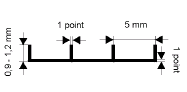
- The recommended distance between the notches in a comb is 5 mm.
- The distance between the horizontal lines of two combs positioned one below the other should be at least 7.5-8 mm.
- The notch height must be 0.9-1.2 mm.
- The thickness of both the notches and the horizontal lines should be 1 pt.
- If frames with a comb are used, the minimum distance between frames should be 2.5-3 mm.