
Fiddler logging for Web Stations
1
Open the Web Station web.config file
For a Verification Web Station installed alongside the Application Server, the file is in
C:\inetpub\wwwroot\FlexiCapture12\Verification.2
Point the station at the Application Server machine
In the
ApplicationServer key, replace localhost with the name of the machine where the Application Server is installed.3
Add the proxy section to both web.config files
Edit the Web Station file and the Application Server file, the latter in
C:\inetpub\wwwroot\FlexiCapture12\Server. Add a system.net\defaultProxy section to each.4
Launch Fiddler
Run it on the machine that launches the Web Station.
/FlexiCapture12/Server/API/Soap requests.
Fiddler logging for desktop stations
1
Name the Application Server machine when connecting
Enter the machine name in the Processing Server Properties dialog box.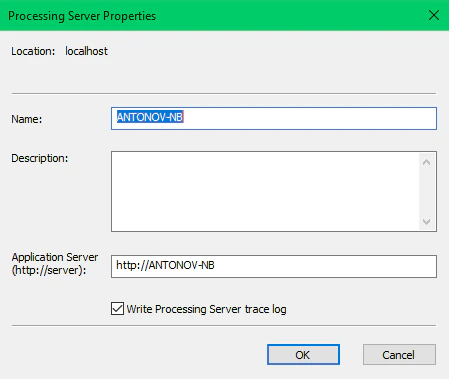
localhost when the Application Server sits on the same machine as the station. Fiddler cannot intercept requests in that case, so nothing about them reaches the log.2
Launch Fiddler
Run it on the machine that launches the desktop station.
/FlexiCapture12/Server/API/Soap requests.
Fiddler logging for server components
Use this to capture requests between server components. Examples include a Processing Station or an executor calling the Application Server. Both the Processing Server and Processing Stations launch under theNetworkService system account by default, and Fiddler cannot intercept requests from that account.
1
Relaunch the Processing Server under a different account
Any account other than
NetworkService works.2
Relaunch the Processing Station under a different account
Use an account with administrator rights on the machine hosting the Processing Server, for example.
3
Launch Fiddler
Run it on the machine where the Processing Station is installed.