
擷取核發日期
- 在 Fields 分頁中開啟 Manage Fields 對話方塊,並選取要在此活動中使用的 “Date” 欄位。按一下 Save。
- 前往 Search Elements 分頁。您會看到為 “Date” 欄位建立的 Date 類型搜尋元素。它會自動對應到該欄位。
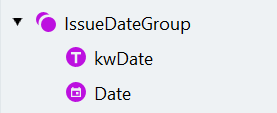
- 建立名為 “IssueDateGroup” 的 Group 搜尋元素。將此元素設為選用。
- 新增名為 “kwDate” 的 Static Text 元素,以搜尋標籤,協助我們定位實際日期。
- 此文件類別包含荷蘭文或法文的文件,因此標籤文字有多種可能選項。您可以在 Text to find 對話方塊中,將每個選項輸入在新的一行。於第一行輸入 “Date”,第二行輸入 “Datum”。
- 停用 Search for parts of words 選項。
- 將 “Date” 搜尋元素拖放到群組中,並將其置於 “kwDate” 元素下方。
- 為 “Date” 元素指定搜尋區域。 a. 刪除在建立元素時自動新增的 Nearest to 關聯。b. 將 “kwDate” 元素選為距離我們要搜尋之元素最近的元素。 c. 日期可能位於關鍵字的右方或下方。請指定 “kwDate” 元素下方的搜尋區域。 d. 搜尋區域也應包含關鍵字所在的那一行。按一下元素名稱右側的下邊界圖示,並選取 Top Boundary of Region。由於文字行可能不齊,請將 Below 值設定為 -10,以將搜尋區域略微向上延伸超出該行。
- 按一下 Match,確認日期被正確定位。
擷取病假日期
您不只能在文件表格中的欄位上使用 Table Cell 元素。如果您需要從表單中擷取資料,而其中內容位於類似方框或表格式結構中,它也會很有用。如果這些方框有清楚的分隔線,Table Cell 元素的效果將非常好。
-
開啟 Manage Fields 對話方塊,並在目前活動中新增下列欄位:
- Start Date
- End Date
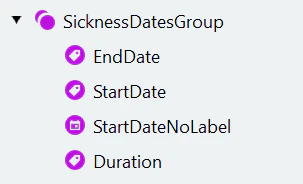
- 前往 Search Elements 分頁,為起始日期擷取建立 Group 元素。為群組中包含的元素設定下列參數:
| Parameter | Value |
|---|---|
| Group search element: | |
| Name | StartDateGroup |
| Static Text search element: | |
| Name | kwStartDate |
| Text to find | Vanaf / From, A partir du, Van |
| Search for parts of words | Disabled |
| Table Cell search elements: | |
| Name | StartDateDay |
| Search pattern | Number |
| Character count | {1, 1, 3, 3} |
| Search for parts of words | Disabled |
| Search area | Below the “kwStartDate” element, nearest to “kwStartDate” |
| Table Cell search element: | |
| Name | StartDateMonth |
| Search pattern | Number |
| Character count | {1, 1, 3, 3} |
| Search for parts of words | Disabled |
| Search area | Below the “kwStartDate” element, right of “StartDateDay”, nearest to “StartDateDay” |
| Table Cell search element: | |
| Name | StartDateYear |
| Search pattern | Number |
| Character count | {2, 2, 4, 4} |
| Search for parts of words | Disabled |
| Search area | Below the “kwStartDate” element, right of “StartDateMonth”, nearest to “StartDateMonth” |
Table Cell 元素會原樣傳回儲存格中的文字。在此情況下,Search pattern 包含 Number,它只會辨識數字,因此該元素傳回的文字將會是一個數字。
- 建立 “StartDateGroup” 元素的複本,並將其重新命名為 “EndDateGroup”。
- 重新命名群組的子元素:“kwStartDate” 為 “kwEndDate”、“StartDateDay” 為 “EndDateDay”、“StartDateMonth” 為 “EndDateMonth”、“StartDateYear” 為 “EndDateYear”。
- 將 “kwEndDate” 元素的 Text to find 變更為 “Tot en met / Till and incl., Jusqu’ au, Tot en met”。
- 為 “EndDateDay” 元素指定搜尋區域。它應位在 “kwEndDate” 元素下方,且距離它最近。刪除其他關聯。
-
開啟 Manage Fields 對話方塊,新增名為 “Start Date Composed” 的 Data Composition Field。將下列元素對應至欄位:
- “StartDateDay” 對應到
Day - “StartDateMonth” 對應到
Month - “StartDateYear” 對應到
Year
- “StartDateDay” 對應到
-
建立名為 “End Date Composed” 的 Data Composition Field。將下列元素對應至欄位:
- “EndDateDay” 對應到
Day - “EndDateMonth” 對應到
Month - “EndDateYear” 對應到
Year
- “EndDateDay” 對應到
- 將 “Start Date Composed” 和 “End Date Composed” 資料組合欄位對應到 “Start Date” 和 “End Date” 欄位。
擷取病假單類型
- 在 Fields 分頁中開啟 Manage Fields 對話方塊,啟用 “Type of Sick Note” 核取標記群組。啟用群組中的 “Primary” 與 “Secondary” 核取標記,以供目前的活動使用。按一下 Save。
- 建立一個與德文文件相似的結構,但請注意,在荷蘭與比利時文件中,標籤 (核取標記附近的文字) 會先出現。此類群組的子元素順序很重要。a. 建立一個名為 “TypeOfSickNoteGroup” 的 Group 元素。b. 建立此群組的複本並將其重新命名為 “PrimaryGroup”,再將它放入 “TypeOfSickNoteGroup” 中。c. 在 “PrimaryGroup” 群組中新增一個名為 “kwCheckmark” 的 Static Text 元素。d. 將要搜尋的文字設定為 “eerste / Primary, première, primair”。
在這些文件中,核取標記旁的文字位於核取標記的左側,因此我們將搜尋區域設定在其左側,而不是右側。
| Parameter | Value |
|---|---|
| Static Text search element: | |
| Name | Checkmark |
| Text to find | X |
| Character count | {1, 1, 3, 3} |
| Search for parts of words | Disabled |
| Search area | Right of “kwCheckmark”, nearest to “kwCheckmark” |
| Static Text search element: | |
| Name | XMark |
| Text to find | X |
| Character count | {1, 1, 3, 3} |
| Search for parts of words | Disabled |
| Search area | Below the “kwCheckmark” top boundary, Below value = -15, Left of “kwCheckmark”, Above the “kwCheckmark” bottom boundary, Above value = -15, Nearest to “kwCheckmark” |
| Under what conditions | Do not find element if “Checkmark” is found |
| Region search element: | |
| Name | CheckmarkRegion |
| Search Conditions section of the Code Editor | if Checkmark.IsFound then RSA: Checkmark.Rect; else if XMark.IsFound then RSA: XMark.Rect; else DontFind; |
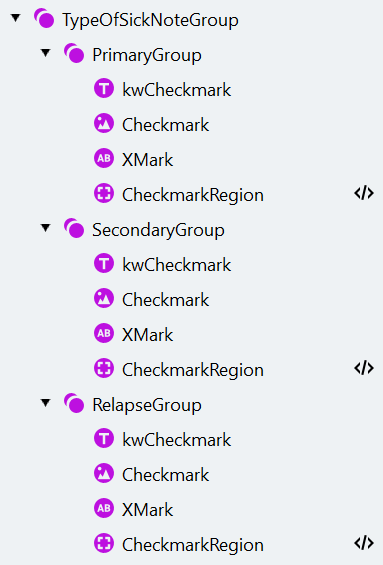
- 開啟 Manage Fields 視窗,並在 “Type of Sick Note” 核取標記群組中新增一個 “Relapse” 核取標記。啟用群組中所有核取標記以供目前的活動使用,然後按一下 Save。
- 將這些核取標記對應到相應的 Region 元素,並刪除在啟用欄位時自動建立的元素。