
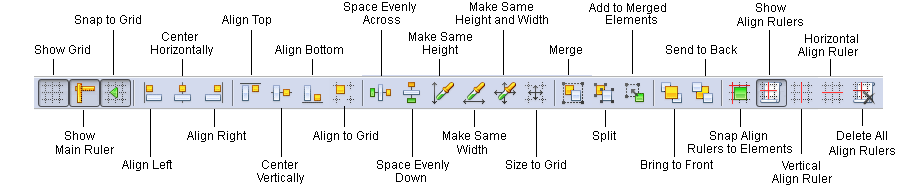
The Design Tools toolbar.
| Button | Description |
|---|---|
| Show Grid | Shows or hides the grid. |
| Show Main Ruler | Shows or hides the main ruler. |
| Snap to Grid | Snaps the top left corner of newly created elements to the nearest grid node. When moving a form element, it will also be snapped to the nearest grid node. |
| Align Left | Aligns the selected elements to the left edge of the last selected element. |
| Center Horizontally | Centers the selected elements along the center of the last selected element without changing their vertical position. |
| Align Right | Aligns the selected elements to the right edge of the last selected element. |
| Align Top | Aligns the selected elements to the top edge of the last selected element. |
| Center Vertically | Centers the selected elements along the center of the last selected element without changing their horizontal position. |
| Align Bottom | Aligns the selected elements to the bottom edge of the last selected element. |
| Align to Grid | Aligns the top left corners of all the selected elements to the nearest grid nodes. |
| Space Evenly Across | Spaces selected elements evenly across the page. |
| Space Evenly Down | Spaces selected elements evenly down the page. |
| Make Same Height | Makes the height of all the selected elements the same as the height of the last selected element. |
| Make Same Width | Makes the width of all the selected elements the same as the width of the last selected element. |
| Make Same Height and Width | Makes the height and width of all the selected elements the same as the height and width of the last selected element. |
| Size to Grid | Expands the borders of the selected element to the nearest grid lines. |
| Merge | Merges the selected elements on the form. |
| Split | Splits the selected elements on the form. |
| Add to Merged Elements | Adds elements to previously merged elements. Both the elements to be added and the previously merged elements must be selected. |
| Bring to Front | Moves the selected elements to the foreground. |
| Send to Back | Moves the selected elements to the background. |
| Snap Align Rulers to Elements | Turns on or off the automatic binding of elements to rulers. If this mode is turned on, when you move a ruler on the form, it will be automatically bound to the elements that are sufficiently close to it. |
| Show All Rulers | Shows or hides all rulers. |
| Vertical Ruler | Creates a vertical ruler. |
| Horizontal Ruler | Creates a horizontal ruler. |
| Delete All Rulers | Deletes all rulers. |