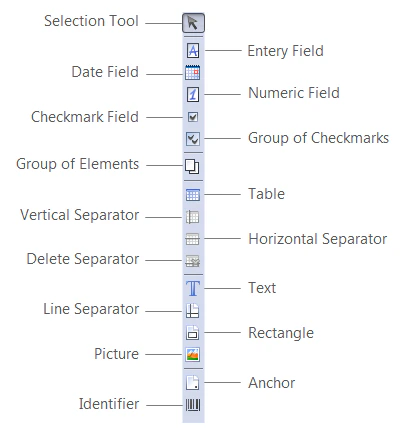
On the Form Elements toolbar you will find buttons for adding new elements to the form. Click a button to add the corresponding element to the form.
Buttons on the Form Elements toolbar:
ButtonDescription
Selection ToolSelects a tool on the toolbar or an element on the form.
Entry FieldAdds an entry field element to the form.
Date FieldAdds a date field to a form.
Numeric FieldAdds a numeric field to a form.
Checkmark FieldAdds a checkmark field element to the form.
Group of ElementsAdds a group of elements
TableAdds an table element to the form.
Vertical SeparatorAdds a vertical separator to a table.
Horizontal SeparatorAdds a horizontal separator to a table.
Delete SeparatorDeletes a separator from the table.
TextAdds a text element to the form.
Line SeparatorAdds a line separator element to the form.
RectangleAdds a rectangle element to the form.
PictureAdds a picture element to the form.
AnchorAdds an anchor element to the form.
IdentifierAdds an identifier element to the form.
Group of checkmarksAdds a checkmark group element to the form.