
Open the editor
To open the Document Definition editor from the main window of the program:1
Select Project → Document Definitions….
2
In the Document Definitions dialog box that opens, highlight the Document Definition name and click Edit….
Window layout
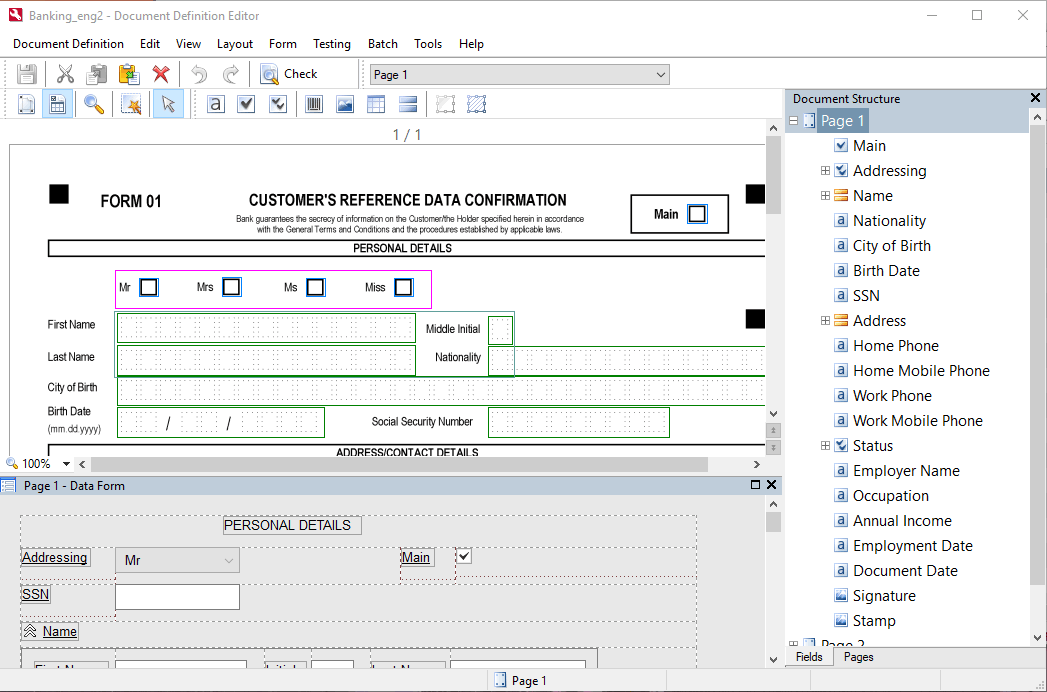
- The page image with marked fields and static elements, shown at the top-left. The program has two modes for handling fields and static elements:
- The Field Regions mode, enabled by clicking the
 button.
 - The Static Elements mode, enabled by clicking the
 button.
- The Field Regions mode, enabled by clicking the
- The editor for configuring data presentation is at the bottom-left.
- The right side of the window contains the Document Structure pane. The Fields tab of this pane contains a list of all fields in the Document Definition, and the Pages tab contains thumbnails of all pages in the document. You can change the order of the pages by dragging the thumbnails or by using shortcut menu commands (right-click a thumbnail and click Move → Up or Down on the shortcut menu). The order of the pages in the Pages pane affects document assembly settings in the Document Definition.