
ABBYY FlexiCapture lets you create Document Definitions for documents with annexes. Annexes are additional pages that can accompany each form. No Document Definition is applied to these pages, but they are taken into account during document assembly. For example, a loan application (a fixed form) submitted along with an income statement in free-form style can be processed with the income statement as an annex.

Create a Document Definition for a document with an annex

1

Open the Document Definition properties

In the Document Definition editor window, select Document Definition → Document Definition Properties.
2

Open the Assembly tab

Go to the Assembly tab.
3

Enable annex pages

Enable the Enable annex pages option. The Annex pages line appears in the sections list.
4

Set the page limits

Enter the minimum and maximum number of pages in the annex.
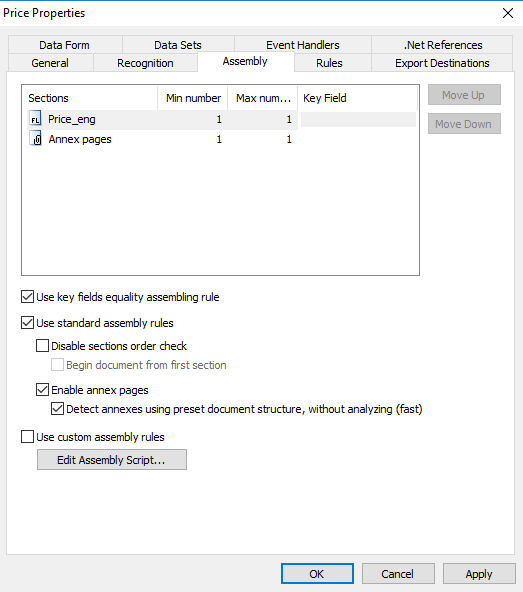
Screenshot of the Assembly tab in the Document Definition Properties dialog box with the Enable annex pages option selected.
To save the text from the annex, specify image save options in the Export Settings dialog box when you configure export. If you select PDF searchable to save the image, the text is recognized and saved in a PDF searchable file.