
Why automate KYC
Manual KYC slows onboarding, raises costs, and creates compliance risk. The KYC Agent removes that friction. It validates requests, applies business rules, extracts data automatically, and records every step for a complete, auditable view of each case.How the KYC Agent works
The KYC Agent coordinates ABBYY Vantage, ABBYY Timeline, and agentic AI in IBM watsonx Orchestrate across the full onboarding lifecycle.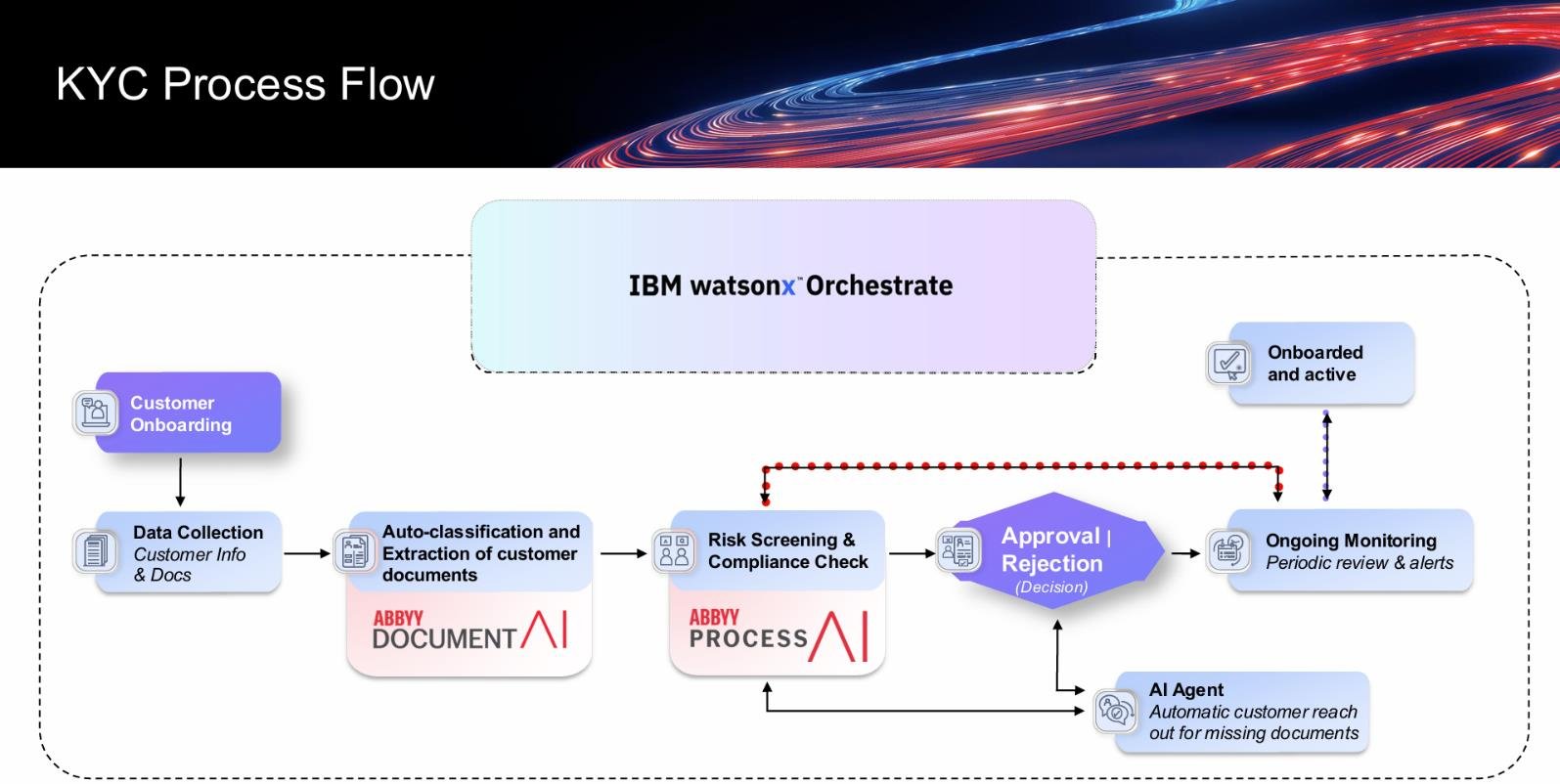
Solution benefits
Get started
Set up the KYC Agent in this order:- System requirements
- Set up ABBYY Vantage (Document AI)
- Set up ABBYY Timeline (Process AI)
- Set up IBM watsonx Orchestrate
- Configure the Microsoft Graph API
Next steps
Timeline event log schema
The event log columns the ABBYY Timeline project must use for KYC data ingestion.
Release notes
Version history, new features, and known issues.
Get help
If you run into issues while installing, configuring, or running the KYC Agent, use these ABBYY resources:- ABBYY documentation – Configuration, APIs, authentication, best practices, and troubleshooting at docs.abbyy.com.
- ABBYY Support Portal – Customers and partners with an active support agreement can submit tickets at support.abbyy.com.