
Installing ABBYY Vantage Overview
ABBYY Vantage is provided as a set of containers running in a Kubernetes cluster and interacting with third-party services. The following diagram shows the installed Vantage schema: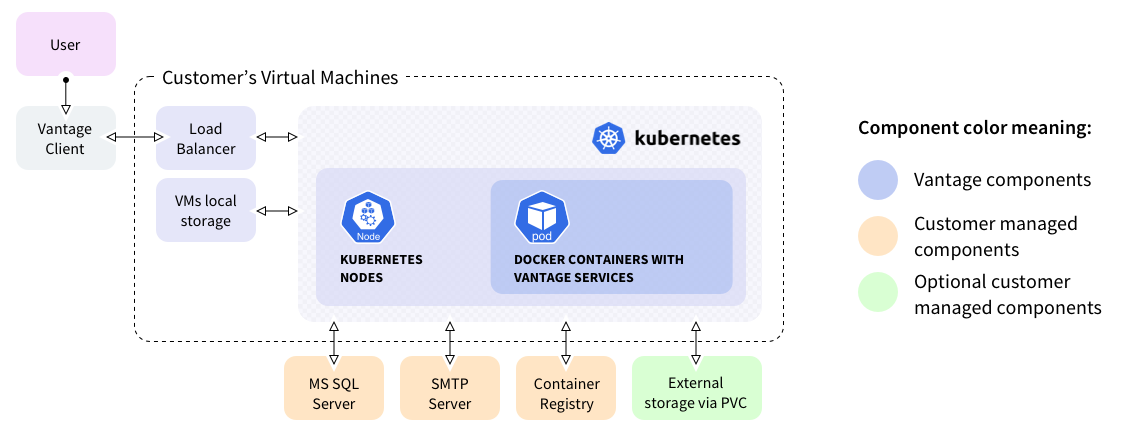
- Vantage Client. User interface for accessing the platform.
- Load Balancer. Distributes traffic across the cluster.
- Kubernetes Nodes. Host the Docker containers with Vantage services.
- Docker Containers. Run the Vantage application services.
External Dependencies
The deployment requires the following external services:| Component | Description |
|---|---|
| MS SQL Server | Database for storing application data. |
| SMTP Server | Email server for notifications. |
| Container Registry | Stores Docker images. |
| External Storage (PVC) | Persistent storage for documents. |
Component Types
- Vantage components. Core application services.
- Customer managed components. Infrastructure you manage.
- Optional customer managed components. Additional services as needed.
Deployment Options
ABBYY Vantage installations can be implemented in two deployment options:- Highly available. A scaling configuration intended for the production process, intended to process up to 200,000 pages per 8 hours, depending on the amount of resources used. For more information, see the Performance Guide. Includes redundancy fail-safes.
- Without high availability. Configuration recommended for demo and test deployments, intended to process up to 50,000 pages per 8 hours. For more information, see the Performance Guide. Requirements are minimal, no fault tolerance.
Installation Steps
The Vantage installation procedure consists of the following steps:- Download images of the Vantage containers to a local container registry.
- Download an installation container to a machine that has Docker installed.
- Specify resource credentials.
- Run the installation container.
- Run the installation Ansible playbooks inside the installation container.