
- Vantage log files
- The built-in Skill Monitor service, which collects statistics for existing Vantage skills and provides detailed information regarding completed and ongoing transactions. This service also lets you get transaction event information required by technical support.
- Third-party services which allow you to monitor internal Vantage processes, monitor specific workflows, analyze collected data to further fine-tune and optimize document processing, and collect and analyze logs.
- Click Help on the left pane, then About, and select Version details.
- Copy the details.
How to Access Diagnostics Logs
The log files created while processing documents in Vantage are stored locally on the machines used for the product installation. Logs are stored as follows: the Fluent Bit agent running on all Kubernetes nodes collects container logs and sends them to the Fluentd aggregator service. By default, all logs are stored as archive files on a persistent volume and can be accessed using NFS. Optionally, the administrator can also send the logs to the Elasticsearch cluster.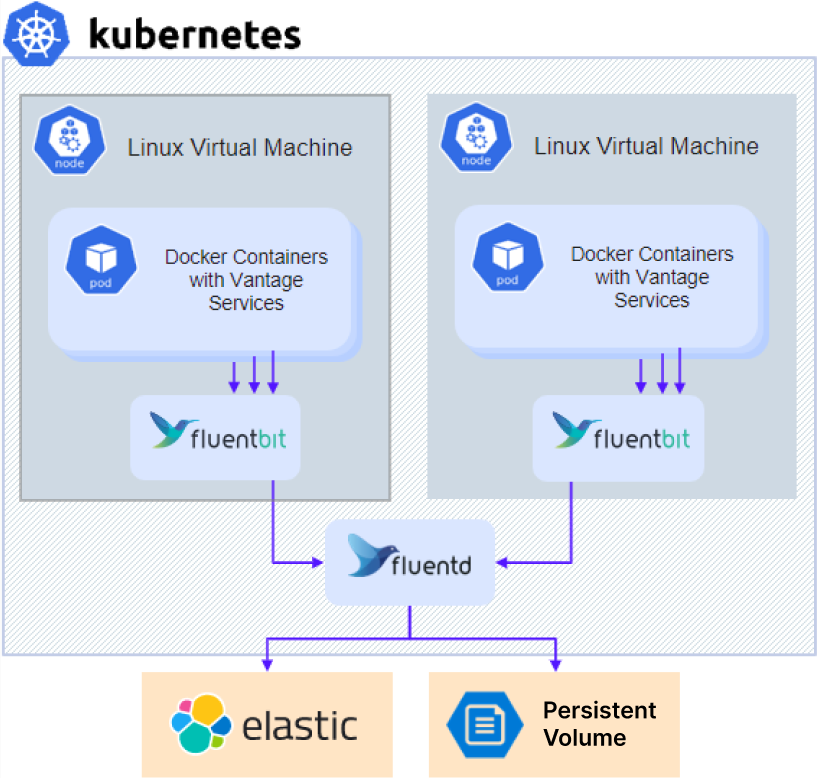
- If you are using an external NFS server or other external storage, skip directly to step 3.
- For installation with an in-cluster NFS server (default for Without high availability configuration), get the IP address of the NFS server:
- Access the share:
- For NFS:
- Linux:
mount –t nfs <nfs server ip>:/ /opt/mount - Windows: Install ClientForNFS, open Explorer, and go to
\\<nfs server ip>
- Linux:
- For other types of external storage: Contact your system administrator for access instructions.
- For NFS:
- Navigate to the
\\<nfs server ip>\<sharename>\<env>\abbyy-monitoring\fluentd-pvcdirectory.
Providing Logs to Technical Support
To provide ABBYY customer support with Vantage logs:- Navigate to the logs folder. Logs are stored in subfolders that have the same names as the namespaces of the Kubernetes cluster. Vantage logs are located in the
abbyy-vantagefolder. - Copy the files related to the time period when the problem occurred. The logs are compressed as gzip files with names in the
Y-M-DD-Hformat (e.g.,2022-12-09-0800.log.gz). - Send the files to ABBYY technical support.
Elasticsearch and Kibana
Elasticsearch and Kibana are tools for searching, analyzing, and visualizing logs. Elasticsearch and Kibana are not installed together with ABBYY Vantage and have to be installed and set up separately. This can be done regardless of whether the product is installed or not. You can use any existing installation.The sample setup procedure below has been simplified and is provided only as an example.
- Clone the repository:
- Install the operator that deploys the resources:
- Create a file named
elastic.yamlwith the following content:
- Create a file named
kibana.yamlwith the following content:
- Run the following command to install Elasticsearch:
- Run the following command to install Kibana:
- Get the password for an Elasticsearch user:
- Add the following parameters to your
env_specific.yamlfile:
- If you are installing Kibana after the product has already been installed, update your
env_specific.yamlfile and run the following command:
Grafana
Grafana (used together with Prometheus) is a tool for visualizing, monitoring, and analyzing data. Grafana is not installed together with ABBYY Vantage and has to be installed and set up separately. You can use any existing installation.Grafana must be installed in the cluster since Prometheus is only available within a cluster.
The sample setup procedure below has been simplified and is provided only as an example.
- Create a file named
grafana.yaml. - Copy and paste the following code into the file and save it:
Replace the host parameter value with the domain name of your Vantage cluster and change the initial administrator password.
- Run the following commands: