
Qty, Quantity, ORDERED, or QtyNet. However, the table contains another name that may also include the word Quantity. That name has its own unique text, so first describe the ExtraQtyTag element and then exclude it from the search area of the Quantity name.
On all the documents, the name of the ExtraQtyTag column is exactly the same. Even though the image quality is fairly good, set the maximum error percentage to 35%. For a seven- or eight-letter word, this allows two incorrect characters.
Because all the names are on the same level, specify an additional search constraint relative to the already detected Designation column name.
Create the ExtraQtyTag element
1
Create the Static Text element
In the TableHeader element, create a Static Text element and name it ExtraQtyTag.
2
Enter the search text
Click the Static Text tab. In the Search text field, type
Quantity *BK.ORD.3
Set the maximum error percentage
Set Max error percentage to 35.
4
Allow multiple lines
Because the ExtraQuantity field contains multiple lines, select the Take spaces into account and Permit multiple lines options.
5
Set the line break penalty
To avoid penalizing hypotheses carried over to the next line, set Line break penalty to 1.
6
Add position relations
To place this name on the same level as the Designation name, click the Relations tab and specify these additional constraints: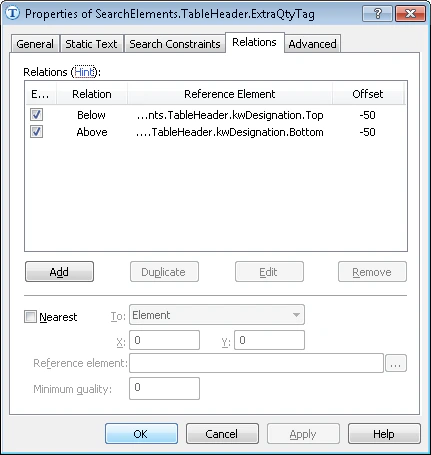
- Above the lower boundary of the kwDesignation element, Offset = -50, Reference boundary = Bottom.
- Below the upper boundary of the kwDesignation element, Offset = -50, Reference boundary = Top.
7
Add a pre-search condition
To optimize the search, do not search for the name if the Designation name is not detected. Click the Advanced tab and specify this condition in Advanced pre-search relations. In the FlexiLayout language:
8
Add whole-word matching
In Advanced pre-search relations, also specify this constraint:
9
Match the FlexiLayout
Match the FlexiLayout to confirm that the element is detected on the first page of the document.