
Total Chf, Carried Over, or Total. It is located below the table (this constraint is already specified for the SumGroup element) and always occurs on the last page.
Create the kwTotal element
1
Create the Static Text element
In the SumGroup element, create a Static Text element and name it kwTotal.
2
Enter the search text
Click the Static Text tab. In the Search text field, type
TotalChf|CarriedOver|Total.3
Set the maximum error percentage
Set Max error percentage to 20.
4
Limit the search to the last page
Click the Search Constraints tab and limit the search area to the last page: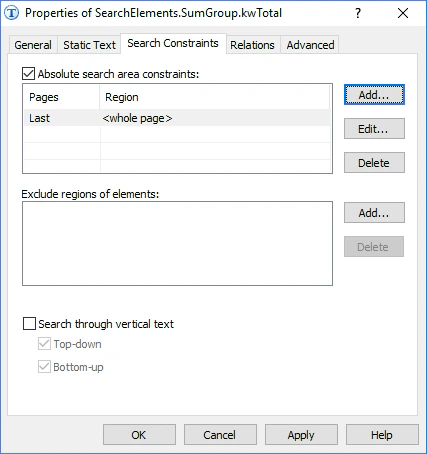
- Select Absolute search area constraints.
- In the Pages field, select Last from the drop-down list.
- Do not select any other options.
- Click Add. The search area appears in the Search areas list.
5
Add post-search relations
Among the many detected elements that contain the specified text, select the one closest to the bottom boundary of the table. This location lets you influence the quality of the hypotheses. Click the Advanced tab. In Advanced post-search relations, specify additional parameters for the hypothesis: if a non-null hypothesis is generated, calculate the distance between the upper boundary of the detected element and the bottom boundary of the last table detected in the document, and check whether this distance belongs to the specified fuzzy interval. In the FlexiLayout language: