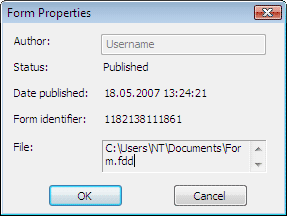
Review form details in the Form Properties dialog box of ABBYY FormDesigner: author, draft or published status, publish date, identifier, and file path.
View the main properties of a form in the Form Properties dialog box (Form → Form Properties…).
The Form Properties dialog box.
Property
Description
Author
The name of the person who created the form.
Status
The form status: Draft (changes are allowed) or Published (the form is read-only).
Date published
The date the form was published.
Form identifier
The value of the form identifier.
File
The path to the file that contains the form.
Was this page helpful?
Assistant
Responses are generated using AI and may contain mistakes.