
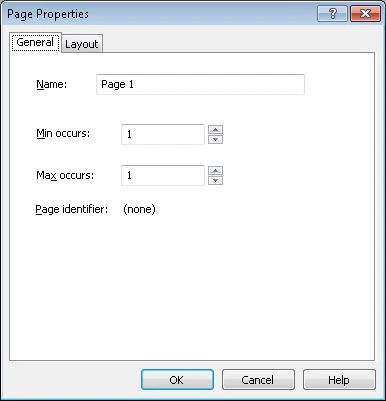
Page settings determine the size of the page, its orientation, indents, and style. To change the settings of a page, select Form → Page Properties… or right-click the page and select Page Properties… on the shortcut menu.

Item

Description

General tab

Name

Sets the name of a page.

Min occurs

Sets the minimum number of occurrences of the current page in the form.

Max occurs

Sets the maximum number of occurrences of the current page in the form.

Page identifier

Displays the value of the page identifier.

Layout tab

Style

Sets the form style:

  • Gray drop-out form
  • Black and white form
  • Orange drop-out form
  • Red drop-out form
  • Green drop-out form
  • Color form (printing is not recommended)

Paper size

Size

Select one of the standard page sizes from the drop-down list (A3, A4, A5, US Legal, or US Letter), or set your own custom page size. To set your own page size, select the Custom size item in the list and specify the required width and height in the corresponding fields.

Width

Sets page width.

Height

Sets page height.

Margins

Top

Sets the width of the top margin.

Bottom

Sets the width of the bottom margin.

Left

Sets the width of the left margin.

Right

Sets the width of the right margin.

Background

Color

Selects a form background color from the drop-down list for dropout forms or from the palette for color forms.

Note. Color can only be selected for color and dropout forms. White is the default color for black and white forms.

Size

Use this list to select the area covered with the background color. You have two choices:

  • Whole page (all the page except for the form elements will be filled in).
  • Inside margins (the page will be filled in but the page margins and the form elements will be left white).

Note. For black and white forms, the option is not available.

Orientation

Portrait

Sets portrait page orientation.

Landscape

Sets landscape page orientation.

Default font


Selects font for empty pages from the drop-down list* and specify the font size.

* - The range of available colors depends on the type of your form (black and white or color). Note. You may purchase additional fonts and multilingual font support at www.paratype.com/shop/.