
Online Learning runs at runtime. The system collects documents as they are processed, puts them into the skill’s training and test sets, and improves the skill in real time using these sets. Online Learning is available for Document skills and Classification skills.Documentation Index
Fetch the complete documentation index at: https://docs.abbyy.com/llms.txt
Use this file to discover all available pages before exploring further.
Online Learning is not available for skills designed to process structured documents. For these skills, the Collect documents and learn option is disabled — the system still collects documents, but does not learn from them.
How Online Learning works
This section assumes that your Process skill includes a manual review stage and that the Online Learning feature is enabled.
- The system collects new documents and puts them into either the training set or the test set.
- The system runs a learning session using the training set.
- The system tests the updated skill.
Step 1. How documents are collected
The system collects documents as follows:-
Online Learning starts collecting documents as soon as it receives the first corrected document from a Manual Review Operator.
- For a Document skill, this is the first document where the region of at least one field has been corrected.
- For a Classification skill, this is the first document whose type has been changed.
-
After the system obtains the first document, it collects:
- All documents that have passed through manual review.
- Some documents that haven’t passed through manual review (their share doesn’t exceed 33% of all documents in the training set and the test set combined).
-
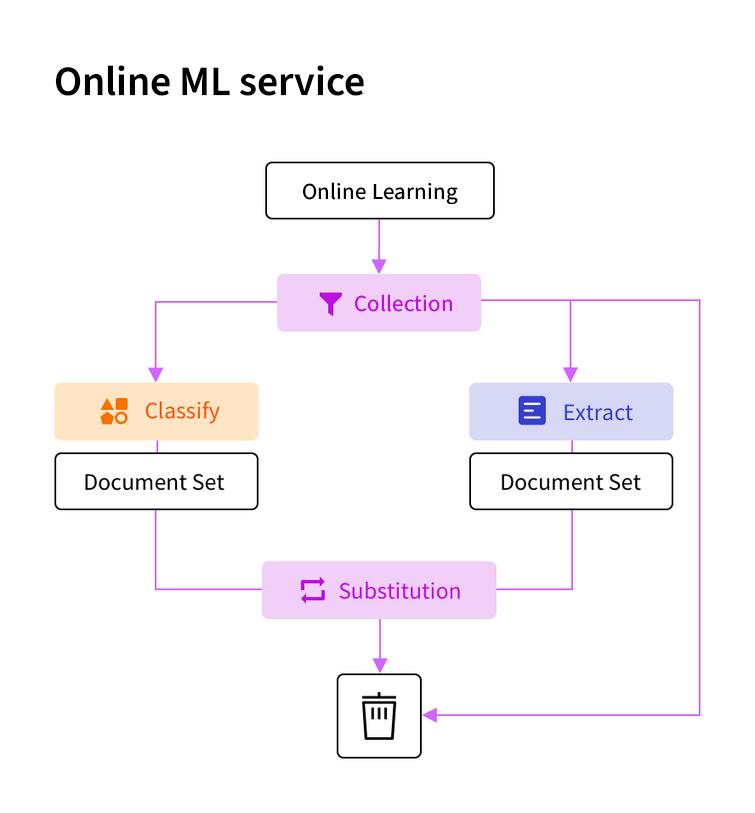
As new documents are collected, the system puts them into either the training set or the test set.
- The maximum number of documents in the training set is 10,000. The maximum number of documents in the test set is 1,000.
- Until the training set has 30 documents — every document goes into the training set.
- Once the training set has at least 30 documents and both sets are still filling — each new document has an 80% chance of going to the training set and a 20% chance of going to the test set.
- Once one set is full — new documents go to the other set until it also fills.
- Once both sets are full — 80% of new documents are discarded. Of the 20% kept, 80% go to the training set and 20% go to the test set, each replacing the oldest existing document in that set.
Step 2. When a learning session is started
- If this is the first learning session after the skill version was published, it starts once the document set receives 10% new documents. For example, if there are 95 documents in the document set, a new learning session starts after 10 new documents are added.
- If the last learning session was successful and the skill was updated, a new session starts under the same conditions as the first session.
- If the last learning session was unsuccessful and the skill wasn’t updated, a new learning session starts once the document set receives 5% new documents. For example, if there are 95 documents in the document set, a new learning session starts after 5 new documents are added.
Step 3. How the skill is tested
The system updates the skill when Online Learning leads to at least a 1% increase in accuracy. The system tests skill accuracy as follows:- If there are at least 20 documents in the test set, the system tests the skill on the test set.
- If there are fewer than 20 documents in the test set:
- For a Document skill, the system tests the skill on both the training set and the test set.
- For a Classification skill, if each class has fewer than five documents, the system tests the skill on both the training set and the test set. Otherwise, the system uses cross-validation to evaluate accuracy.
Online Learning doesn’t create a new version of the skill. A change of version only occurs when a skill is published. See Publishing a skill.
Related topics
Enable Online Learning
Turn on Online Learning for Document and Classification skills
Training via Manual Review
Help the system learn from operator corrections during manual review
Publishing a skill
Make a new version of a skill available for use